
logo-darklogo-darklogo-darklogo-dark
  • Home
  • Browse
    • Assistant
    • Coding
    • Image
    • Productivity
    • Video
    • Voice
    • Writing
    • All Categories
    • AI Use Cases
  • My Favorites
  • Suggest a Tool
✕
Home › Writing & Editing›
Published by Dusan Belic on December 4, 2024

Paraphrasing Tool

Paraphrasing Tool
Paraphrasing Tool Homepage
Categories Writing & Editing

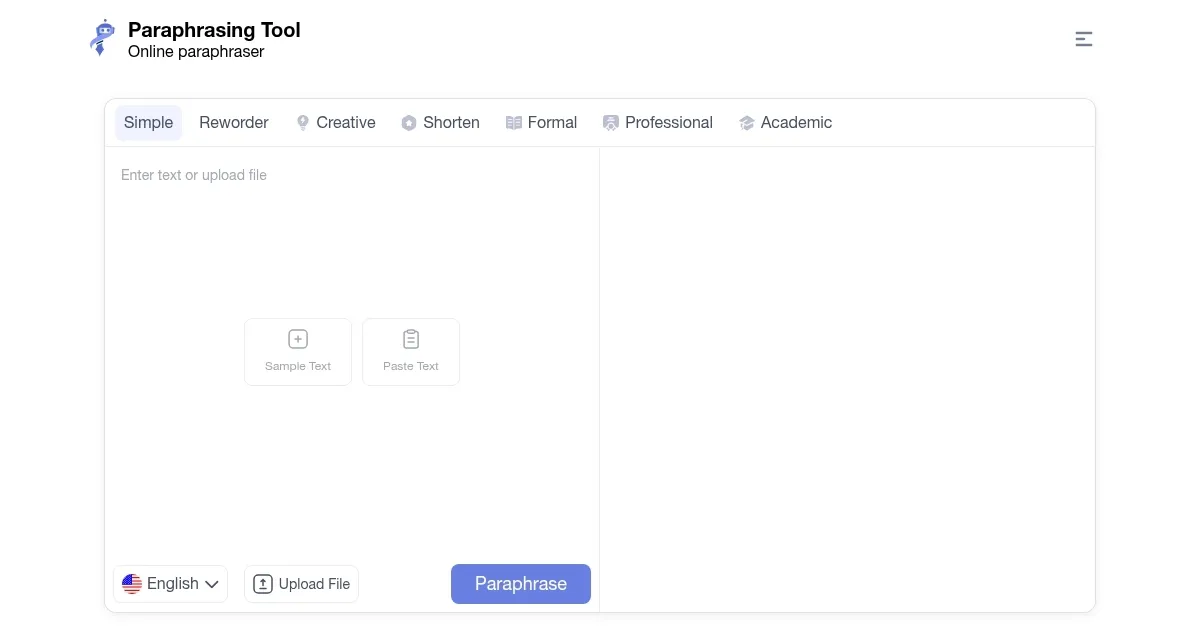
Paraphrasing Tool - screenshot

An AI-driven service for rephrasing content while preserving its original meaning

Paraphrasing Tool

Paraphrasing Tool is an AI-driven service designed to assist writers, students, and professionals in rephrasing content while preserving its original meaning. By leveraging advanced AI and large language models, it offers a user-friendly interface that allows users to transform essays, articles, blogs, and other textual materials into unique and high-quality versions.

Paraphrasing Tool provides eight distinct paraphrasing modes to cater to various writing needs: Simple, Reworder, Creative, Shorten, Formal, Professional, Academic, and Super AI. Each of these modes offers a different approach to rephrasing, allowing users to select the one that best aligns with their specific requirements. For instance, the Creative mode introduces innovative phrasing, while the Formal mode adjusts the tone to suit professional contexts.

Paraphrasing Tool supports multiple languages, including English, Indonesian, German, French, and Spanish, among others. This multilingual support makes it useful for a global audience. The platform also emphasizes user security, making sure that all text is processed with strong encryption and privacy measures to maintain data confidentiality.

Paraphrasing Tool operates on a freemium model, offering free access with a word limit of 1,000 words per paraphrasing session. Registered users can paraphrase up to 1,500 words, while premium subscribers have a limit of 3,000 words. Also, Premium users benefit from additional features such as access to advanced paraphrasing modes, an ad-free experience, and 24/7 chat support. Check it out.

Paraphrasing Tool Homepage
Categories Writing & Editing

What are the key features? ⭐

  • Multiple paraphrasing modes: The platform offers eight distinct modes-Simple, Reworder, Creative, Shorten, Formal, Professional, Academic, and Super AI.
  • Multilingual support: Paraphrasing Tool supports over 15 languages, including English, German, French, Spanish, and more.
  • Plagiarism removal: The tool effectively eliminates duplicate phrases and sentences, ensuring the content is unique and free from potential plagiarism.
  • Content quality enhancements: Beyond rephrasing, it corrects grammar, punctuation, spelling, and diction errors to improve the overall readability and quality of the text.
  • User-friendly interface: Paraphrasing Tool is designed with simplicity in mind, making it accessible to both novices and experts.

Who is it for? 🤔

Paraphrasing Tool is made for a broad audience, including students, writers, researchers, content marketers, and SEO professionals. Its versatile features cater to anyone seeking to enhance their writing by ensuring uniqueness, improving readability, and maintaining the original context across different languages and writing styles.

Examples of what you can use it for 💭

  • Students can rephrase assignments and research papers to avoid plagiarism and enhance content quality
  • Marketers can rewrite and repurpose existing content for different channels
  • SEO professionals can improve content uniqueness and readability
  • Writers can utilize the creative mode to generate new ways of expressing ideas
  • Refine machine translations by paraphrasing them for more natural language

Pros & Cons ⚖️

  • Simple to navigate for quick paraphrasing
  • Support for multiple languages
  • Integrated plagiarism checker tool
  • Free version is cluttered with ads
FAQs 💬

What is Paraphrasing Tool mainly used for?
Paraphrasing Tool rephrases text to make it unique, clearer, and more readable while preserving the original meaning. It's popular for rewriting essays, articles, blog posts, and professional content.
How many paraphrasing modes does the tool offer?
It provides seven modes: Simple, Reworder, Creative, Shorten, Formal, Professional, and Academic, so you can match the tone to your needs.
Does Paraphrasing Tool support languages other than English?
Yes, it handles multiple languages including Spanish, French, German, Indonesian, and more, though English gives the strongest results.
Is registration required to use Paraphrasing Tool?
No, you can start paraphrasing right away without an account, but signing up removes captchas and increases the word limit.
What word limit does the free version have?
The free version allows paraphrasing up to 500 words at a time, which works well for shorter pieces or quick edits.
Can Paraphrasing Tool help avoid AI content detection?
It often produces more natural-sounding text than basic generators, and many users combine it with the built-in AI humanizer to improve chances of passing detectors, though success varies.
Does the tool fix grammar or spelling errors during paraphrasing?
Yes, it corrects grammar, punctuation, spelling, and awkward diction while rephrasing, so the output usually comes out cleaner.
What other writing tools are available on the Paraphrasing Tool site?
The platform includes a plagiarism checker, readability checker, AI content detector, text summarizer, citation generator, and more to support the full writing process.
Is Paraphrasing Tool suitable for academic writing?
The Academic mode helps adjust tone for essays and research papers, and many students use it to improve clarity and originality in their work.
How fast is the paraphrasing process?
Results appear almost instantly after you paste text and select a mode, making it ideal for quick rewrites or brainstorming.
Visit Paraphrasing Tool

Related tools ↙️

  1. CopyMonkey CopyMonkey Generates keyword-optimized Amazon listings in seconds
  2. Typeset Typeset Automates design and writing for ebooks, presentations, and social graphics quickly
  3. Just Think Just Think Generates AI content including chat responses, speech audio, artistic images, and animated videos
  4. Kua.ai Kua.ai Generates SEO-optimized listings, blogs, and posts for multiple e-commerce channels
  5. Copyrocket Copyrocket Generates AI-driven content, images, voices, code, and more for creative and marketing tasks
  6. Story321 Story321 Generates engaging stories, books, and videos using AI from simple user prompts
Last update: February 7, 2026
Share
Promote Paraphrasing Tool
light badge
Copy Embed Code
dark badge
Copy Embed Code
neutral badge
Copy Embed Code
About Us | Contact Us | Suggest an AI Tool | Privacy Policy | Terms of Service

Copyright © 2026 Best AI Tools
415 Mission Street, 37th Floor, San Francisco, CA 94105