
logo-darklogo-darklogo-darklogo-dark
  • Home
  • Browse
    • Assistant
    • Coding
    • Image
    • Productivity
    • Video
    • Voice
    • Writing
    • All Categories
    • AI Use Cases
  • My Favorites
  • Suggest a Tool
✕
Home › Marketing & Advertising ›

Buffer AI Assistant

Published by Dusan Belic on September 25, 2024

Buffer AI Assistant

Buffer
Buffer AI Assistant Homepage
Categories Marketing & Advertising
An advanced tool for streamlining social media content creation

Buffer AI Assistant

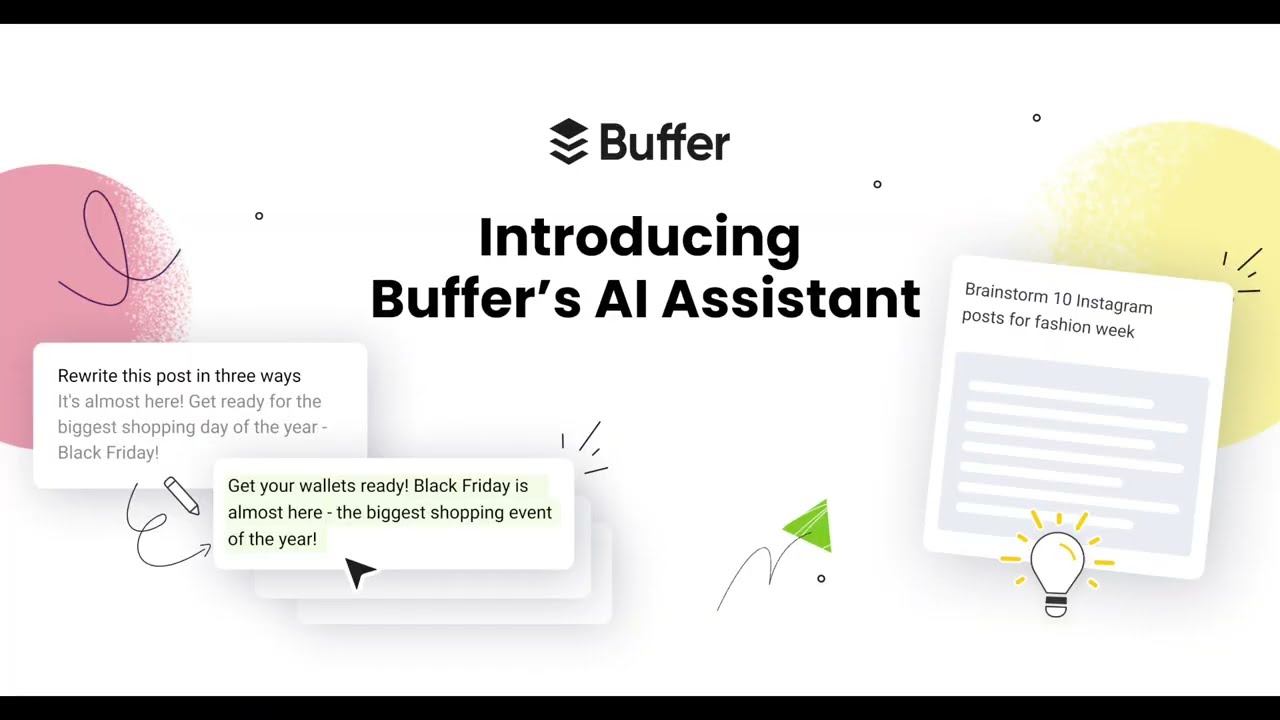
Buffer’s AI Assistant is an advanced tool for streamlining social media content creation. It helps users generate post ideas quickly, saving time on brainstorming while helping maintain relevance to their brand.

The “magic” happens by analyzing trends and patterns, after which the AI suggests posts that fit industry-specific topics, seasonal events, or current trends.

A key feature of Buffer’s AI Assistant is its ability to repurpose content. For example, you can turn a LinkedIn post into a Twitter thread in seconds, making multi-platform posting more efficient. This helps users maintain consistency across various social media channels without creating unique content for each one.

Buffer AI Assistant also offers tools for social media growth. To that end, it provides suggestions for posts designed to boost engagement and grow your follower base by focusing on content that resonates with audiences. Moreover, it tailors its responses based on engagement metrics to further refine post suggestions and maximize visibility.

The best part is that Buffer’s AI Assistant doesn’t require any complex setup or training, making it accessible to novice users and seasoned social media managers alike. It integrates with Buffer’s core features, such as publishing and scheduling, allowing users to focus on creativity — with the AI handling repetitive tasks like rewriting, summarizing, and post variation.

So, if you’re serious about your social media, you may want to check it out.

Buffer AI Assistant Homepage
Categories Marketing & Advertising

Video Overview ▶️

What are the key features? ⭐

  • Content generation: Quickly generate post ideas and captions across social media platforms with AI assistance.
  • Post repurposing: Easily repurpose existing content from one platform (e.g., LinkedIn) to another (e.g., Twitter).
  • Content enhancement: Provides suggestions to improve your posts and make them more engaging.
  • Multilingual translation: Automatically translates posts for different global audiences.
  • Audience growth: Suggests posts tailored to increase engagement and follower growth.

Who is it for? 🤔

Buffer AI Assistant is great for social media managers, small business owners, content creators, and marketers who want to streamline their content creation process. It is designed for users who need consistent and engaging social media content across multiple platforms, allowing them to save time and grow their audience effectively.

Examples of what you can use it for 💭

  • Create, repurpose, and optimize posts across platforms with ease
  • Grow your audience by using AI-generated, engaging content ideas
  • Streamline the brainstorming process with AI-generated prompts and post formats
  • Boost engagement by using tailored post suggestions to fit audience trends
  • Save time by automating content generation and growing an online presence

Pros & Cons ⚖️

  • Automates content scheduling across platforms
  • Offers analytics and performance recommendations
  • Free plan is available with basic features
  • Initial setup and mastering all features might take some time

FAQs 💬

What is Buffer's AI Assistant?
Buffer's AI Assistant is an integrated tool within the Buffer platform that acts like a creative sidekick for social media. It helps generate post ideas, rewrite content, repurpose existing posts for different platforms, and optimize text for channels like Instagram, LinkedIn, or X. Powered by OpenAI's GPT-4, it focuses on making content creation faster and more engaging without automating everything on its own.
Is Buffer's AI Assistant free to use?
Yes, it's completely free with unlimited access when you sign up for a free Buffer account. No credit card required, and it works right away. Paid plans like Essentials ($5 per channel monthly) unlock more scheduling features, but the AI itself has no extra costs or limits across all tiers.
How does the AI Assistant integrate with Buffer's other tools?
It plugs directly into Buffer's post composer and Create space, so you can brainstorm, edit, or schedule AI-generated content in one seamless flow. For example, generate a caption, tweak its tone with one click, and queue it up for posting across multiple platforms without switching apps.
Which social media platforms does it support?
The AI tailors content for major channels including Instagram, LinkedIn, X (formerly Twitter), Facebook, Threads, TikTok, Pinterest, and YouTube. It adjusts styles automatically, like making posts snappy for Threads or professional for LinkedIn, though some newer networks might lag in direct scheduling support.
Can I customize the AI's output to match my brand voice?
Absolutely. You can adjust tone (casual to formal), length (shorten or expand), and structure with simple prompts or one-click options. It pulls from trends and your input to keep things on-brand, but I think it's smart to review outputs since AI isn't perfect at nailing every nuance right away.
What are the main limitations of the AI Assistant?
It excels at text but doesn't generate images, videos, or hashtags yet. Outputs might need fact-checking, as it's based on general models, and it shares your prompts with OpenAI for processing (though no other data). Free plans cap channels at three, which could feel tight if you're managing a lot.
How accurate and safe is the generated content?
It's reliable for brainstorming and polishing, drawing from social trends, but always double-check for accuracy or brand fit. Buffer stresses it's optional and user-controlled, with no auto-posting, and they use secure OpenAI tech. Recent reviews note it's great for ideas but not a full replacement for human creativity.
Is it suitable for beginners or small businesses?
Definitely. The interface is clean and intuitive, with tips for new users, making it ideal for solopreneurs or small teams fighting writer's block. Many reviews from 2025 highlight how it saves hours on content without needing marketing expertise.
How does it compare to other AI social tools like Hootsuite's OwlyWriter?
Buffer's feels more focused on quick, platform-specific tweaks and repurposing, while Hootsuite leans heavier on analytics. Buffer wins on affordability (free AI) and simplicity, but if you need deeper insights, Hootsuite might edge it out. Users often switch to Buffer for its no-fuss vibe.
Can I try it before committing to a full plan?
Yes, just create a free Buffer account to test the AI instantly. There's also a public post generator for one-off tries. Paid trials (14 days) let you explore unlimited scheduling if you want more.

Related tools ↙️

  1. Zixflow Zixflow Manages customer journeys with AI-driven CRM and multi-channel messaging
  2. Commenter.ai Commenter.ai Streamline the process of generating engaging comments for various online platforms
  3. Highperformr Highperformr An AI social media management platform for enhancing your online presence and content creation
  4. Respond.io Respond.io Unifies customer chats across channels in one AI-powered team inbox
  5. Automateed Automateed Streamline the creation of eBooks, lead magnets, and other digital content
  6. Yellow.ai Yellow.ai An AI platform specializing in automating customer service and engagement across multiple channels
Last update: November 23, 2025
Share
Promote Buffer AI Assistant
light badge
Copy Embed Code
light badge
Copy Embed Code
light badge
Copy Embed Code
About Us | Contact Us | Suggest an AI Tool | Privacy Policy | Terms of Service

Copyright © 2026 Best AI Tools
415 Mission Street, 37th Floor, San Francisco, CA 94105