
logo-darklogo-darklogo-darklogo-dark
  • Home
  • Browse
    • Assistant
    • Coding
    • Image
    • Productivity
    • Video
    • Voice
    • Writing
    • All Categories
    • AI Use Cases
  • My Favorites
  • Suggest a Tool
✕
Home › Writing & Editing ›

Humanize AI

Published by Dusan Belic on June 17, 2024

Humanize AI

Humanize
Humanize AI Homepage
Categories Writing & Editing

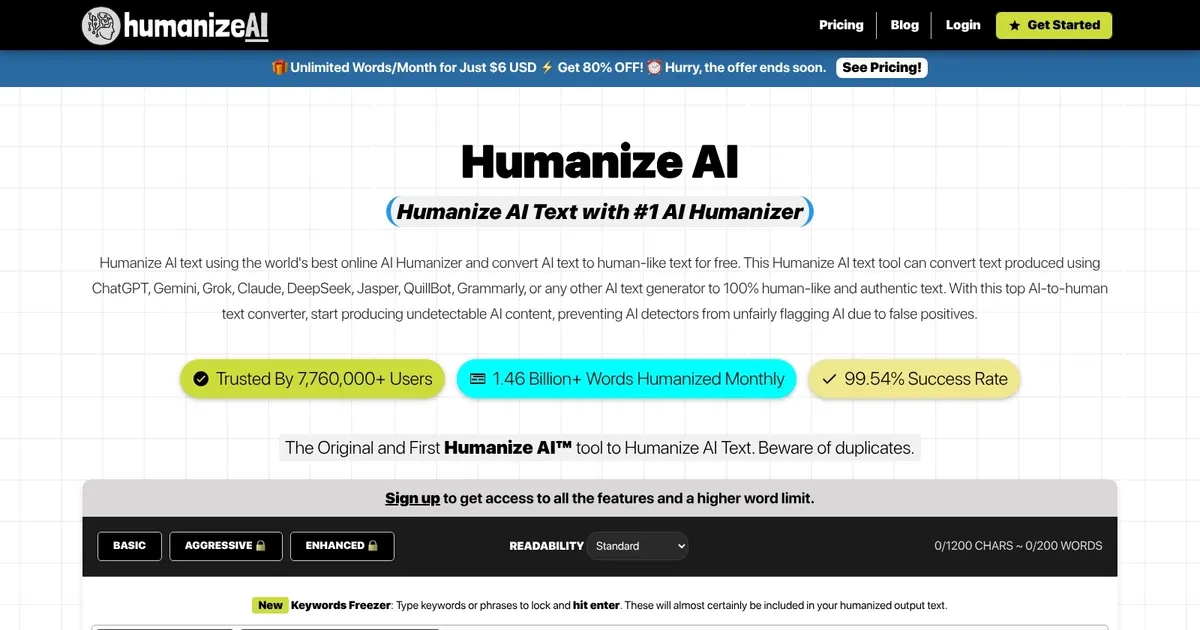
Humanize AI - screenshot

An advanced tool that can transform AI-generated text into natural, human-like content

Humanize AI

Humanize AI is an advanced tool that can transform AI-generated text into natural, human-like content. It uses sophisticated algorithms to rewrite content produced by AI tools such as ChatGPT, Bard, and Jasper — ensuring the output is free of a robotic tone.

Humanize AI guarantees plagiarism-free text that bypasses AI detectors, making it ideal for content creators aiming to efficiently produce high-quality, human-like content. It supports multiple languages and is compatible with all browsers and devices.

What makes Humanize AI special is its ability to produce original text that is also indistinguishable from human writing and optimized for search engines (SEO). This makes it useful for writers, marketers, and businesses looking to streamline their content creation process while maintaining a “human touch.”

The tool is easy to use, requiring users to paste their AI-generated text, complete a CAPTCHA, and click the “Humanize AI” button. Then, they’ll get a human-like text, which they can use on their website, in a blog, and so on.

Beyond this functionality, Humanize AI offers advanced features such as sentiment analysis and the ability to add emojis for a more personalized touch.

All in all, Humanize AI is a powerful tool that meets the growing need for high-quality, human-like content in various fields and for different kinds of users.

Humanize AI Homepage
Categories Writing & Editing

What are the key features? ⭐

  • Human-like text conversion: Converts AI-generated text into human-like text, making it indistinguishable from human writing to enhance readability and engagement.
  • Plagiarism-free output: Ensures that the converted text is free from plagiarism, making it suitable for various content creation needs.
  • SEO-friendly: The tool retains SEO keywords in the text to ensure the content remains optimized for search engines.
  • Multiple language support: Humanize AI supports text conversion in multiple languages, making it useful for global use.
  • Easy to use: The tool is user-friendly, requiring no technical expertise to convert text quickly and efficiently.

Who is it for? 🤔

Humanize AI is aimed at content creators, marketers, educators, and businesses needing to convert AI-generated text into human-like content. It is suitable for anyone looking to enhance the readability and engagement of their automated content, making sure it passes AI detection tests and remains plagiarism-free. Lastly, the tool is beneficial for anyone seeking to optimize their content for SEO while maintaining a natural tone.

Examples of what you can use it for 💭

  • Bloggers, journalists, and writers can use it to enhance AI-generated content, making it more relatable and engaging
  • Marketers can use it to humanize promotional content, making advertisements and social media posts more appealing
  • Teachers and educators can convert AI-generated study materials into more understandable and relatable content for students
  • Businesses can convert automated emails and reports into more professional and human-like communication
  • E-commerce professionals can enhance product descriptions, making them more customer-friendly

Pros & Cons ⚖️

  • Makes it easy to humanize AI-produced content
  • Great for SEO efforts
  • Also makes sure your content is free of plagiarism
  • It's a bit expensive

FAQs 💬

What is Humanize AI?
Humanize AI is a free online tool that transforms AI-generated text from models like ChatGPT or Gemini into natural, human-like writing. It preserves the original meaning while making content more engaging and readable for everyday use.
How does Humanize AI work?
You paste your AI text into the input box, select a mode like Basic or Aggressive, and hit humanize. The tool processes it in seconds using advanced algorithms to adjust tone, structure, and flow, then outputs undetectable content.
What AI detectors does it bypass?
It effectively evades popular detectors such as GPTZero, Originality.ai, Turnitin, and Copyleaks in most cases. I think users often see 0% AI scores on basic checks, though advanced tools might flag it occasionally.
Is there a free version, and what are its limits?
Yes, the free version lets you humanize unlimited words overall, but caps each request at about 300 words or 1800 characters. It's great for quick tasks, no sign-up needed.
What writing styles or modes can I choose?
Options include Basic for everyday use, Aggressive for tougher detectors, and Enhanced for top accuracy, all requiring sign-up for premium access. You can also pick tones like casual or professional to match your needs.
Does it support multiple languages?
The free tool handles several languages beyond English, like Spanish or French, making it versatile for global users. Premium focuses mainly on English for deeper tweaks.
Can it keep my SEO keywords intact?
Absolutely, it features a keyword freezer to lock important terms while rephrasing around them. This helps maintain search rankings without losing relevance.
Is the output always original and error-free?
It aims for 100% originality by avoiding plagiarism patterns, and it fixes common AI errors like stiff grammar. That said, a quick manual review might catch any rare awkward spots.
Who is Humanize AI best for?
It's ideal for students polishing essays, bloggers boosting readability, or marketers crafting authentic posts. Probably not for super technical writing where precision trumps speed.
How reliable is it based on user feedback?
Many users on forums like Reddit and Trustpilot praise its ease and results, with scores often hitting 100% human on detectors. Some note inconsistencies with strict tools, so testing your output is smart.

Related tools ↙️

  1. Walter Writes AI Walter Writes AI Transform AI-generated text into natural, human-like writing
  2. PerfectEssayWriter PerfectEssayWriter One of those AI-powered writing tools that feels like a magic trick when you first use it
  3. Poppy AI Poppy AI Streamlines content creation with AI-powered visual tools
  4. PlagiarismRemover.net PlagiarismRemover.net An AI-driven tool that helps eliminate plagiarism from various types of content
  5. Notion AI Notion AI Streamlines work with AI-powered note-taking, app searches, and workflow automation
  6. Conch Conch All-in-one AI writing assistant
Last update: December 2, 2025
Share
Promote Humanize AI
light badge
Copy Embed Code
light badge
Copy Embed Code
light badge
Copy Embed Code
About Us | Contact Us | Suggest an AI Tool | Privacy Policy | Terms of Service

Copyright © 2026 Best AI Tools
415 Mission Street, 37th Floor, San Francisco, CA 94105