logo-darklogo-darklogo-darklogo-dark
  • Home
  • Browse
    • Assistant
    • Coding
    • Image
    • Productivity
    • Video
    • Voice
    • Writing
    • All Categories
    • AI Use Cases
  • Events
  • My Favorites
  • Suggest a Tool
✕
Home › Productivity›
Published by Dusan Belic on July 10, 2023

Nanonets

Nanonets
Nanonets Homepage
Categories Productivity
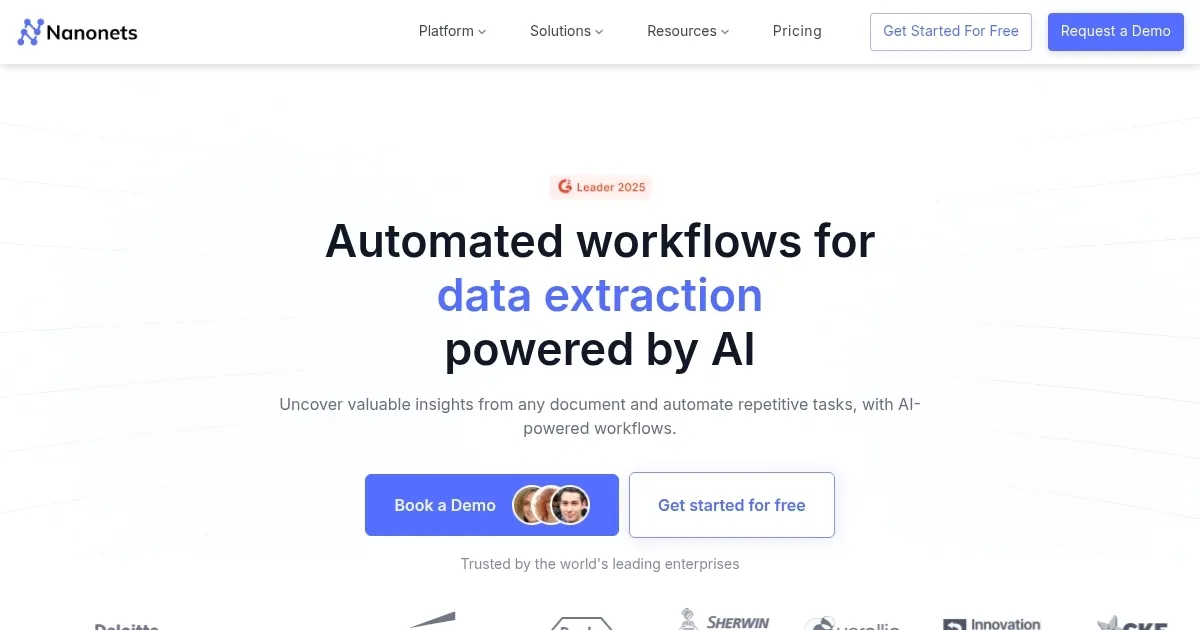
An AI tool to capture data from documents and automate manual data entry

Nanonets

Nanonets is an AI-powered tool designed to optimize business processes through intelligent automation and data extraction from various types of documents. It serves a range of industry needs — including finance, manufacturing, and healthcare — by automating tasks like invoice and receipt processing, ID and document verification, and even complex business workflows such as accounts payable, expense management, and supply chain optimization.

The platform supports seamless integration with numerous third-party applications and systems — including QuickBooks, Stripe, Airtable, and SAP — facilitating data flow across business operations. Nanonets uses advanced AI to extract, process, and enrich data from documents, emails, and databases without the need for pre-defined templates. This, in turn, enables businesses to transform unstructured data into actionable insights.

Nanonets also ensures that the automation of these business processes is user-friendly, requiring no code to set up and operate. Its AI engine is designed to learn and adapt to various documents and workflows, enhancing efficiency and decision-making capabilities.

The platform emphasizes data security, adhering to compliance standards like GDPR, SOC 2, and HIPAA — ensuring that businesses’ sensitive information is protected.

To sum it up – with its capability to export extracted data to numerous formats and directly to essential business systems, Nanonets aims to put business processes on autopilot — promising significant time and cost savings while improving accuracy and customer experiences.

Nanonets Homepage
Categories Productivity

Video Overview ▶️

Nanonets - Video Overview

What are the key features? ⭐

  • AI-driven automation: Streamline business processes with AI-driven automation, reducing manual tasks and increasing efficiency.
  • OCR: Convert various documents such as invoices, receipts, and ID cards into digital data using Optical Character Recognition (OCR) technology.
  • No-code platform: Easily set up and customize workflows without the need for coding, making it accessible even to non-technical users.
  • Integration: The tool integrates with services like Gmail, Dropbox, and SAP to ensure smooth data flow across platforms.
  • Smart decision engines: Automate decision-making processes by flagging, reviewing, and validating data efficiently.

Who is it for? 🤔

Nanonets targets businesses across different industries, including finance, healthcare, supply chain, and customer support - which require automation of repetitive tasks and data extraction from unstructured documents. It is especially beneficial for companies looking to improve efficiency, reduce manual errors, and integrate AI-powered automation into their workflows.

Examples of what you can use it for 💭

  • Automate invoice processing, reducing errors and speeding up payment cycles
  • Optimize order processing and inventory management by extracting and analyzing data from various sources
  • Organize and summarize patient data quickly, improving efficiency and patient care
  • Streamline expense management and reconciliation by automating data extraction from financial documents
  • Enhance customer service by automating data extraction from emails and support tickets

Pros & Cons ⚖️

  • Lets you automate many of the manual tasks
  • The built-in OCR makes data extraction much easier
  • Integrates with existing tools
  • Onboarding and setup could take some time

FAQs 💬

What exactly does Nanonets do?
Nanonets uses AI and advanced OCR to automatically extract structured data from unstructured documents like invoices, receipts, and forms, then automates workflows around that data.
Do I need to create templates before using Nanonets?
No, the platform works without predefined templates. It relies on AI models that learn from your documents and improve accuracy over time.
Which industries benefit most from Nanonets?
Finance (especially accounts payable), manufacturing, insurance, accounting, and any operation dealing with high volumes of documents see the biggest gains.
Can Nanonets handle handwritten text or complex layouts?
Yes, it manages a wide range of document types, including some handwritten content and complicated layouts, though accuracy improves with training on your specific examples.
How does Nanonets integrate with other tools?
It connects easily to CRMs like Salesforce and HubSpot, ERPs like SAP, cloud storage like Google Drive or Dropbox, and communication tools like Slack or email.
Is Nanonets suitable for small businesses or only large enterprises?
It works well for businesses of many sizes, though enterprises with heavy document volume tend to see the fastest and largest returns.
How accurate is the data extraction in Nanonets?
Users and the company report accuracy often exceeding 95%, especially after the AI learns from your documents and any manual corrections.
Does Nanonets offer a way to review and correct extractions?
Yes, it includes review workflows where only uncertain items are flagged for human checks, often via Slack, email, or the platform interface.
Can I automate entire end-to-end processes with Nanonets?
Absolutely. It supports ingesting data, extracting information, applying business rules, and pushing structured output to other systems automatically.
What file formats does Nanonets support for input?
It processes PDFs, images, scanned documents, emails, and data from various sources like support tickets or cloud storage.
Visit Nanonets

Related tools ↙️

  1. Pineify Pineify Generates error-free Pine Script indicators and strategies without coding
  2. ResuFit ResuFit Generates AI-tailored resumes, cover letters, and interview prep for job applications
  3. Fina Money Fina Money Builds customizable AI-driven systems to track and optimize personal finances effortlessly
  4. Oliv Oliv Automates sales workflows with AI agents for deal tracking and coaching
  5. Upwork Uma Upwork Uma Streamlines freelance hiring with AI-powered skill assessments and job creation
  6. Justt Justt Automates chargeback disputes using AI to customize evidence and boost recovery rates.
Last update: February 7, 2026
Share
Promote Nanonets
light badge
Copy Embed Code
dark badge
Copy Embed Code
neutral badge
Copy Embed Code
About Us | Contact Us | Suggest an AI Tool | Privacy Policy | Terms of Service

Copyright © 2026 Best AI Tools
415 Mission Street, 37th Floor, San Francisco, CA 94105