
Tableau AI by Salesforce

Tableau AI, enhanced by Einstein Generative AI, is made to streamline and accelerate the data analysis process across the entire Tableau platform. It offers a set of capabilities aimed at democratizing data analysis, delivering insights at scale, simplifying data exploration, and supporting business decisions.
The tool aids data analysts by reducing technical barriers and repetitive tasks, and provides business users with smart and contextual insights in natural language — making insights quick and easy to understand.
Tableau AI is built on the Salesforce’s Einstein Trust Layer, allowing for the creation of trusted, ethical, and open AI-powered experiences without compromising data security and privacy. The platform can accelerate time to value and reduce repetitive tasks for data analysts through smart suggestions and in-product guidance. Moreover, it supercharges analysts by automating data analysis, preparation, and governance to accelerate time to insight.
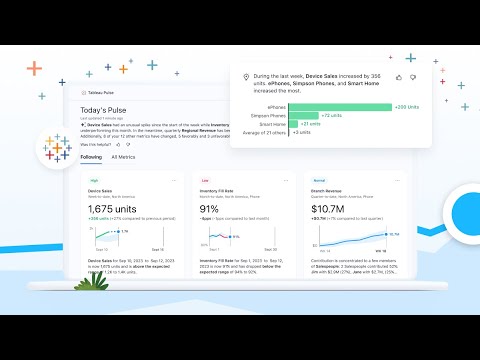
One of the key features of Tableau AI is Tableau Pulse, which personalizes the user experience by providing proactive delivery of timely insights. Thanks to the use of generative AI tech, Insight Summaries are generated in natural language, offering a comprehensive overview of metrics’ performance — which significantly reduces the time and energy needed for users to determine their focus.
Generative AI tech also provides in-context help for understanding Tableau features, improves visualization and dashboard quality through prescriptive guidance, and automates known curation and repetitive tasks to speed up dashboard creation.
Ultimately, Tableau AI — with its generative AI capabilities – is setting a new standard for data analysis and insight consumption. It is not just about providing data visualization tools but is reimagining the future of data analysis.
Video Overview ▶️
What are the key features? ⭐
- Contextual insights: Tableau AI provides personalized and contextually relevant insights directly in your workflow. In a way, it's like having a conversation with your data.
- Automated data analysis: It can automatically analyze your data and provide explanations in plain language. This makes it easier to understand complex datasets without needing deep technical expertise.
- Einstein Copilot: This is a conversational assistant powered by generative AI, designed to increase productivity. It is meant to help you understand how to use Tableau's features better, improve the quality of your visualizations and dashboards, and automate repetitive tasks so you can focus on more strategic work.
- Tableau Pulse: Powered by generative AI, Tableau Pulse offers a newsfeed of key insights and anticipates your questions, providing answers in an easy-to-understand format.
- Security and privacy: Tableau AI doesn't compromise on data security and privacy. It is built on the Einstein Trust Layer, ensuring that your data is not only processed securely but also remains private and compliant with regulations.
Who is it for? 🤔
Examples of what you can use it for 💭
- Automatically analyze your business metrics and provide natural language summaries
- Improve the quality of your data visualizations and dashboards
- Automate the repetitive tasks associated with preparing and analyzing data
- Get a newsfeed-like delivery of key insights tailored to your needs
- Keep your data secure and in compliance with privacy regulations
Pros & Cons ⚖️
- Makes it easier to get valuable insights from your data
- Einstein Copilot is there to provide answers from your data
- You can also automate many of the business intelligence tasks
- It's a tool for slightly bigger companies (which have more data to play with)








