logo-darklogo-darklogo-darklogo-dark
  • Tool Categories
    • 🎨Art & Creative Design505
    • 🏢Business Management644
    • 💻Coding & Development514
    • 👮Detection83
    • 🧠General Use728
    • 🏥Health & Wellness55
    • 📷Image & Photo Analysis100
    • 🖼️Image Generation & Editing618
    • 📐Interior & Architectural Design37
    • 🎓Learning & Education483
    • ⚖️Legal & Finance90
    • 🎭Lifestyle & Entertainment236
    • 📢Marketing & Advertising627
    • 🎧Music & Audio138
    • 👔Office & Workplace1,014
    • 🔬Research & Data Analysis373
    • 👥Social Media245
    • 🎥Video Generation & Editing426
    • 👧🏻Virtual Companion135
    • 🎤Voice Generation & Editing381
    • ✍️Writing & Editing808
    • All Categories
    • AI Use Cases
  • News
  • Events
    • Academic Conferences
    • Developer Conferences
    • Expos / Trade Shows
    • Industry Summits
    • Workshops / Training
    • All Events
    • Past Events
  • Saved Tools
  • Suggest a Tool
✕
Home › Social Media › Social Media Post Generation› Typegrow
Typegrow

Typegrow

An AI-powered tool designed to help users grow their LinkedIn audience

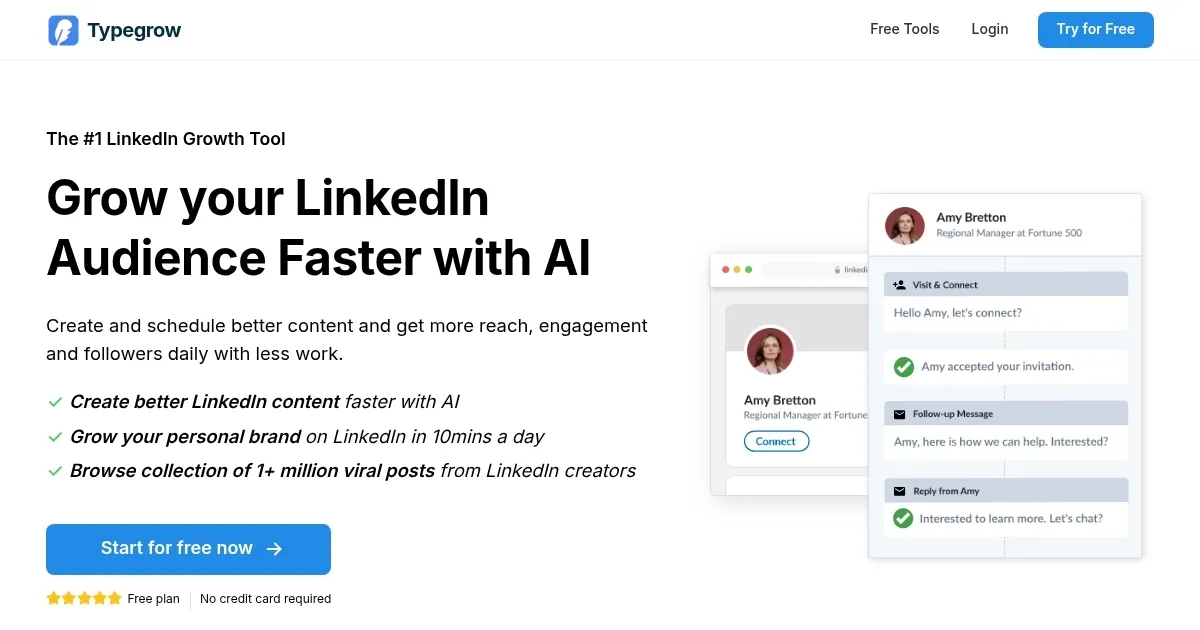
Typegrow is an AI-powered tool designed to help users grow their LinkedIn audience. It offers features like an AI assistant for creating posts, a scheduler for planning content, and tools such as a carousel maker and hook generator to enhance engagement. In addition, Typegrow provides access to a library of over a million viral LinkedIn posts for inspiration.

Using Typegrow can streamline your LinkedIn content strategy. The AI assistant can help you craft engaging posts, saving time and ensuring consistency. Also, scheduling posts in advance will keep your profile active without daily manual updates. Further, the growth tools, like the carousel maker, can improve your content’s visual appeal, leading to increased engagement.

One feature we find particularly valuable is the viral posts library. By analyzing successful content, you can gain insights into effective strategies and tailor your posts accordingly. This can be instrumental in enhancing anyone’s content’s reach and resonance with their audience.

The bottom line is – Typegrow offers a comprehensive and user-friendly solution for professionals looking to expand their LinkedIn presence. Its combination of AI-driven content creation, scheduling capabilities, and growth tools makes it a valuable asset for enhancing engagement and growing one’s network. Check it out.

Visit Typegrow ↗
Categories
👥 Social
📝 Social Media Post Generation 📱 Social Media Management ⭐ Influencer
✍️ Writing
♻️ Content Repurposing 🤖 Writing Assistant
📢 Advertising
🚀 Marketing

Homepage Screenshot 📸

Typegrow screenshot

Video Overview 🎬

Typegrow - Video Overview

What are the key features? ✨

  • AI assistant: Typegrow's AI helps you write better LinkedIn posts quickly. It saves time and makes your content more engaging.
  • Post scheduler: You can plan and set up your posts to go live at the best times. This keeps your LinkedIn activity regular without daily effort.
  • Growth tools: Typegrow offers tools like a carousel maker and hook generator. These features can make your posts more attractive and interesting.
  • Viral posts library: Access a collection of over 1 million successful LinkedIn posts. This library gives you ideas and shows what works well.
  • Free tools: Typegrow also provides free tools such as a carousel generator and text formatter. These help you easily create and enhance your LinkedIn content.

Who is it for? 🤔

Typegrow is designed for individuals and companies aiming to expand their presence on LinkedIn. It's especially useful for content creators, professionals building personal brands, and social media agencies managing client profiles. By simplifying content creation and scheduling, Typegrow helps users engage more effectively with their LinkedIn audience.

Examples of what you can use it for 💡

  • Whether you're new or experienced, Typegrow's AI helps you effortlessly craft engaging LinkedIn posts
  • Plan your LinkedIn content ahead of time to ensure consistent posting without daily manual updates
  • Increase your reach and gain more followers on LinkedIn
  • Explore the viral posts library to find ideas that have worked for others
  • Utilize free tools to enhance your LinkedIn profile and make it more appealing to potential connections

Pros & Cons ⚖️

  • Enhances LinkedIn engagement
  • Automates LinkedIn post creation
  • Easy one-click post scheduling
  • Free version is very limited (guess that makes sense)

FAQs 💬

What is TypeGrow mainly used for?
TypeGrow helps users grow their LinkedIn audience by creating engaging posts with AI, scheduling content, and using tools like hook generators and carousels to boost reach and followers.
Does TypeGrow require any prior LinkedIn experience?
No, the platform is designed to be intuitive and user-friendly, so beginners can start creating and scheduling posts without needing social media expertise.
How does the AI assistant in TypeGrow work?
You provide a topic or prompt, and the AI generates high-quality LinkedIn post drafts that sound like top creators, which you can then edit to add your personal touch.
Can TypeGrow schedule posts automatically?
Yes, the built-in scheduler lets you plan posts and carousels to publish at optimal times with one click, so you don't have to log in daily.
Is TypeGrow safe for my LinkedIn account?
It uses LinkedIn's official API for connections and posting, focusing on content tools rather than aggressive automation, which keeps accounts secure.
What free tools does TypeGrow offer?
Free options include a LinkedIn post generator, carousel maker, hook generator, text formatter, post preview, headline generator, and video downloader, all usable without signup.
Who is TypeGrow best suited for?
It's ideal for founders, CEOs, marketers, agencies, and creators who want to build personal or company brands on LinkedIn with consistent, high-engagement content.
Can I post from company pages with TypeGrow?
Yes, you can connect company pages and choose to publish from your personal profile or company pages directly through the tool.
Does TypeGrow help with content inspiration?
It includes a library of over 1 million viral LinkedIn posts, so you can browse proven high-performers for ideas and strategies.
How does TypeGrow differ from other LinkedIn tools?
It emphasizes AI-driven content creation tailored to LinkedIn's style, combined with scheduling and visual tools like carousels, rather than broad social media features.

Ready to try Typegrow?

An AI-powered tool designed to help users grow their LinkedIn audience

Visit Typegrow ↗

Typegrow alternatives 🔗

  1. Canva Magic Design Canva Magic Design Generates custom, on-brand designs from text prompts or uploaded media in seconds.
  2. Adobe Express Adobe Express Creates on-brand content with AI-driven design and video tools
  3. CapCut Creative Suite CapCut Creative Suite Online creative suite for everyone to create stunning images and videos
  4. Picsart Picsart A platform for creating, customizing, and sharing images and videos
  5. MiriCanvas MiriCanvas Creates stunning designs with AI-powered templates and editing tools
  6. Kapwing Kapwing Transforms text or images into edited videos with AI-driven features
Share
Typegrow screenshot enlarged
Promote Typegrow
light badge
Copy Embed Code
dark badge
Copy Embed Code
neutral badge
Copy Embed Code
Best AI Tools

Discover the best AI tools for any use case

Explore
  • Tool Categories
  • AI Use Cases
  • AI Events
  • AI News
  • Saved Tools
Company
  • About Us
  • Contact Us
  • Media & Partnerships
  • Suggest a Tool
Legal
  • Privacy Policy
  • Terms of Service
Copyright © 2026 Best AI Tools 415 Mission Street, 37th Floor, San Francisco, CA 94105