logo-darklogo-darklogo-darklogo-dark
  • Home
  • Browse
    • Assistant
    • Coding
    • Image
    • Productivity
    • Video
    • Voice
    • Writing
    • All Categories
    • AI Use Cases
  • My Favorites
  • Suggest a Tool
✕
Home › Voice Generation & Editing ›

Inkr

Published by Dusan Belic on September 17, 2025

Inkr

Inkr
Inkr Homepage
Categories Voice Generation & Editing
Transcribes audio files to editable text instantly

Inkr

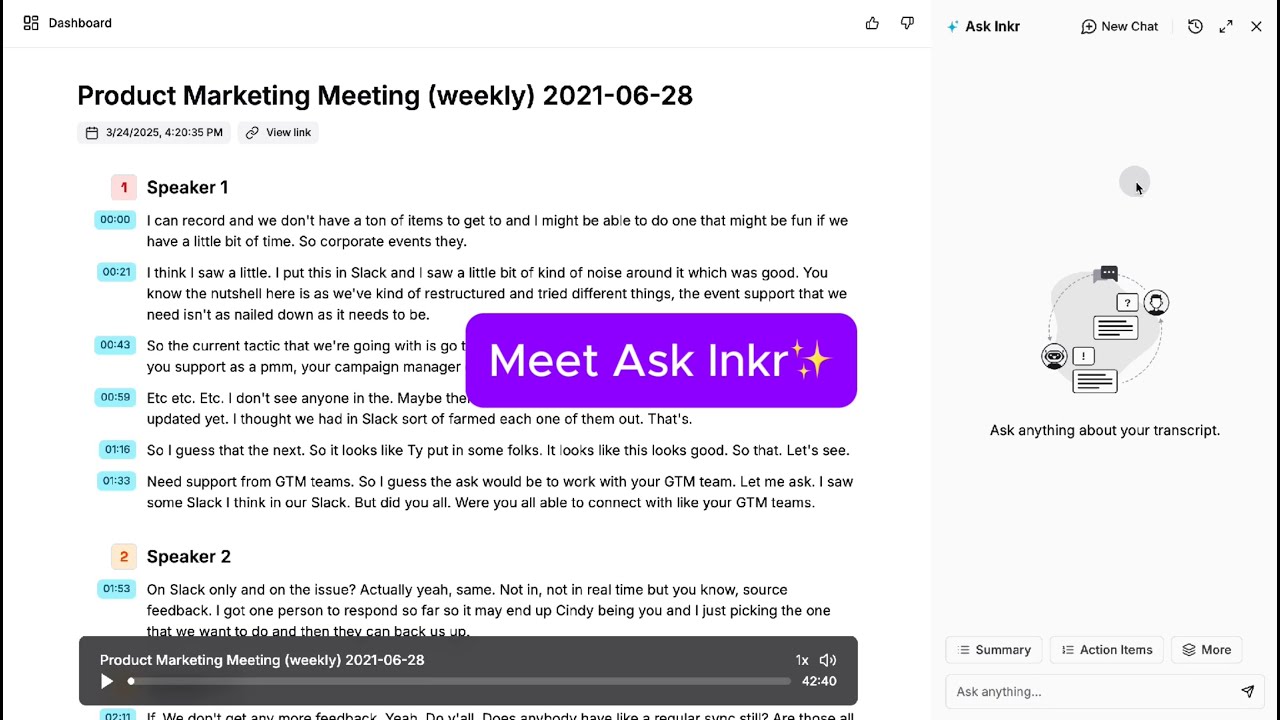
Inkr is an AI transcription tool that converts audio and video files to text. It processes uploads from devices or links from platforms like YouTube and Zoom. The system uses speech-to-text models for accuracy, adding timestamps, speaker identification, and editable formats.

Core functions include instant transcription in Flash mode, which handles short files in seconds, and standard mode for longer ones up to several minutes. Users edit transcripts directly in the interface, with audio playback per segment for verification. Export options cover TXT, DOCX, PDF, and SRT files. An AI summarizer extracts key points into structured lists.

The tool supports multiple languages and auto-detects them during processing. Free plan limits usage to 30 minutes monthly; paid plans remove caps and add priority processing. Competitors like Otter.ai include live meeting integration, while Descript offers waveform editing; Inkr focuses on text output at lower general costs.

Strengths appear in speed for clean audio and ease of use for non-technical users. Weaknesses involve reduced accuracy in noisy environments and lack of advanced collaboration features. A notable element is real-time link transcription for web videos.

Test users report 90-95 percent accuracy on standard inputs, with manual fixes taking under five minutes per 10-minute file. The platform runs on web browsers with no software install required.

For best results, test with clear recordings first and review edits before export.

Inkr Homepage
Categories Voice Generation & Editing

Video Overview ▶️

What are the key features? ⭐

  • Instant Transcription: Converts audio to text in seconds using AI speech recognition for quick results.
  • Speaker Identification: Automatically labels different voices in conversations to organize dialogue clearly.
  • Editable Interface: Allows direct text modifications with linked audio playback for easy corrections.
  • Multi-Format Export: Outputs transcripts as TXT, DOCX, PDF, or SRT files for versatile use.
  • AI Summarizer: Generates concise bullet-point overviews of key content from full transcripts.

Who is it for? 🤔

Inkr is made for busy professionals like journalists capturing interviews on the go, podcasters needing show notes without the hassle, and students logging lecture audio for study guides, as it turns scattered spoken ideas into organized text fast, freeing up time for what matters most, though it shines brightest for those handling English-heavy content with occasional noise challenges.

Examples of what you can use it for 💭

  • Journalist: Transcribes field recordings from events to draft articles quickly with accurate quotes.
  • Podcaster: Converts episode audio to editable scripts and summaries for social media clips.
  • Teacher: Turns lecture videos into timestamped notes for student handouts and review.
  • Business Meeting: Processes Zoom calls to identify speakers and extract action items in text form.
  • Content Creator: Summarizes YouTube videos into key points for blog post outlines.

Pros & Cons ⚖️

  • Accurate on clear audio
  • Speaker labels
  • Free trial minutes
  • Noisy audio errors
  • Limited free tier

FAQs 💬

What file types does Inkr support?
It handles MP3, WAV, M4A, and video formats like MP4 from links.
Is Inkr accurate for accents?
Yes, it manages common accents well, though heavy ones may need minor edits.
Can I edit transcripts?
Absolutely, the interface lets you revise text and replay audio segments.
Does it work offline?
No, it requires an internet connection for processing.
How long are free minutes?
The free plan gives 30 minutes of transcription per month.
Supports multiple languages?
Yes, it auto-detects and handles switches between English, Spanish, French, and more.
Export formats available?
Options include TXT, DOCX, PDF, and SRT for subtitles.
Speaker detection reliable?
It labels up to four speakers accurately in clear multi-voice files.
Integrate with other apps?
Exports work seamlessly with Google Docs, Word, and subtitle software.

Related tools ↙️

  1. Unmute.sh Unmute.sh Transforms text-based LLMs into real-time voice AI with low-latency
  2. Moises Moises Separates vocals and instruments from songs using AI for practice and production.
  3. Vocal Remover Vocal Remover Separates vocals from instrumentals in songs using AI
  4. Synthesizer V Synthesizer V An AI-powered synthesizer that faithfully replicates the nuances of the human singing voice
  5. Riverside Audio & Video Transcription Riverside Audio & Video Transcription An AI service that generates high-accuracy audio and video transcription in multiple languages.
  6. PodLM PodLM Transforms URLs, texts, and documents into professional podcasts using AI
Last update: October 24, 2025
Share
Promote Inkr
light badge
Copy Embed Code
light badge
Copy Embed Code
light badge
Copy Embed Code
About Us | Contact Us | Suggest an AI Tool | Privacy Policy | Terms of Service

Copyright © 2026 Best AI Tools
415 Mission Street, 37th Floor, San Francisco, CA 94105