
PixAI.Art
Anime AI image generator, available on the web and as a mobile app

PixAI.Art is an AI art generator for fans of Japanese anime art. It will pretty much add the “anime filter” to any prompt you provide to come up with a fancy-looking image.
The service is easy and also free, with no ads to deal with. It supports different scenes, styles, and poses of characters – just like in real manga comics.
If you’re unsure where to start, you can check out reference images, some of which look nothing short of amazing. Or you can train your own model; it’s up to you.
In any case, once you get yourself an image you like, feel free to share it with friends – from the web or a mobile app. Yes, there is also a mobile app to allow you to create these fancy images while on the go. Pretty cool.
Categories Art & Creative Design
Video Overview ▶️
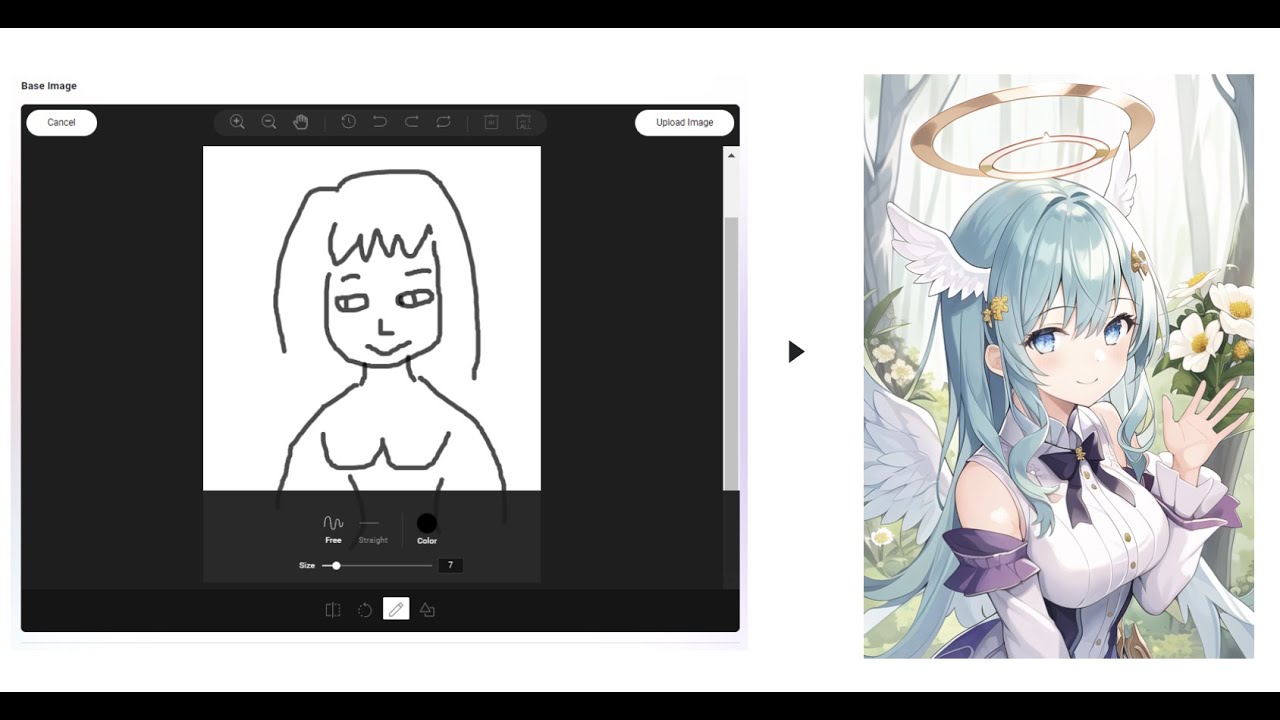
What are the key features? ⭐
- Choices, choices: PixAI.Art supports different character poses, styles, scenes, and more.
- Free with no ads: That's right. Despite the fact that this is a free service, you don't have to deal with ads. That's an unusual yet very appreciated concept. :)
- Examples galore: To get inspiration, you can check out images on the homepage. There are quite a few of them, and many look really cool.
- Train your model: Don't like the ideas you see on the homepage? No problem, train your own model to get really unique anime images.
- Make anime on the go: Have an idea for an anime image while commuting in a train or while waiting in a queue? Fire up the PixAI.Art app on your smartphone and "just prompt it."
Who is it for? 🤔
PixAI.Art is, obviously, made for fans of anime, but that's not all. Designers of all sorts should be interested in trying out the service and perhaps add a "dose of anime" to their designs. Whether we're talking about web pages, fliers, posters, or some other marketing material - it could only look better with a dash of anime. Or so we think.
Examples of what you can use it for 💭
- Create anime art and share it with friends
- Design marketing materials for your company (or a client)
- Get inspiration for your other design work
- Create posters for all kinds of settings
Pros & Cons ⚖️
- Great results with little effort
- <em>The</em> place for anime art fans
- Create fancy images on your phone while on the go
- It could be NSFW in some places
FAQs 💬
What is PixAI.Art, and who is it best for?
PixAI.Art is an AI-powered platform that lets you create high-quality anime and stylized images from text prompts or reference pics. It shines for anime fans, game devs, writers needing character visuals, and hobbyists who don't have pro drawing skills. If you're into quick concept art or custom characters, it's a solid pick, though power users might pair it with local tools like Stable Diffusion for more tweaks.
How do I get started with PixAI.Art without paying anything?
Head to pixai.art, sign up for a free account, and claim daily credits, usually around 10,000 to start generating. Jump into the quick generation mode, type a prompt like "blonde elf warrior in forest," hit generate, and boom, you've got images in seconds. No install needed, works in your browser or app. Users on Trustpilot say it's dead simple for newbies.
What are the main features that make PixAI.Art different from other AI art tools?
Key stuff includes text-to-image generation, LoRA training for custom models from your refs, inpainting/outpainting for edits, a Model Market with thousands of community LoRAs, and upscale tools for sharper results. It has pro modes for fine control like negative prompts and samplers. Compared to Leonardo AI, it's more anime-focused with better community sharing, per a 2025 Skywork review.
Is there a free version, and what are the limits?
Yeah, it's free with unlimited basic generations via daily credits, but heavy use eats them fast, say 200-500 per image depending on steps. You can grind more through tasks or ads. No watermarks on free outputs, and you own the art for personal use. Reviews on App Store note it's generous for casual play, though pros hit limits quick.
How much does PixAI.Art cost for premium features?
Plans start at about $10/month for basic membership, bumping to $24 or $48 for more credits and exclusives like faster models. Credits buy packs too. It's not the cheapest, but Reddit folks say the value's there if you're churning out lots of art. Check pixai.art/pricing for exacts, as they tweak 'em.
Can I use PixAI.Art for commercial projects, like selling prints or game assets?
Absolutely, their terms allow it for most generated art, as long as you don't train rival AIs on it. Just attribute if needed for contests. Game devs on SourceForge praise it for indie assets, but double-check for NSFW stuff, which has extra rules.
Does PixAI.Art have a mobile app, and how's the experience?
Yep, iOS and Android apps let you generate on the go, with the same features plus gacha-style credit grinds. App reviews from 2025 call it smooth and fun, though some wish for more offline tweaks. Great for ideation during commutes.
How good is the image quality, especially for anime styles?
Pretty darn good, with crisp details and style consistency thanks to SDXL models and LoRAs. Prompts like "cyberpunk samurai girl" yield pro-level results fast. A Pollo.ai test showed strong prompt adherence, but complex scenes might need a few rerolls. Better than generic gens for anime, users say.
What are some common downsides or complaints about PixAI.Art?
Credit costs add up for high-res work, and occasional bugs like random artifacts pop up in upscales. Some Reddit tips warn about prompt overload from LoRAs messing things up. Also, NSFW filters can be picky. Overall, pros outweigh cons for anime lovers, but it's not perfect for photorealism.
How does PixAI.Art compare to alternatives like NovelAI or Leonardo AI?
It's more affordable and anime-tuned than NovelAI's story focus, with easier LoRA access. Leonardo edges out on broad tools like video, but PixAI wins for quick character sheets. A 2025 Sider review picks it for fun, low-friction anime workflows over the others.
Related tools ↙️






Last update:
November 12, 2025
Promote PixAI.Art


