
logo-darklogo-darklogo-darklogo-dark
  • Home
  • Browse
    • Assistant
    • Coding
    • Image
    • Productivity
    • Video
    • Voice
    • Writing
    • All Categories
    • AI Use Cases
  • My Favorites
  • Suggest a Tool
✕
Home › Productivity›
Published by Dusan Belic on May 20, 2024

Retool AI

Retool AI
Retool AI Homepage
Categories Productivity
An innovative platform made to help integrate AI functionalities into applications and workflows

Retool AI

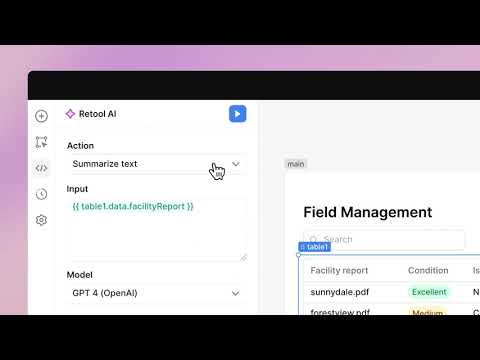
Retool AI is an innovative platform made to help integrate AI functionalities into applications and workflows. To that end, it provides a range of pre-built AI queries and blocks that allow users to generate content, automate tasks, create custom chat responses, and manage AI-driven workflows effectively.

One of Retool AI’s key features is its managed vector store, called Retool Vectors, which enables the storage and indexing of business data into vector embeddings for enhanced AI retrieval.

The platform supports different AI models, including those from OpenAI, Anthropic, and Azure. This is further complemented by the ability to connect to different AI platforms using API keys.

Retool AI emphasizes data security with features such as self-hosted deployments, permissions, audit trails, Single Sign-On (SSO), and version control.

For developers, Retool AI offers tools that accelerate the software development process. Among these are capabilities to automatically write and debug code, generate user interfaces from AI recommendations, and assemble UI components efficiently.

Furthermore, Retool AI allows users to create AI-powered search capabilities and contextual AI bots that can handle and process data extracted from various sources. This is particularly beneficial for businesses looking to enhance their operational efficiency and data management practices.

In a nutshell, Retool AI is a comprehensive tool that enhances the efficiency of integrating AI into business processes while ensuring robust data security and offering extensive customization options to meet the needs of different businesses.

Retool AI Homepage
Categories Productivity

Video Overview ▶️

What are the key features? ⭐

  • Pre-built AI blocks: Retool AI offers a range of ready-to-use AI blocks that allow users to quickly integrate AI functionalities into their apps. This includes the ability to generate content, automate tasks, and create custom workflows​.
  • Multiple AI models supported: The platform supports different AI models from major providers like OpenAI, Anthropic, and Azure.
  • Data security: Retool AI prioritizes data security with features like self-hosted deployments, permissions management, audit trails, Single Sign-On (SSO), and version control.
  • AI-powered search: The platform includes Retool Vectors, a managed vector store that simplifies storing and indexing business data into vector embeddings.
  • Development tools: Retool AI also provides AI-enhanced tools that assist in writing code, debugging, generating user interfaces, and assembling UI components automatically.

Who is it for? 🤔

Retool AI targets a broad market that includes developers, startups, and large enterprises looking to integrate AI functionalities into their applications and workflows. It is particularly appealing to businesses that need to automate repetitive tasks, enhance data management, or accelerate software development. The platform also caters to those who prioritize data security, offering robust features to control data access and manage permissions. Finally, thanks to its ability to support various AI models and provide pre-built AI blocks - Retool AI can serve different industries, ranging from technology to customer service and finance.

Examples of what you can use it for 💭

  • Create smart chatbots that handle routine customer inquiries, reducing the workload on human agents
  • Utilize Retool AI's vector storage capabilities to enhance data retrieval systems
  • Automate various manual tasks within business workflows
  • Develop custom applications with AI functionalities
  • Manage user access and control permissions within applications

Pros & Cons ⚖️

  • Makes it easier for organizations to deploy AI apps
  • You can use it to create your own smart search
  • Or to automate different kinds of manual tasks
  • Not really a tool for small firms

FAQs 💬

What is Retool AI and how does it differ from the standard Retool platform?
Retool AI builds on the core Retool low-code platform by adding AI capabilities like app generation from natural language prompts, context-aware editing, and AI agents that automate tasks. While standard Retool focuses on drag-and-drop app building with database integrations, Retool AI incorporates large language models (LLMs) to generate queries, UIs, and workflows directly on your data, making it easier for non-developers to create intelligent tools without deep coding knowledge.
Who is Retool AI designed for?
It's aimed at developers, data teams, operations staff, and support roles in enterprises who need to build internal apps or automate processes quickly. Companies like Amazon and Stripe use it for everything from data dashboards to customer support bots, and it's great for teams without large engineering resources, as it empowers domain experts to prototype AI features themselves.
What are the main features of Retool AI?
Key features include AI-powered app generation (AppGen), which creates full apps from prompts; AI agents for tasks like ticket resolution or report generation; retrieval-augmented generation (RAG) for adding your data to model calls; workflow orchestration that chains AI actions with business logic; and built-in monitoring with audit trails. It also supports any LLM provider, like OpenAI or Anthropic, and integrates with databases such as Postgres or Salesforce.
How does Retool AI handle security and compliance?
It automatically enforces your organization's policies, including SSO, role-based access control (RBAC), and data-level permissions, right from the start. Apps and agents run in your secure environment, with controls over what data reaches models and full audit logs for every AI action. This makes it suitable for regulated industries like finance and healthcare, where users report it meets enterprise standards without extra setup.
Can Retool AI integrate with my existing data sources and tools?
Yes, it connects seamlessly to over 50 data sources, including Postgres, Databricks, Salesforce, and APIs from services like Stripe or HubSpot. You can also bring in custom models or tools, and it supports dev workflows with Git integration and CI/CD. Recent user feedback highlights how easy it is to pull live data for AI-driven apps, reducing the need for manual data prep.
How easy is it to get started with Retool AI as a beginner?
Getting up and running is straightforward with templates for common use cases like approval workflows or data analysis dashboards, plus a visual editor that suggests components via AI. Tutorials show you can build a basic Q&A chatbot in under an hour, though some users note a short learning curve for advanced customizations. The free tier lets you experiment without commitment.
What kind of use cases does Retool AI support?
Common scenarios include automating customer support with history-aware agents, generating natural language dashboards from queries, routing workflows intelligently, or creating internal search tools across data silos. For example, finance teams use it to pull multi-source data into formatted reports, and ops groups build adaptive automations that handle exceptions better than rigid scripts.
Does Retool AI support self-hosting or on-premise deployment?
Absolutely, it offers self-hosted options for full control over your infrastructure, which is popular among enterprises concerned about data privacy. You can deploy in your cloud or on-prem, with the same AI features available. Reviews from 2025 mention it's simpler than competitors for setup, especially with the on-premise agent for AI tasks.
How does Retool AI compare to alternatives like Appsmith or Bubble?
Unlike open-source options like Appsmith, which are cheaper but require more coding for AI features, Retool AI provides enterprise-grade security and prompt-to-app generation out of the box. Compared to no-code tools like Bubble for external apps, it's more focused on internal, data-heavy tools with better scalability and LLM integrations, though it might feel less flexible for public-facing UIs.
What recent updates have improved Retool AI?
In late 2025, updates included enhanced AppGen for enterprise use, better performance for large apps, and Workflows 2.0 for more robust AI chaining. Users praise the stability gains, with fewer bugs in saving and querying, plus new templates for AI agents that cut build time dramatically.
Visit Retool AI

Related tools ↙️

  1. Pineify Pineify Generates error-free Pine Script indicators and strategies without coding
  2. Oliv Oliv Automates sales workflows with AI agents for deal tracking and coaching
  3. Fina Money Fina Money Builds customizable AI-driven systems to track and optimize personal finances effortlessly
  4. ResuFit ResuFit Generates AI-tailored resumes, cover letters, and interview prep for job applications
  5. Upwork Uma Upwork Uma Streamlines freelance hiring with AI-powered skill assessments and job creation
  6. Pine Script Wizard Pine Script Wizard Generates custom Pine Script code for TradingView indicators and strategies from text descriptions
Last update: November 29, 2025
Share
Promote Retool AI
light badge
Copy Embed Code
dark badge
Copy Embed Code
neutral badge
Copy Embed Code
About Us | Contact Us | Suggest an AI Tool | Privacy Policy | Terms of Service

Copyright © 2026 Best AI Tools
415 Mission Street, 37th Floor, San Francisco, CA 94105