
logo-darklogo-darklogo-darklogo-dark
  • Home
  • Browse
    • Assistant
    • Coding
    • Image
    • Productivity
    • Video
    • Voice
    • Writing
    • All Categories
    • AI Use Cases
  • My Favorites
  • Suggest a Tool
✕
Home › Image Generation & Editing / Video Generation & Editing ›

Unboring

Published by Dusan Belic on July 10, 2023

Unboring by Reface

Unboring
Unboring Homepage
Categories Image Generation & EditingVideo Generation & Editing

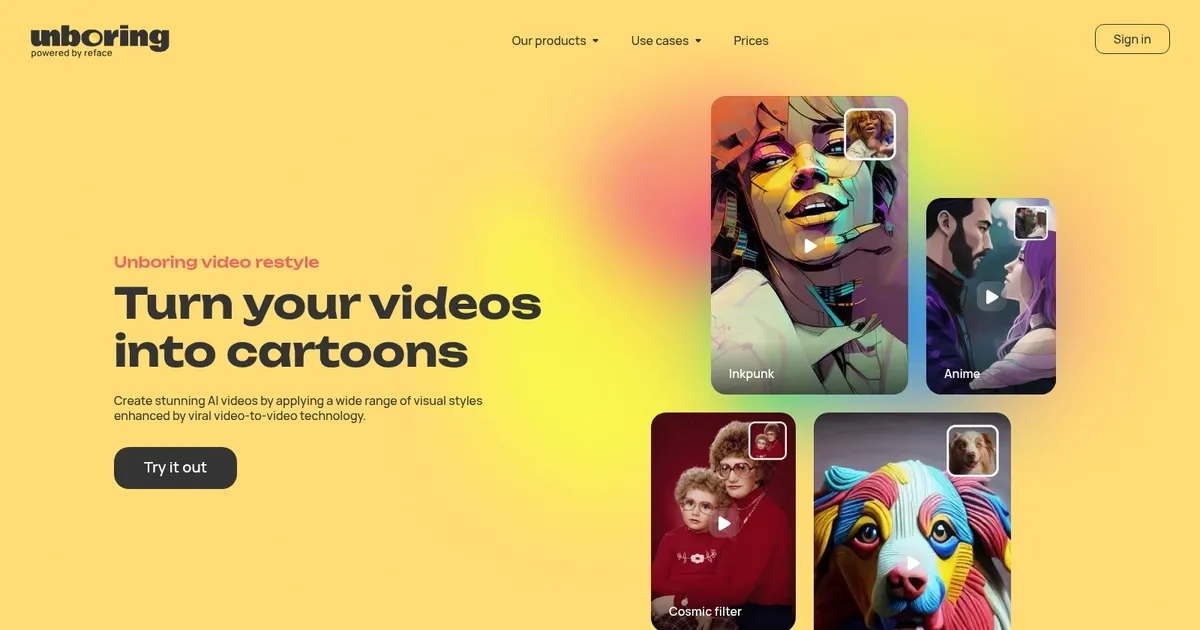
Unboring - screenshot

Make your photos and videos unboring with tools like restyle, animate, change faces, etc.

Unboring

Unboring is an innovative online tool designed to bring a creative twist to photos and videos through face swapping, animation, and various restyling features. With just a few clicks, users can instantly change faces in photos or create entertaining videos with friends.

The tool goes a step further by animating static images to make them talk or dance and even transforming photos and videos into different styles, such as cartoons or cyberpunk. Additionally, for special occasions like Halloween, it offers unique animations like zombies singing and dancing.

Whether it’s creating meme-worthy content, transforming oneself into different characters, or making pets look even cuter in cartoon form – Unboring provides a user-friendly platform for unleashing creativity without requiring advanced editing skills.

The tool offers a variety of subscription plans — utilizing a token-based system that applies across its services — including face swapping, photo animation, video restyling, and image restyling. The different subscription tiers provide a certain amount of tokens per month which can be utilized for creating a specified number of face swaps, restyles, and animations.

Accompanied by a user-friendly interface and a gallery of photos and videos to choose from, Unboring guarantees fast, entertaining, and hilarious results — making it an appealing choice for anyone looking to add a fun and creative twist to their media.

Unboring Homepage
Categories Image Generation & EditingVideo Generation & Editing

What are the key features? ⭐

  • Face Swap: instantly replace faces in photos or videos using custom or template content for quick, entertaining edits
  • AI Animation: animate static photos to sing, dance, or move with lip-sync and added effects from a growing library
  • Video Restyle: transform uploaded videos into creative styles like Anime, Claymation, or Cosmic using advanced AI filters
  • Multi-Face Support: handle group images or videos with multiple face replacements in a single process
  • High-Definition Output: generate results in HD quality with fast processing for shareable content

Who is it for? 🤔

This tool helps social media enthusiasts, casual creators, meme makers, and anyone who wants to add humor to personal photos or videos without learning complex editing software.

Examples of what you can use it for 💭

  • Social media user: creates viral memes or funny posts by swapping faces in group photos or animating selfies
  • Content creator: restyles short videos into unique artistic versions for platforms like TikTok or Instagram
  • Family member: animates portraits to sing birthday songs or dance for personalized greetings
  • Pet owner: turns pet photos into talking or dancing clips for lighthearted sharing
  • Office worker: pokes fun at coworkers with face-swapped images or video jokes

Pros & Cons ⚖️

  • Fast and easy to use for quick results
  • Fun, creative styles keep things entertaining
  • Supports multiple faces and custom content
  • Regular updates add new templates and effects
  • Free tier limits run out quickly
  • Occasional inconsistencies in complex outputs

FAQs 💬

What is Unboring by Reface?
Unboring by Reface is a web-based AI tool for face swapping, photo animation, and video restyling, allowing users to create fun content from uploaded media.
Is there a free version available?
Yes, a free tier exists with limited activities, while paid subscriptions unlock unlimited use, priority processing, and no watermarks.
Can I use my own photos and videos?
Absolutely, the tool supports custom uploads in formats like JPG for images and MP4/MOV for videos.
Does it work on videos longer than a few seconds?
Yes, it handles longer videos, though processing time may increase and results vary with complexity.
How does it compare to Deepswap?
Unboring focuses on fun, stylized results and ease of use, while Deepswap emphasizes more realistic, pro-level video swaps.
Is HD quality guaranteed?
The tool aims for high-definition outputs and monitors performance to deliver strong results.
Can I animate any photo to sing or dance?
Yes, as long as the photo has a clear face, the AI animation feature adds movement, lip-sync, and effects.
What styles are available for video restyle?
Popular options include Anime, Claymation, Inkpunk, Cosmic, and more, with new styles added over time.

Related tools ↙️

  1. Artguru Avatar Generator Artguru Avatar Generator Create highly realistic and expressive avatars with Artguru's advanced AI model
  2. StarByFace StarByFace Upload a photo and see which celebrity looks the most like you
  3. Phot.AI Phot.AI An online platform that uses AI to enhance photo editing and visual content creation
  4. Sktch.Ai Sktch.Ai Use AI-powered sketch bots to create personalized sketches in 30-60 seconds
  5. ArchSynth ArchSynth An AI-powered tool that transforms sketches into stunning visuals in seconds
  6. DreamUp DreamUp An AI-powered tool allowing users to generate unique artworks by inputting text prompts
Last update: January 14, 2026
Share
Promote Unboring
light badge
Copy Embed Code
light badge
Copy Embed Code
light badge
Copy Embed Code
About Us | Contact Us | Suggest an AI Tool | Privacy Policy | Terms of Service

Copyright © 2026 Best AI Tools
415 Mission Street, 37th Floor, San Francisco, CA 94105




