logo-darklogo-darklogo-darklogo-dark
  • Tool Categories
    • 🎨Art & Creative Design505
    • 🏢Business Management644
    • 💻Coding & Development515
    • 👮Detection83
    • 🧠General Use727
    • 🏥Health & Wellness55
    • 📷Image & Photo Analysis100
    • 🖼️Image Generation & Editing618
    • 📐Interior & Architectural Design37
    • 🎓Learning & Education483
    • ⚖️Legal & Finance90
    • 🎭Lifestyle & Entertainment236
    • 📢Marketing & Advertising627
    • 🎧Music & Audio138
    • 👔Office & Workplace1,014
    • 🔬Research & Data Analysis372
    • 👥Social Media245
    • 🎥Video Generation & Editing426
    • 👧🏻Virtual Companion135
    • 🎤Voice Generation & Editing381
    • ✍️Writing & Editing808
    • All Categories
    • AI Use Cases
  • News
  • Events
    • Academic Conferences
    • Developer Conferences
    • Expos / Trade Shows
    • Industry Summits
    • Workshops / Training
    • All Events
    • Past Events
  • Saved Tools
  • Suggest a Tool
✕
Home › Office & Workplace › SOP Generation› Tango
Tango

Tango

Creates interactive how-to guides from screen captures in minutes.

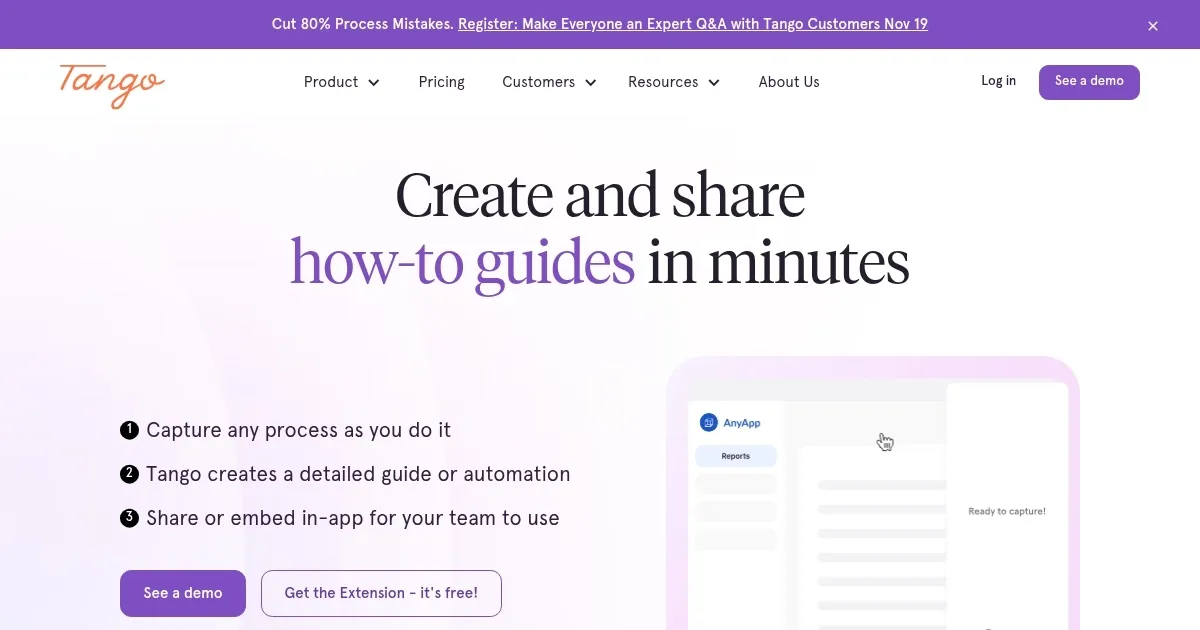
Tango is a digital adoption platform that captures user processes in web applications to generate interactive guides and automations. It operates as a browser extension compatible with systems like Salesforce, SAP, and Workday. The tool automates documentation by recording clicks, hovers, and interactions, then produces step by step walkthroughs with screenshots and annotations. Users customize these outputs for sharing via links, embeds, or exports.

Core features include Process Capture for initial recording, Knowledge Pinning to anchor guides in specific UI elements, and Team Guidance for on screen instructions. Integration allows embedding into knowledge bases, LMS, or chat tools like Zendesk. Adoption Analytics tracks completions, views, and bottlenecks through dashboards with progress metrics and user feedback options.

Tango supports no code setup across thousands of web tools without API requirements. It addresses issues in traditional training by standardizing processes and reducing errors in CRM, ERP, and HRIS environments. Case studies show ninety percent error reduction in quote to cash workflows at Jasco Manufacturing.

Competitors include Whatfix for advanced analytics and WalkMe for enterprise scale, though Tango offers simpler entry with lower setup demands. Pricing features a free tier limited to ten users, Pro at twenty two dollars per user monthly on annual plans, and custom Enterprise options, generally more affordable than rivals enterprise tiers.

Users appreciate quick guide creation and broad compatibility but note limitations in free plan team size and export formats. The Secure Blur feature automatically masks sensitive data for compliance. For potential adopters, Tango suits teams focused on rapid onboarding and process efficiency in web based environments.

Visit Tango ↗
Categories
👔 Work
📜 SOP Generation 📄 Document Generation ⚡ Work Productivity 💼 Workplace Assistant
🎓 Education
📺 Tutorial 📋 Lesson Plan Generation
🏢 Business
🔄 Workflow

Homepage Screenshot 📸

Tango screenshot

Video Overview 🎬

What are the key features? ✨

  • Process Capture: Records user actions in browser apps to auto generate detailed guides with screenshots and descriptions.
  • Knowledge Pinning: Anchors tips, guides, and links directly in UI spots for contextual help.
  • Team Guidance: Delivers on screen highlights and instructions to direct users through processes accurately.
  • Walkthrough Integration: Embeds guides into knowledge bases, LMS, ticketing, and chat systems seamlessly.
  • Adoption Analytics: Monitors completions, views, and stuck steps via dashboards for optimization insights.

Who is it for? 🤔

Tango proves helpful for IT, operations, and change management teams wrestling with software rollouts and inconsistent processes, as well as organizations aiming to standardize workflows in CRM, ERP, and HRIS systems to curb errors and preserve knowledge during turnover. New hire onboarding specialists find it invaluable for accelerating ramp ups, while customer support leads use it to foster self service and trim ticket volumes, empowering anyone burdened by ad hoc training disruptions or buried documentation.

Examples of what you can use it for 💡

  • IT Manager: Captures CRM setup steps to create pinned guides that speed new user adoption during software launches.
  • Operations Lead: Standardizes invoice processing by generating interactive walkthroughs embedded in team dashboards.
  • HR Specialist: Builds onboarding sequences for HRIS navigation, tracking completion rates to ensure quick employee integration.
  • Support Agent: Pins troubleshooting tips in ticketing tools, reducing query volumes through in app self help.
  • Sales Trainer: Automates quote creation guides for Salesforce, analyzing usage to refine training focus.

Pros & Cons ⚖️

  • Quick guide creation
  • No code setup
  • Broad app support
  • Strong analytics
  • Free tier limits
  • Basic exports

FAQs 💬

What makes Tango different from traditional training methods?
Tango captures processes in real time within apps, creating interactive guides that provide in context help, unlike static videos or manuals that require separate viewing.
Does Tango require technical setup for integrations?
No, it works via browser extension across web tools without APIs or custom coding.
How does the free tier work?
The free tier allows creating and sharing one Tango with up to ten users, ideal for testing single processes.
Can Tango handle sensitive data in guides?
Yes, the Secure Blur tool automatically detects and masks PII, customer info, and compliance sensitive elements.
What analytics does Tango provide?
It tracks views, completions, drop off points, and user feedback to identify process improvements.
Is Tango suitable for customer support?
Absolutely, embed guides in support portals to enable self service and cut ticket resolution times.
How does pricing scale?
Pro starts at twenty two dollars per user monthly annually, with Enterprise custom for larger teams.
Does it support mobile or desktop apps?
Primarily web based via browser, but captures desktop interactions through extension.
Can teams collaborate on guides?
Yes, shared workspaces allow editing, commenting, and optimizing walkthroughs together.
What if my app isnt listed as supported?
It covers thousands of web apps generically, so most browser based tools work without specific integrations.

Ready to try Tango?

Creates interactive how-to guides from screen captures in minutes.

Visit Tango ↗

Tango alternatives 🔗

  1. Scribe AI Scribe AI Save hours a week with an AI tool that builds how-to guides, SOPs, and training manuals for you
  2. guidde guidde The generative AI platform for business that helps create video documentation 11x faster
  3. Process AI Process AI A tool that transforms your tedious manual processes into powerful, AI-driven workflows in just a few clicks.
  4. Trupeer Trupeer Creates polished product videos and guides from screen recordings in minutes
  5. Weet Weet Record and share engaging video messages and screen captures asynchronously
  6. Checklist.gg Checklist.gg Generates AI checklists for tasks and processes
Share
Tango screenshot enlarged
Promote Tango
light badge
Copy Embed Code
dark badge
Copy Embed Code
neutral badge
Copy Embed Code
Best AI Tools

Discover the best AI tools for any use case

Explore
  • Tool Categories
  • AI Use Cases
  • AI Events
  • AI News
  • Saved Tools
Company
  • About Us
  • Contact Us
  • Media & Partnerships
  • Suggest a Tool
Legal
  • Privacy Policy
  • Terms of Service
Copyright © 2026 Best AI Tools 415 Mission Street, 37th Floor, San Francisco, CA 94105