logo-darklogo-darklogo-darklogo-dark
  • Home
  • Browse
    • Assistant
    • Coding
    • Image
    • Productivity
    • Video
    • Voice
    • Writing
    • All Categories
    • AI Use Cases
  • My Favorites
  • Suggest a Tool
✕
Home › Music Generator / Voice Generation & Editing ›

VocalRemover

Published by Dusan Belic on July 10, 2023

VocalRemover

VocalRemover
VocalRemover Homepage
Categories Music GeneratorVoice Generation & Editing

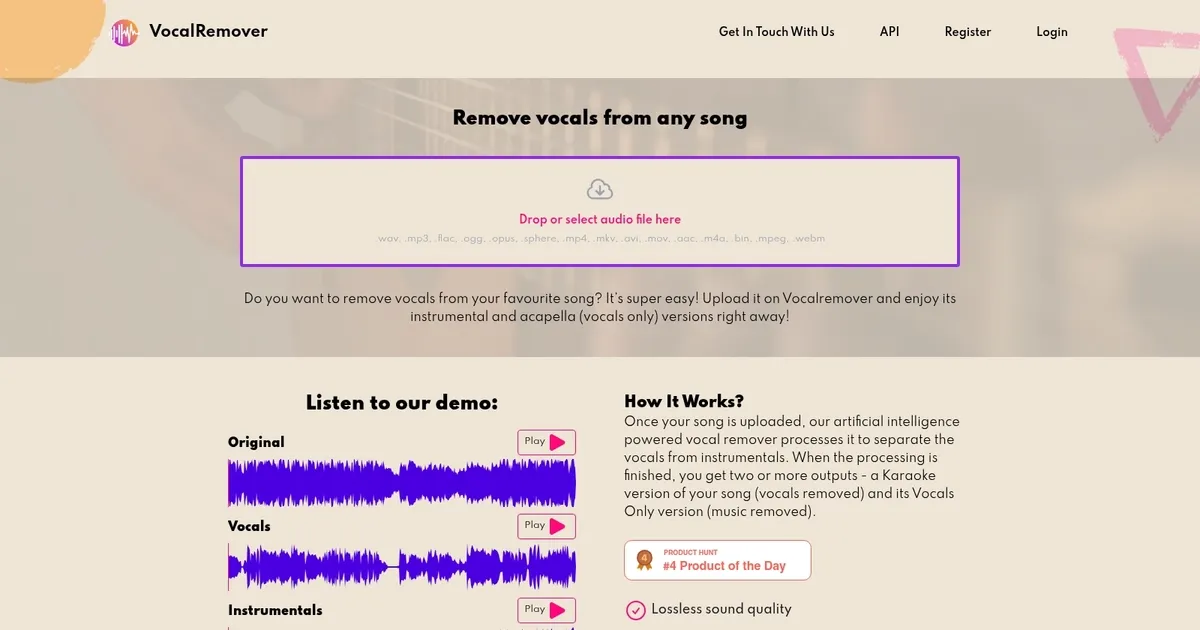
VocalRemover - screenshot

Remove vocals from any song and enjoy its instrumental and acapella (vocals only) versions

VocalRemover

VocalRemover is an AI tool designed to extract vocals from songs that is ideal for creating karaoke tracks or acapella versions for remixing purposes. It lets users upload their audio files and automatically process them to isolate the vocal and instrumental tracks. This process is facilitated by advanced AI algorithms that ensure a high-quality output with minimal distortion or loss of audio quality.

VocalRemover’s interface is user-friendly, catering to both beginners and professionals. It simplifies the vocal removal process, enabling users to achieve their desired results with just a few clicks. This makes it cool for anyone looking to quickly create karaoke versions or practice remixing and music production.

On the other hand, it’s worth noting that VocalRemover’s performance can vary depending on the complexity of the song’s mix and the quality of the original recording. Songs with complex arrangements or poor audio quality may pose challenges for the vocal removal process.

In summary, VocalRemover provides a straightforward and effective solution for isolating vocals from music tracks, supported by an easy-to-use interface and powered by robust AI technology. Check it out.

VocalRemover Homepage
Categories Music GeneratorVoice Generation & Editing

What are the key features? ⭐

  • AI Vocal Removal: Separates lead vocals from instrumentals to create clean karaoke tracks or acapellas.
  • Multi Stem HQ Separation: Splits audio into bass, drums, piano, vocals, and instrumental layers using Band-Split technology.
  • Video and Movie Processing: Handles video files to extract or remove audio elements like songs or dialogue.
  • Fast Online Processing: Converts uploads in minutes with priority queuing in paid plans.
  • Lossless Quality Output: Delivers high-fidelity separated files with minimal audio degradation on good sources.

Who is it for? 🤔

VocalRemover helps musicians practicing covers, karaoke hosts needing backing tracks, DJs building remixes, content creators editing audio, and coaches (like gymnastics instructors) who want original songs without vocals for routines. Its especially useful for anyone who wants quick, browser-based stem separation without installing complex software or dealing with steep learning curves.

Examples of what you can use it for 💭

  • Karaoke Host: Uploads popular songs to generate instrumental versions for sing-along events without buying official tracks.
  • Music Teacher: Isolates vocals from student practice songs to teach melody lines or harmonies clearly.
  • Remix Producer: Separates drums or bass stems to rebuild beats or mashups in a DAW.
  • Gymnastics Coach: Removes vocals from competition floor music so routines match the original feel exactly.
  • Content Creator: Extracts acapellas from tracks for voice-over projects or lyric videos.

Pros & Cons ⚖️

  • Multi-stem splits available
  • Handles video files
  • High-quality on clean tracks
  • Limited free usage
  • Artifacts in complex mixes

FAQs 💬

Is VocalRemover completely free to use?
Basic use is free with limits on processing time and file size. Paid subscriptions unlock more minutes, priority processing, larger storage, and big-file support.
What file formats does it support?
It works with common audio formats like MP3 and WAV, plus video files for audio extraction.
How accurate is the vocal removal?
Results are strong on most pop and rock tracks, but complex mixes with heavy effects may leave minor vocal bleed or artifacts.
Does it offer stem separation beyond vocals?
Yes, the Multi Stem HQ model separates bass, drums, piano, vocals, and instrumentals.
Can I process video files?
Yes, it supports video uploads to remove or isolate audio elements like songs or dialogue.
How long does processing take?
Most tracks finish in a few minutes, though wait times vary with queue and file size.
Is there a mobile version or app?
It runs fully in the browser on phones, tablets, or computers—no app needed.
What happens to my uploaded files?
Files are stored temporarily based on your plan and deleted after a set period for privacy.
How does it compare to LALAL.AI?
VocalRemover offers easier multi-stem access and video support, while LALAL.AI often provides cleaner vocal isolation in challenging tracks.
Do I need an account to use it?
Basic uploads work without one, but paid plans and file management require registration.

Related tools ↙️

  1. Musicfy Musicfy Create an AI clone of your voice or explore other voices and use them for your songs
  2. Suno AI Music Suno AI Music Creates unique, professional-quality music from text prompts in seconds
  3. AIMusicGen.AI AIMusicGen.AI Using AI to transform your thoughts into melodies within seconds
  4. Songtell Songtell An AI tool that unravels the stories behind the lyrics you love
  5. Cryo Mix Cryo Mix Mixes and masters vocal tracks with AI for professional-grade audio quality
  6. MusicGPT MusicGPT Generates original music from text prompts in seconds
Last update: January 31, 2026
Share
Promote VocalRemover
light badge
Copy Embed Code
light badge
Copy Embed Code
light badge
Copy Embed Code
About Us | Contact Us | Suggest an AI Tool | Privacy Policy | Terms of Service

Copyright © 2026 Best AI Tools
415 Mission Street, 37th Floor, San Francisco, CA 94105