logo-darklogo-darklogo-darklogo-dark
  • Home
  • Browse
    • Assistant
    • Coding
    • Image
    • Productivity
    • Video
    • Voice
    • Writing
    • All Categories
    • AI Use Cases
  • My Favorites
  • Suggest a Tool
✕
Home › Productivity›
Published by Dusan Belic on August 30, 2023

AI Engine by Meow Apps
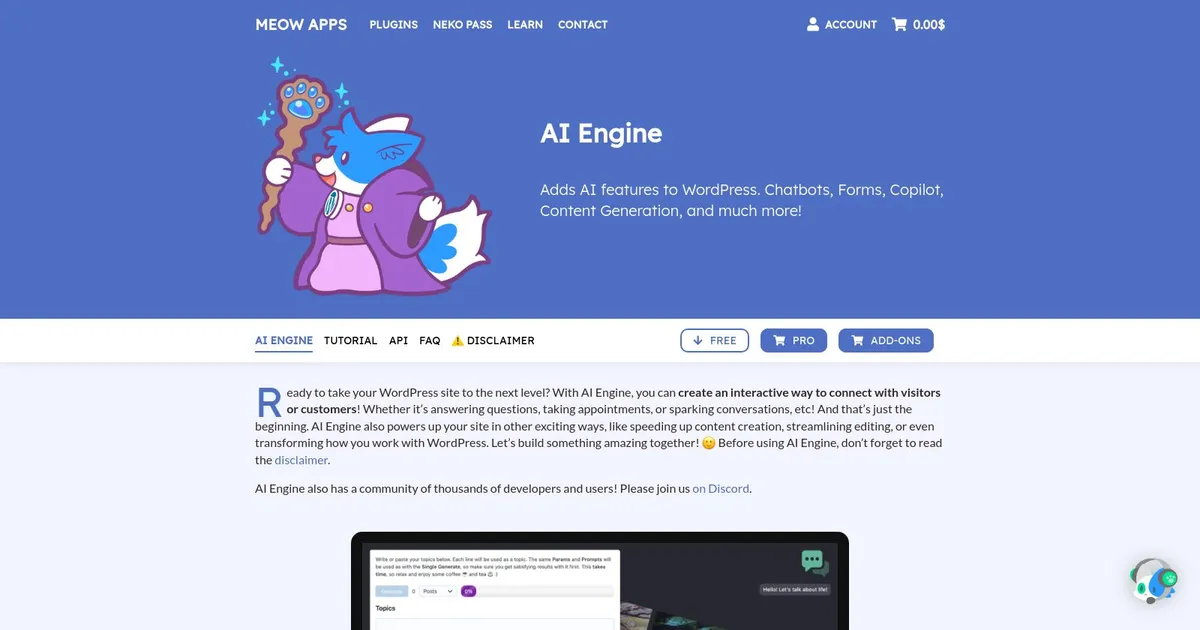
AI Engine Homepage
Categories Productivity

AI Engine - screenshot

Integrates AI chatbots, content generation, images, forms, and automation into WordPress

AI Engine

The AI Engine plugin for WordPress is designed to integrate artificial intelligence capabilities directly into WordPress websites. Among the features it includes are content generation; the implementation of a ChatGPT-style chatbot for interactive visitor engagement; customizable AI models for more tailored experiences; and tools for translating, correcting text, and conducting AI-driven discussions.

In addition, the plugin offers an AI Playground for experimenting with these features, options for AI model fine-tuning and detailed tracking of AI usage and limitations — enabling users to optimize the AI’s integration according to their needs.

AI Engine is available in both Free and Pro tiers, with the latter version including advanced functionalities such as dynamic AI forms for generating responses, AI embeddings for creating a knowledge database to enhance answer quality, content-aware chatbots that understand and interact based on the webpage’s content, and comprehensive statistics and limits for managing AI requests and performance. Both versions support customization and API integration.

AI Engine Homepage
Categories Productivity

What are the key features? ⭐

  • Intelligent Chatbots: Build customizable chatbots with memory, voice, file uploads, and themes using shortcodes, no coding required.
  • MCP for AI Agents: Allow AI models like ChatGPT or Claude to manage WordPress sites, plugins, database, and WooCommerce through natural conversation.
  • AI-Powered Forms: Create dynamic forms that generate answers, images, or files with conditional logic and user interactions.
  • Embeddings & Knowledge: Construct knowledge bases from content or PDFs for semantic search, recommendations, and grounded AI responses.
  • Multi-Provider Support: Connect seamlessly to OpenAI, Claude, Gemini, Mistral, Perplexity, OpenRouter, and more with easy model switching.

Who is it for? 🤔

AI Engine suits WordPress site owners, bloggers, content creators, developers, and agency users who want deep AI integration without relying on external SaaS platforms. It helps non-technical users add smart chatbots and content tools quickly, while developers appreciate the extensibility, function calling, embeddings, and MCP for automation. Anyone running content-heavy sites, e-commerce stores needing engagement, or self-hosted setups benefits most from its flexibility and cost control.

Examples of what you can use it for 💭

  • Bloggers: Generate SEO-friendly posts, titles, excerpts, and images directly in the editor to speed up publishing workflows.
  • Site owners: Add intelligent chatbots with memory and file support to answer visitor questions and boost engagement on any page.
  • E-commerce managers: Use AI forms for product recommendations or MCP to automate WooCommerce tasks via conversation.
  • Developers: Build custom knowledge bases with embeddings and trigger WordPress functions through smart function calling for advanced automation.
  • Agency users: Switch AI providers easily and monitor token usage across client sites with detailed analytics in Pro.

Pros & Cons ⚖️

  • Highly versatile features
  • Excellent value pricing
  • Strong community support
  • No provider lock-in
  • Learning curve for advanced tools
  • Occasional prompt tuning needed

FAQs 💬

Is there a free version of AI Engine?
Yes, the free version includes powerful chatbots, content generation, image AI, editor copilot, playground, and more core tools.
Which AI models does AI Engine support?
It connects to OpenAI, Claude, Gemini, Mistral, Perplexity, OpenRouter, and others, with easy switching.
Do I need coding skills to use AI Engine?
No, most features like chatbots and content tools work without coding, though advanced setups benefit from some familiarity.
Can AI Engine create images?
Yes, it generates images from text prompts and interprets uploaded images using supported models.
What is MCP in AI Engine?
MCP allows AI agents to manage your WordPress site conversationally, handling tasks like plugin management or queries.
How does pricing work?
Free core version available; Pro uses a yearly license for advanced features, plus you pay only the AI provider API costs.
Can chatbots use my site content?
Yes, embeddings let you build knowledge bases from content or PDFs for accurate, grounded responses.
Is AI Engine good for e-commerce?
Yes, especially in Pro with WooCommerce-aware MCP and dynamic AI forms for better customer interaction.
Does it have usage tracking?
Pro includes detailed insights for monitoring tokens, costs, and access limits.
Where can I get support?
The developer offers quick support via forums, Discord community, and direct channels for Pro users.
Visit AI Engine

Related tools ↙️

  1. Pineify Pineify Generates error-free Pine Script indicators and strategies without coding
  2. ResuFit ResuFit Generates AI-tailored resumes, cover letters, and interview prep for job applications
  3. Oliv Oliv Automates sales workflows with AI agents for deal tracking and coaching
  4. Upwork Uma Upwork Uma Streamlines freelance hiring with AI-powered skill assessments and job creation
  5. Fina Money Fina Money Builds customizable AI-driven systems to track and optimize personal finances effortlessly
  6. Pine Script Wizard Pine Script Wizard Generates custom Pine Script code for TradingView indicators and strategies from text descriptions
Last update: March 9, 2026
Share
Promote AI Engine
light badge
Copy Embed Code
dark badge
Copy Embed Code
neutral badge
Copy Embed Code
About Us | Contact Us | Suggest an AI Tool | Privacy Policy | Terms of Service

Copyright © 2026 Best AI Tools
415 Mission Street, 37th Floor, San Francisco, CA 94105