ChatPRD
I spent a couple of days messing around with ChatPRD, and let me tell you, it’s like having a super-smart intern who never sleeps but occasionally needs a nudge. As a product manager, I’m always juggling deadlines, and PRDs are my kryptonite — necessary but tedious. So, when I stumbled across ChatPRD, created by Claire Vo, a CPO with a knack for automation, I was curious. Could this AI really cut my drafting time and make me look like a rockstar PM? Here’s what I found, with a bit of flair and a lot of honesty.
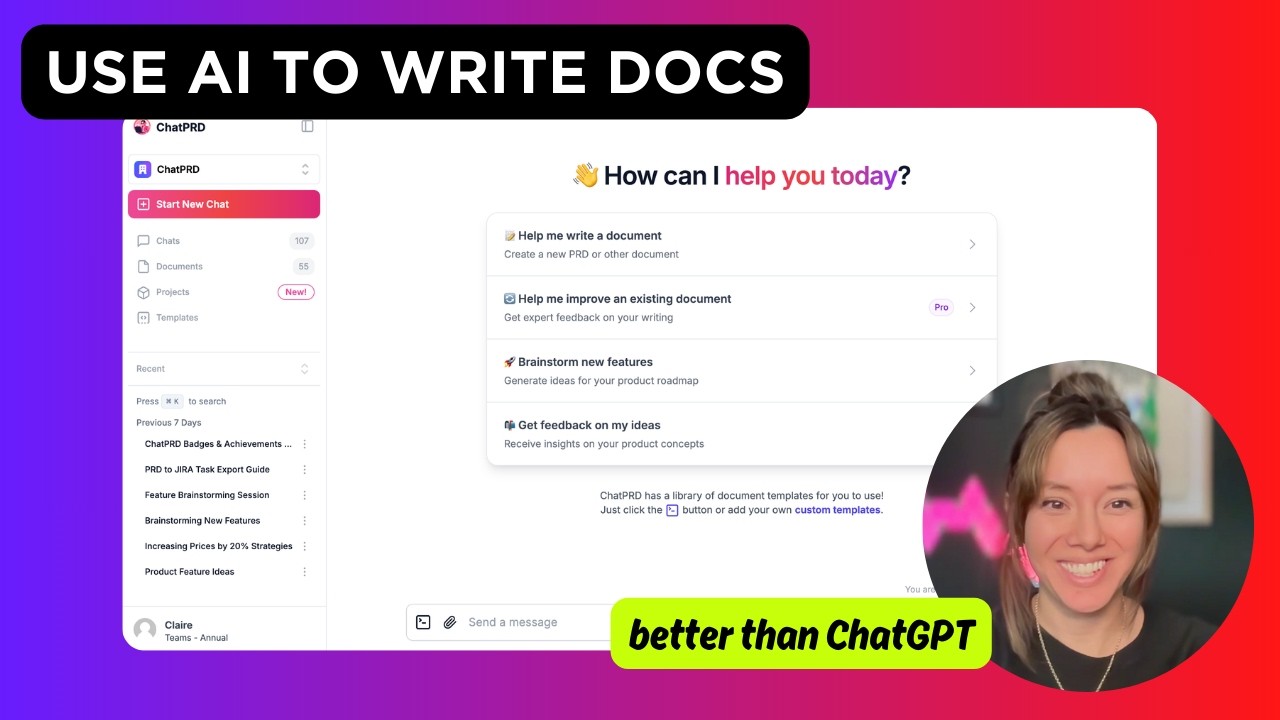
Logging into ChatPRD feels like stepping into a sleek, PM-focused cockpit. I started with the Document Mode, tossing in a vague idea about a user onboarding feature. In about 20 minutes, it churned out a PRD with clear sections: objectives, user stories, technical requirements, even a risks section. It was like watching a blank canvas turn into a half-decent painting. The PRD wasn’t perfect — some metrics felt generic, like “increase user retention” without specifics — but it gave me a solid starting point. I tweaked it using the AI’s suggestions, which felt like having a colleague whisper, “Hey, clarify this user story.” The Custom Profiles feature let me tailor the output to my startup’s vibe, which was a nice touch.
What surprised me was the Coaching Mode. I uploaded an old PRD, and ChatPRD flagged a missing dependency and suggested a better way to phrase my success metrics. It’s not just a tool; it’s like a mentor who doesn’t bill by the hour. I also played with the Templates Library, which includes community-sourced options from top PMs. It’s a goldmine for consistency, especially if your team’s PRDs look like they were written by different species. Exporting to Notion was seamless, though I wish the free version didn’t cap me at three documents. That limit hit faster than I expected.
Compared to ChatGPT or Aha!, ChatPRD feels purpose-built. ChatGPT’s PRDs need heavy editing to sound human, and Aha! is more about roadmapping than drafting. But ChatPRD isn’t flawless. The AI sometimes overcomplicates simple features, and I had to manually prune jargon. Pricing-wise, it’s affordable for solo PMs, but teams might need the pricier plan for collaboration features. X posts from users like Claire Vo highlight the tool’s 50,000+ user base, which adds a sense of community trust.
My advice? Start small. Use a template, input a clear feature idea, and let ChatPRD draft. Spend 10 minutes refining, then use the coaching feedback to level up your skills. It’s not a magic wand, but it’s a damn good shortcut.
Video Overview ▶️
What are the key features? ⭐
- Document Mode: Generates structured PRDs from brief inputs, including objectives and user stories.
- Templates Library: Offers pre-built and community-sourced PRD templates for consistency.
- Coaching Mode: Provides real-time feedback to improve PRDs and PM skills.
- Collaboration Tools: Supports team editing and version control on paid plans.
- Integrations: Connects with Notion, Google Drive, and Slack for seamless workflows.
Who is it for? 🤔
Examples of what you can use it for 💭
- Solo Product Manager: Drafts a PRD for a new feature in 30 minutes using a template.
- Startup Founder: Refines a pitch deck’s product section with AI feedback.
- Engineering Team: Uses diagrams to clarify user journey flows in a PRD.
- New PM: Gets coaching to improve user story clarity in a draft PRD.
- Team Lead: Shares custom templates across a team for consistent documentation.
Pros & Cons ⚖️
- Fast PRD drafting in under 30 minutes.
- Tailored PM coaching improves skills.
- Integrates with Notion and Google Drive.
- Free plan limits to three documents.
- Occasional jargon in AI outputs.