Skip to content
logo-darklogo-darklogo-darklogo-dark
  • Tool Categories
    • 🎨Art & Creative Design505
    • 🏢Business Management644
    • 💻Coding & Development514
    • 👮Detection83
    • 🧠General Use728
    • 🏥Health & Wellness55
    • 📷Image & Photo Analysis100
    • 🖼️Image Generation & Editing618
    • 📐Interior & Architectural Design37
    • 🎓Learning & Education483
    • ⚖️Legal & Finance90
    • 🎭Lifestyle & Entertainment236
    • 📢Marketing & Advertising627
    • 🎧Music & Audio138
    • 👔Office & Workplace1,014
    • 🔬Research & Data Analysis373
    • 👥Social Media245
    • 🎥Video Generation & Editing426
    • 👧🏻Virtual Companion135
    • 🎤Voice Generation & Editing381
    • ✍️Writing & Editing808
    • All Categories
    • AI Use Cases
  • News
  • Events
    • Academic Conferences
    • Developer Conferences
    • Expos / Trade Shows
    • Industry Summits
    • Workshops / Training
    • All Events
    • Past Events
  • Saved Tools
  • Suggest a Tool
    ✕
    Home › Office & Workplace › Work Productivity› Hunch
    Hunch

    Hunch

    Enables teams to collaborate using multiple AI models for complex projects and productivity

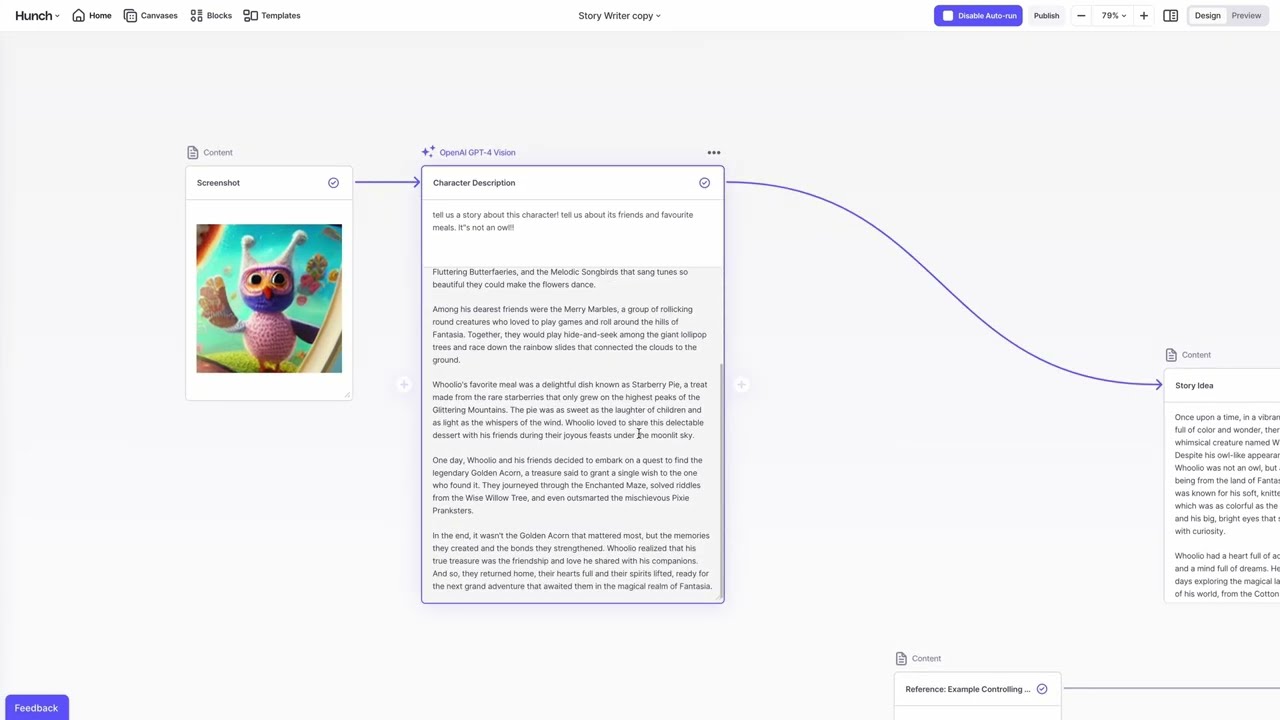
    Hunch is an AI-first workspace designed for teams to utilize multiple top AI models in handling complex projects and boosting productivity within a unified platform. It features a visual canvas interface where users break down large tasks into smaller, AI-optimized segments, supporting activities like writing, coding, illustration, audio transcription, and speech synthesis. The Auto AI function selects appropriate models automatically, or users choose manually from integrated options. Additional capabilities include batch processing for running thousands of tasks in parallel, web scraping for data extraction from websites, and code execution in Python or Bash for processing and integrations.

    Hunch differentiates from standard chatbots by providing a structured environment with every block functioning as a rich text document, serving as a central hub. Users share reusable AI tools to enhance team collaboration. Templates offer quick starts for various workflows, accessible without sign-in. Use cases cover writing and content creation, marketing and sales, product management, software development, analysis and research, and prompt engineering.

    Compared to competitors such as Notion and Coda, Hunch emphasizes multi-model AI integration and code running, while those focus on general collaboration and databases. Hunch provides a free trial, with enterprise plans for advanced needs, aligning with freemium models of rivals. Security includes ongoing work toward SOC2 Type 1 certification.

    Readers may like the intuitive flow and productivity gains, as noted in testimonials from users at Walt Disney Imagineering and Sudowrite, who praise its brain-like interface and daily utility. However, the lack of completed SOC2 might concern some, and the array of features could overwhelm beginners. A surprise element is the no-code approach to complex AI chaining, enabling non-experts to build sophisticated workflows.

    FAQs address differences from other tools, no need for coding or AI expertise, and free access options. Community support aids learning.

    To integrate Hunch effectively, select a template matching your primary use case, build a basic workflow, and gradually incorporate more models as needed.

    Visit Hunch ↗
    Categories
    👔 Work
    ⚡ Work Productivity 🔗 Agent 🖍️ Whiteboard
    🏢 Business
    🔄 Workflow 📋 Project Management
    🧠 General
    🤖 Assistant ✅ Productivity

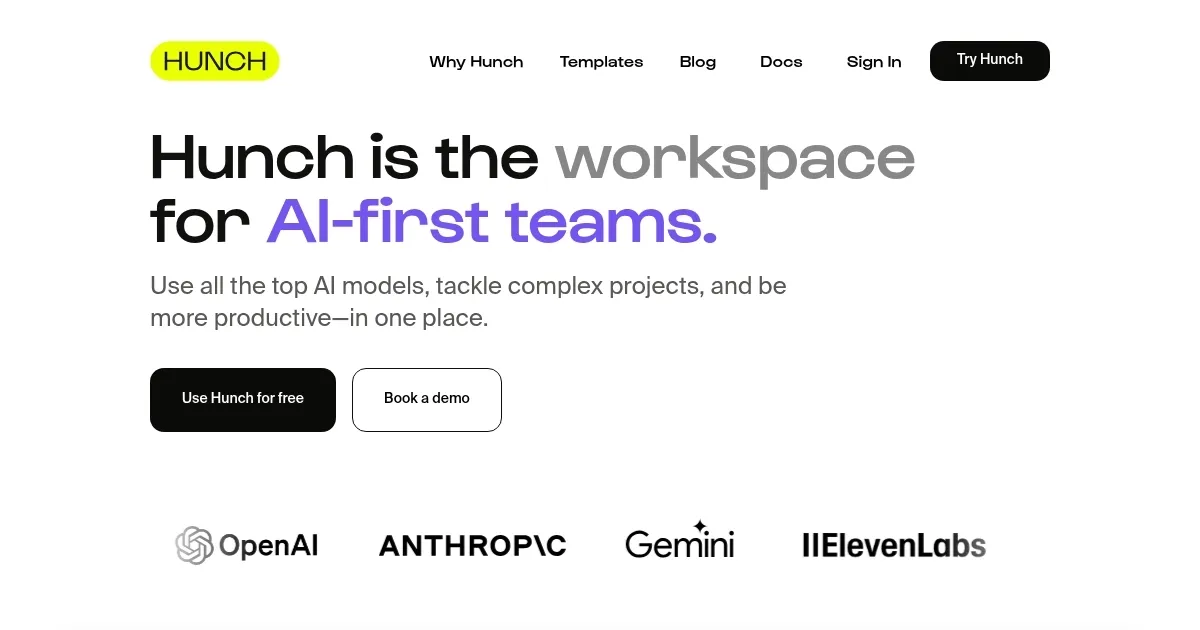
    Homepage Screenshot 📸

    Hunch screenshot

    Video Overview 🎬

    Hunch - Video Overview

    What are the key features? ✨

    • Auto AI: Automatically selects the optimal AI model for each task to enhance efficiency.
    • Batch Processing: Runs thousands of AI tasks in parallel for large-scale operations.
    • Web Scraping: Extracts data from any website to integrate into workflows.
    • Code Execution: Supports running Python and Bash code for data processing and external integrations.
    • Reusable Tools: Allows sharing of custom AI tools to improve team productivity.

    Who is it for? 🤔

    Hunch proves helpful for AI-first teams in creative and technical fields, such as content writers crafting blog posts or scripts, marketers automating campaigns, product managers organizing tasks, software developers chaining code with AI, researchers analyzing data, and prompt engineers optimizing model interactions, essentially anyone aiming to streamline complex projects with multi-AI support in a collaborative space.

    Examples of what you can use it for 💡

    • Content Writer: Uses AI models to generate and refine blog posts, SEO content, or video scripts efficiently.
    • Marketing Professional: Automates media workflows and extracts web data for targeted campaigns.
    • Product Manager: Breaks down projects into tasks and shares reusable tools with the team.
    • Software Developer: Runs code in Python or Bash while integrating AI for illustration and coding.
    • Researcher: Processes large datasets in batch and transcribes audio for analysis.

    Pros & Cons ⚖️

    • Intuitive visual interface
    • Multi-AI model access
    • Powerful batch processing
    • Shareable custom tools
    • SOC2 still pending
    • Potential overload for beginners

    FAQs 💬

    How is Hunch different from other AI tools?
    Hunch offers a workspace for teams with visual canvas and multi-model integration, unlike simple chatbots.
    Do I need coding experience to use Hunch?
    No, Hunch is no-code friendly, though it supports code for advanced users.
    Do I need to be an AI expert to use Hunch?
    No, its designed for accessibility with Auto AI and templates.
    Is Hunch free?
    Hunch provides a free trial, with paid enterprise plans available.
    What AI models does Hunch support?
    Hunch integrates top models for writing, coding, illustration, transcription, and more.
    Can I share workflows in Hunch?
    Yes, users can share reusable AI tools with teams.
    Does Hunch support web scraping?
    Yes, it includes web scraping to extract data from sites.
    Is Hunch secure for teams?
    Hunch is working on SOC2 Type 1 certification for security.
    What use cases does Hunch cover?
    It supports content creation, marketing, product management, development, research, and prompt engineering.
    Are templates available in Hunch?
    Yes, dozens of templates are accessible without sign-in.

    Ready to try Hunch?

    Enables teams to collaborate using multiple AI models for complex projects and productivity

    Visit Hunch ↗
    Hunch alternatives 🔗

    1. Notion AI Notion AI Streamlines work with AI-powered note-taking, app searches, and workflow automation
    2. ClickUp Brain ClickUp Brain Automates workflows with contextual AI for tasks, meetings, and content creation
    3. TeamAI TeamAI Streamlines team collaboration with AI-driven workflows and unified model access
    4. Craft Craft Transforms notes into polished docs with AI and tasks
    5. Miro AI Miro AI Visual collaboration platform that lets you build the next big thing with a prompt and a chat
    6. Fibery Fibery An online tool to brainstorm ideas, improve writing, automate tasks, and experiment
    Share
    Hunch screenshot enlarged
    Best AI Tools

    Discover the best AI tools for any use case

    Explore
    • Tool Categories
    • AI Use Cases
    • AI Events
    • AI News
    • Saved Tools
    Company
    • About Us
    • Contact Us
    • Media & Partnerships
    • Suggest a Tool
    Legal
    • Privacy Policy
    • Terms of Service
    Copyright © 2026 Best AI Tools 415 Mission Street, 37th Floor, San Francisco, CA 94105