logo-darklogo-darklogo-darklogo-dark
  • Tool Categories
    • 🎨 Art
    • 🏢 Business
    • 💻 Coding
    • 👮 Detection
    • 🧠 General
    • 🏥 Health
    • 📷 Image Analysis
    • 🖼️ Image
    • 📐 Architecture
    • 🎓 Education
    • ⚖️ Legal/Finance
    • 🎭 Lifestyle
    • 📢 Advertising
    • 🎧 Music
    • 👔 Work
    • 🔬 Research
    • 👥 Social
    • 🎥 Video
    • 👧🏻 Companion
    • 🎤 Voice
    • ✍️ Writing
    • All Categories
    • AI Use Cases
  • News
  • Events
    • Academic Conferences
    • Developer Conferences
    • Expos / Trade Shows
    • Industry Summits
    • Workshops / Training
    • All Events
    • Past Events
  • Saved Tools
  • Suggest a Tool
✕
Home › Business Management › Project Management› ClickUp Brain
ClickUp Brain

ClickUp Brain

Automates workflows with contextual AI for tasks, meetings, and content creation

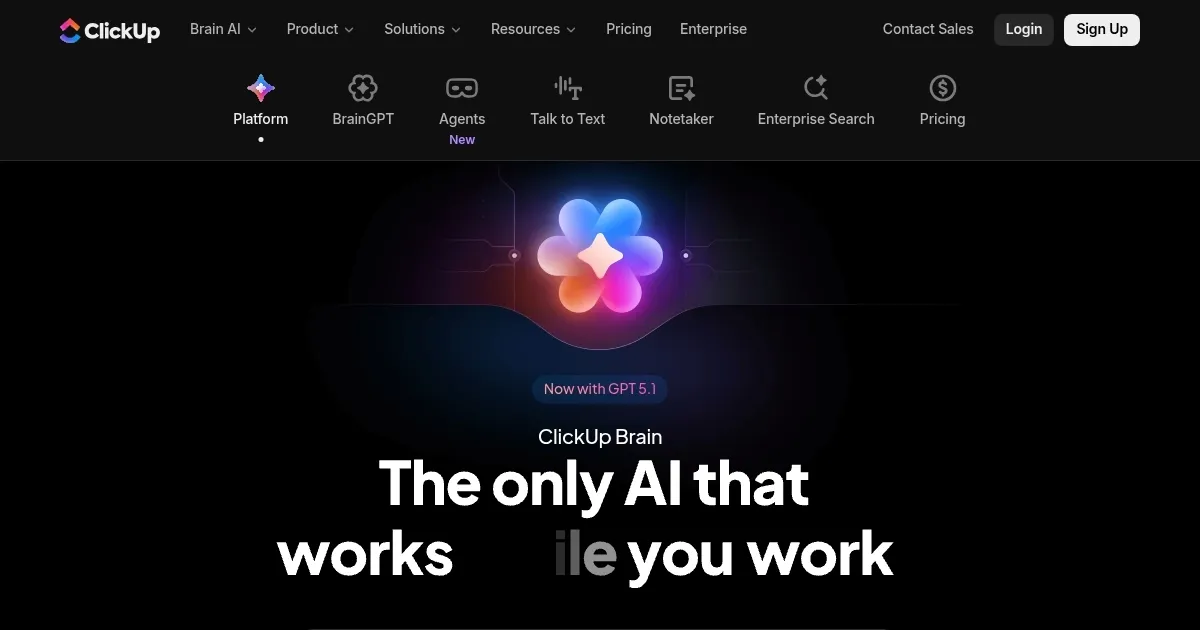
ClickUp Brain is an AI layer built into the ClickUp platform that connects tasks, docs, and apps for contextual automation and insights. It handles everything from meeting summaries to task prioritization, using models such as GPT-5, Claude, and Sonnet. Users access it across desktop, browser, and mobile for seamless workflow integration.

Key features include AI Agents for custom automation, such as Autonomous Answers that deliver instant updates from project data. The AI Project Manager tracks progress autonomously, assigning tasks based on expertise and availability via Intelligent Task Assigning. This reduces manual oversight in teams handling multiple workflows.

For meetings, the AI Notetaker captures discussions, generates action items as tasks, and builds agendas with the Smart Agenda Builder. It integrates with Zoom and Google Meet, turning recordings into searchable clips. Enterprise users report faster follow-ups, though accuracy dips in noisy environments.

The Enterprise AI Search draws from connected sources, such as Salesforce and GitHub, to provide org-wide answers. Every Premium LLM in One Brain lets users switch models for optimal results. Compared to monday.com AI, it offers deeper context without extra apps, but requires solid data organization.

AI Creator tools generate on-brand images and docs without prompts. The AI Image Generator creates visuals from text, while the AI Task Builder details subtasks from chats. Privacy features include GDPR and HIPAA compliance, with no third-party data training. General pricing adds to ClickUp tiers, making it more economical than separate tools like Notion AI.

Teams using it note a 3x faster task completion and 1.1 days saved weekly, according to 2025 studies. Start by connecting core apps and testing one feature, like stand-ups, to build familiarity before scaling.

Visit ClickUp Brain ↗
Categories
🏢 Business
📋 Project Management 🔄 Workflow
👔 Work
✅ Task Management ⚡ Work Productivity 💼 Workplace Assistant 📄 Document Generation 🗒️ Note Taking 🤝 Meeting Assistant
🧠 General
✅ Productivity
✍️ Writing
🤖 Writing Assistant

Screenshot 📸

ClickUp Brain screenshot

Video Overview 🎬

ClickUp Brain - Video Overview

What are the key features? ✨

  • AI Agents: Customizable assistants like Autonomous Answers that execute tasks and respond with full project context.
  • Enterprise AI Search: Instant contextual queries across workspaces, apps, and teams using multiple LLMs.
  • AI Meetings: Automated notetaking, scheduling, and agenda building that turns discussions into actionable tasks.
  • AI Creator: Generates images, docs, and tasks from ideas without manual prompting or engineering.
  • Autonomous Projects: Self tracking progress, prioritizing tasks, and assigning work based on team capacity.

Who is it for? 🤔

ClickUp Brain suits teams buried in app sprawl, from marketing agencies juggling campaigns to software devs syncing code and sprints, anyone who loses hours hunting info or chasing updates. Its ideal for mid sized ops where context matters but time doesnt, empowering managers to delegate busywork while creators focus on ideas, though solo users might find the full power shines brighter in collaborative setups.

Examples of what you can use it for 💡

  • Marketing Manager: Uses AI Agents to auto generate campaign briefs from Slack chats and prioritize content based on deadlines.
  • Software Developer: Leverages Enterprise Search to query GitHub commits and Jira tickets for instant bug fixes.
  • Project Coordinator: Employs AI Meetings to summarize Zoom calls into tasks assigned via Intelligent Task Assigning.
  • Content Creator: Applies AI Creator to build on-brand images and docs from rough ideas in minutes.
  • Operations Lead: Relies on Autonomous Projects to track milestones across Dropbox files and Salesforce data autonomously.

Pros & Cons ⚖️

  • Contextual insights
  • Replaces multiple tools
  • Strong integrations
  • Time savings proven
  • Steep learning curve
  • Add-on pricing extra

FAQs 💬

What is ClickUp Brain?
ClickUp Brain is an embedded AI that connects your tasks, docs, and apps for contextual answers, automation, and content creation across workflows.
How does it integrate with other tools?
It connects seamlessly with apps like Slack, Jira, Zoom, Salesforce, GitHub, and more for unified search and data pulling.
Is ClickUp Brain secure for enterprise use?
Yes, it complies with GDPR, HIPAA, ISO 42001, and SOC 2, with no third-party data training or retention.
What AI models does it support?
It includes premium LLMs like GPT 5, Claude, Sonnet, and Gemini, switchable for different tasks.
How much time does it save users?
Studies show 1.1 days saved weekly through automation and 3x faster task completion.
Can I build custom agents?
Yes, create no-code agents for specific roles like Content Reviewer or Deadline Guardian.
Does it handle meetings automatically?
AI Notetaker joins calls, summarizes, extracts actions, and builds agendas from context.
Is there a free trial for Brain?
Limited-time trials are available on all ClickUp plans, with full access during the period.
How does it compare to standalone AI tools?
It provides workspace context unlike generic chatbots, replacing multiple subs for cost savings.
What if I need support for Brain?
Access ClickUp University courses and help docs, plus enterprise plans include dedicated managers.

Ready to try ClickUp Brain?

Automates workflows with contextual AI for tasks, meetings, and content creation

Visit ClickUp Brain ↗
ClickUp Brain alternatives 🔗

  1. Asana AI Asana AI An AI helper built into the Asana platform to make managing projects and tasks easier
  2. Miro AI Miro AI Visual collaboration platform that lets you build the next big thing with a prompt and a chat
  3. Notion AI Notion AI Streamlines work with AI-powered note-taking, app searches, and workflow automation
  4. Motion Motion AI tool that intelligently plans your day, schedules meetings, and creates to-do lists
  5. Creately AI Creately AI An AI-powered tool that aims to revolutionize how users create and manage visual content
  6. Lucidspark Lucidspark A virtual whiteboard platform made to facilitate team collaboration and brainstorming
Share
ClickUp Brain screenshot enlarged
Promote ClickUp Brain
light badge
Copy Embed Code
dark badge
Copy Embed Code
neutral badge
Copy Embed Code
Best AI Tools

Discover the best AI tools for any use case

About Us | Contact Us | Suggest an AI Tool
Privacy Policy | Terms of Service
Copyright © 2026 Best AI Tools 415 Mission Street, 37th Floor, San Francisco, CA 94105