logo-darklogo-darklogo-darklogo-dark
  • Tool Categories
    • 🎨Art & Creative Design505
    • 🏢Business Management644
    • 💻Coding & Development515
    • 👮Detection83
    • 🧠General Use727
    • 🏥Health & Wellness55
    • 📷Image & Photo Analysis100
    • 🖼️Image Generation & Editing618
    • 📐Interior & Architectural Design37
    • 🎓Learning & Education483
    • ⚖️Legal & Finance90
    • 🎭Lifestyle & Entertainment236
    • 📢Marketing & Advertising627
    • 🎧Music & Audio138
    • 👔Office & Workplace1,014
    • 🔬Research & Data Analysis372
    • 👥Social Media245
    • 🎥Video Generation & Editing426
    • 👧🏻Virtual Companion135
    • 🎤Voice Generation & Editing381
    • ✍️Writing & Editing808
    • All Categories
    • AI Use Cases
  • News
  • Events
    • Academic Conferences
    • Developer Conferences
    • Expos / Trade Shows
    • Industry Summits
    • Workshops / Training
    • All Events
    • Past Events
  • Saved Tools
  • Suggest a Tool
✕
Home › Office & Workplace › Workplace Assistant› Slack AI
Slack AI

Slack AI by Salesforce

Search smarter, summarize conversations instantly, and be at your most productive

Slack AI is a suite of features designed to enhance productivity and collaboration within the popular communication platform.

At the heart of Slack AI is the capacity to instantly summarize conversations and threads, enabling users to stay updated without having to sift through every single message. This, in turn, promises significant time savings — with Slack’s internal analysis during the pilot phase suggesting an average of 97 minutes saved per week for users.

The tool’s conversational search capabilities allow users to ask questions in natural language and receive concise, relevant answers — thus streamlining the search process within Slack and potentially unveiling insights that could influence decision-making​​​​.

However, it is important to note that Slack’s approach to AI extends beyond just a single tool, integrating a variety of AI-driven solutions into its ecosystem. This includes Slack GPT for automatic contextual responses and conversation summaries, and integrations with partner-built apps like ChatGPT and Anthropic’s Claude. Furthermore, Slack is enhancing its Workflow Builder toolkit to include generative AI prompts.

Finally, we should add that Slack AI takes good care of your security and data privacy, ensuring that all interactions and data within Slack remain protected within its secure infrastructure. The company emphasizes that it does not use customer data to train its large language models, maintaining the privacy and integrity of users’ information​​.

Visit Slack AI ↗
Categories
👔 Work
💼 Workplace Assistant ⚡ Work Productivity 🤝 Meeting Assistant 🗒️ Note Taking
✍️ Writing
📝 Summarizer
🧠 General
🔍 Search Engine 🤖 Assistant
🏢 Business
🏢 Enterprise
📢 Advertising
↩️ Response Generation

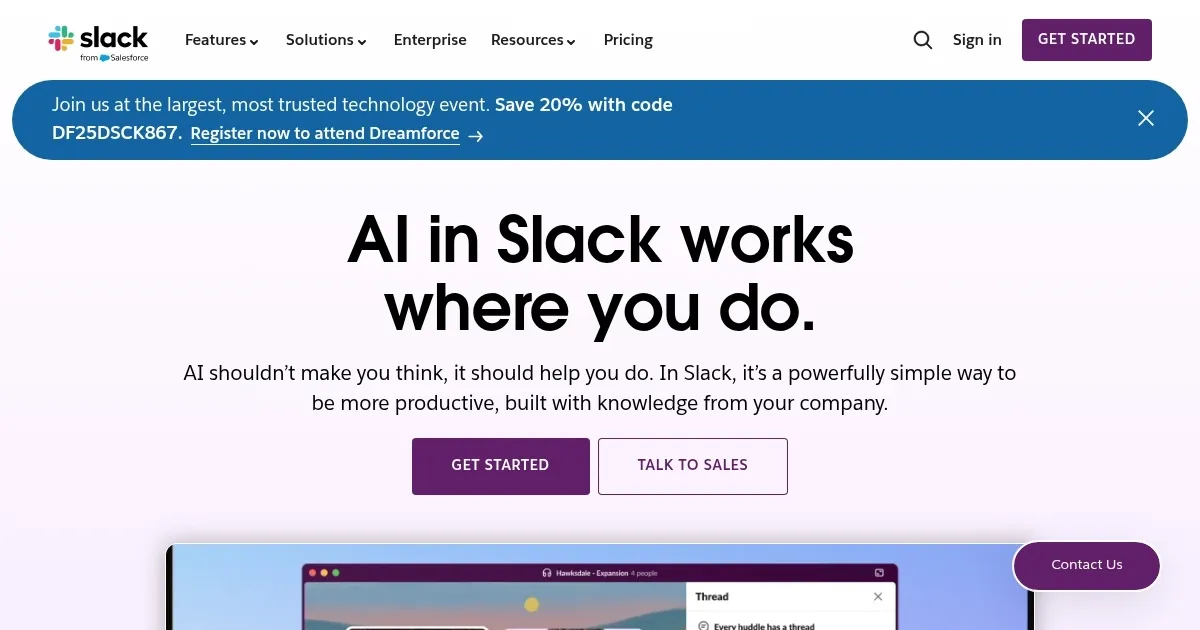
Homepage Screenshot 📸

Slack AI screenshot

Video Overview 🎬

Slack AI - Video Overview

What are the key features? ✨

  • Conversation summaries: Slack AI can quickly summarize entire conversations or threads with a single click. This lets you quickly catch up on what you missed without having to read through every message​​.
  • Smarter search: You can ask Slack AI questions using everyday language, and it will find the answers for you.
  • Data privacy and security: Slack AI operates within Slack's trusted environment, ensuring that the information you share and the conversations you have are kept private and are not used to train the AI models​​.
  • Generative AI-powered custom responses: Slack AI includes tools like Slack GPT, which can automatically generate replies or content based on the context of your conversations. This, in turn, makes responding to messages quicker and easier.
  • Workflow automation: Slack AI enhances Slack's existing workflow builder with AI capabilities, enabling you to automate more of your routine tasks and integrate AI into your workflows.

Who is it for? 🤔

Slack AI is designed for existing Slack users looking for ways to boost productivity and streamline communication among their teams. It targets companies of all sizes, from startups to large enterprises, especially those that rely heavily on collaboration and project management. The tool is ideal for teams seeking to minimize time spent on routine tasks and maximize efficiency in their workflows. With its focus on automating and enhancing workplace communications, Slack AI serves as a versatile tool for a broad range of industries - such as technology, finance, healthcare, and education.

Examples of what you can use it for 💡

  • Use Slack AI to instantly get a summary of long threads or conversations
  • Ask Slack AI a question in plain language to find specific information or documents
  • Get automatic updates or recaps on channels, even those you don't actively follow
  • Easily draft replies or generate content based on your conversation history
  • Automate common tasks or workflows to streamline your work processes

Pros & Cons ⚖️

  • Great for existing Slack users
  • Provides a convenient way to generate content from Slack
  • Improves customer interactions and workflows
  • Not sure you need it if you're not already using Slack

FAQs 💬

What is Slack AI?
Slack AI is a set of features in Slack that uses AI to summarize channels, search data, and automate tasks.
Do I need a paid Slack plan for AI?
Yes, Slack AI features are available on all paid Slack plans, not the free version.
Is my data safe with Slack AI?
Slack ensures customer data stays within its secure infrastructure and isn’t used to train AI models.
Can Slack AI integrate with other apps?
Yes, it integrates with apps like Salesforce and Google Drive for enhanced search and data access.
How does Slack AI compare to Microsoft Teams?
Slack AI excels in async communication, while Teams’ AI is stronger for real-time collaboration.
What is Agentforce in Slack AI?
Agentforce is an AI feature that pulls real-time Salesforce data for actions within Slack channels.
Can Slack AI translate messages?
Yes, it offers in-line message translation for seamless global team communication.
How much time can Slack AI save?
Internal data suggests up to 97 minutes weekly with features like channel recaps.
Is Slack AI available globally?
Yes, it’s available wherever Slack is purchased and supports multiple languages.
Can I automate tasks with Slack AI?
Yes, no-code automations let you create workflows like task notifications easily.

Ready to try Slack AI?

Search smarter, summarize conversations instantly, and be at your most productive

Visit Slack AI ↗

Slack AI alternatives 🔗

  1. Microsoft Copilot Microsoft Copilot Boosts productivity with AI-driven answers, writing, and image creation
  2. Box AI Box AI An assistant that taps into your enterprise content and documents
  3. Zia Zia AI-powered business assistant from Zoho
  4. Amazon Q Amazon Q Your generative AI–powered assistant designed for work that can be tailored to your business
  5. Asana AI Asana AI An AI helper built into the Asana platform to make managing projects and tasks easier
  6. HubSpot Breeze HubSpot Breeze Streamlines business growth with AI tools for marketing, sales, and service
Share
Slack AI screenshot enlarged
Promote Slack AI
light badge
Copy Embed Code
dark badge
Copy Embed Code
neutral badge
Copy Embed Code
Best AI Tools

Discover the best AI tools for any use case

Explore
  • Tool Categories
  • AI Use Cases
  • AI Events
  • AI News
  • Saved Tools
Company
  • About Us
  • Contact Us
  • Media & Partnerships
  • Suggest a Tool
Legal
  • Privacy Policy
  • Terms of Service
Copyright © 2026 Best AI Tools 415 Mission Street, 37th Floor, San Francisco, CA 94105