logo-darklogo-darklogo-darklogo-dark
  • Tool Categories
    • ๐ŸŽจArt & Creative Design505
    • ๐ŸขBusiness Management644
    • ๐Ÿ’ปCoding & Development514
    • ๐Ÿ‘ฎDetection83
    • ๐Ÿง General Use728
    • ๐ŸฅHealth & Wellness55
    • ๐Ÿ“ทImage & Photo Analysis100
    • ๐Ÿ–ผ๏ธImage Generation & Editing618
    • ๐Ÿ“Interior & Architectural Design37
    • ๐ŸŽ“Learning & Education483
    • โš–๏ธLegal & Finance90
    • ๐ŸŽญLifestyle & Entertainment236
    • ๐Ÿ“ขMarketing & Advertising627
    • ๐ŸŽงMusic & Audio138
    • ๐Ÿ‘”Office & Workplace1,014
    • ๐Ÿ”ฌResearch & Data Analysis373
    • ๐Ÿ‘ฅSocial Media245
    • ๐ŸŽฅVideo Generation & Editing426
    • ๐Ÿ‘ง๐ŸปVirtual Companion135
    • ๐ŸŽคVoice Generation & Editing381
    • โœ๏ธWriting & Editing808
    • All Categories
    • AI Use Cases
  • News
  • Events
    • Academic Conferences
    • Developer Conferences
    • Expos / Trade Shows
    • Industry Summits
    • Workshops / Training
    • All Events
    • Past Events
  • Saved Tools
  • Suggest a Tool
โœ•
Home › Research & Data Analysis › Data Analytics› Tableau AI
Tableau AI

Tableau AI by Salesforce

An AI tool made to streamline and accelerate the data analysis process across the entire Tableau platform

Tableau AI, enhanced by Einstein Generative AI, is made to streamline and accelerate the data analysis process across the entire Tableau platform. It offers a set of capabilities aimed at democratizing data analysis, delivering insights at scale, simplifying data exploration, and supporting business decisions.

The tool aids data analysts by reducing technical barriers and repetitive tasks, and provides business users with smart and contextual insights in natural language — making insights quick and easy to understand.

Tableau AI is built on the Salesforce’s Einstein Trust Layer, allowing for the creation of trusted, ethical, and open AI-powered experiences without compromising data security and privacy. The platform can accelerate time to value and reduce repetitive tasks for data analysts through smart suggestions and in-product guidance. Moreover, it supercharges analysts by automating data analysis, preparation, and governance to accelerate time to insight.

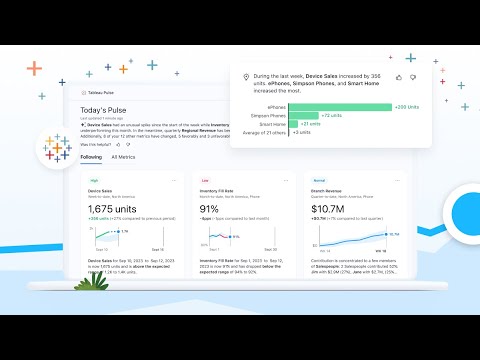
One of the key features of Tableau AI is Tableau Pulse, which personalizes the user experience by providing proactive delivery of timely insights. Thanks to the use of generative AI tech, Insight Summaries are generated in natural language, offering a comprehensive overview of metrics’ performance — which significantly reduces the time and energy needed for users to determine their focus.

Generative AI tech also provides in-context help for understanding Tableau features, improves visualization and dashboard quality through prescriptive guidance, and automates known curation and repetitive tasks to speed up dashboard creation.

Ultimately, Tableau AI — with its generative AI capabilities – is setting a new standard for data analysis and insight consumption. It is not just about providing data visualization tools but is reimagining the future of data analysis.

Visit Tableau AI ↗
Categories
๐Ÿ”ฌ Research
๐Ÿ“Š Data Analytics ๐Ÿ”ฎ Prediction โ›๏ธ Data Mining
๐Ÿ‘” Work
๐Ÿ“ˆ Charting ๐Ÿ“Š Report Generation
๐Ÿข Business
๐Ÿข Enterprise
๐Ÿง  General
๐Ÿค– Assistant

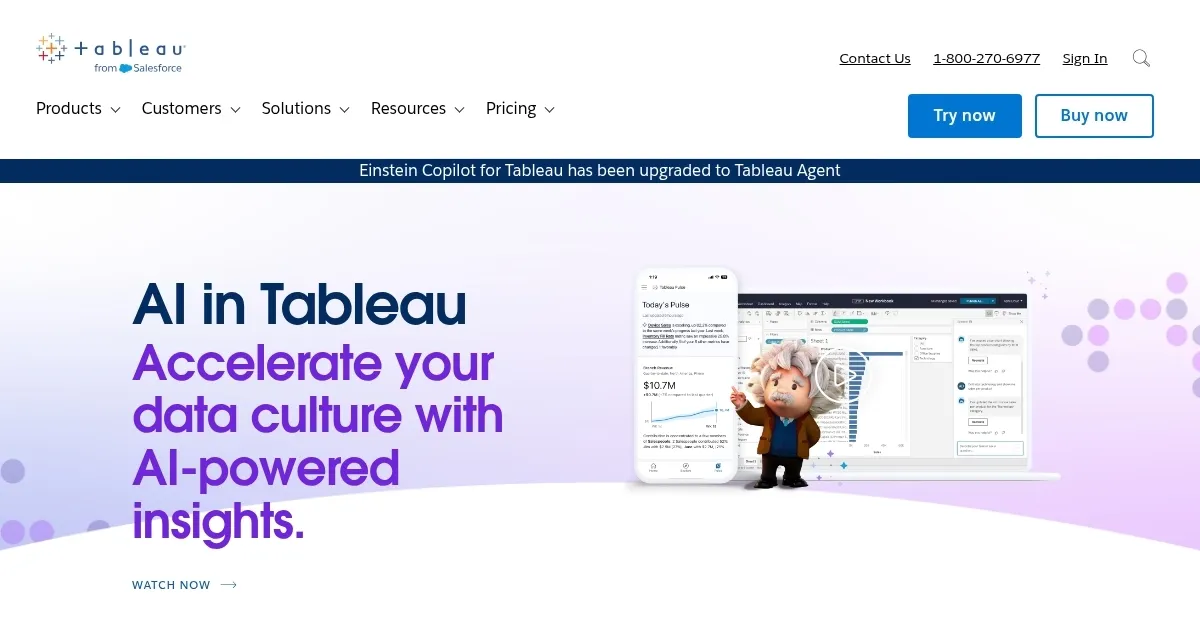
Homepage Screenshot 📸

Tableau AI screenshot

Video Overview 🎬

Tableau AI - Video Overview

What are the key features? ✨

  • Contextual insights: Tableau AI provides personalized and contextually relevant insights directly in your workflow. In a way, it's like having a conversation with your dataโ€‹.
  • Automated data analysis: It can automatically analyze your data and provide explanations in plain language. This makes it easier to understand complex datasets without needing deep technical expertise.
  • Einstein Copilot: This is a conversational assistant powered by generative AI, designed to increase productivity. It is meant to help you understand how to use Tableau's features better, improve the quality of your visualizations and dashboards, and automate repetitive tasks so you can focus on more strategic work.
  • Tableau Pulse: Powered by generative AI, Tableau Pulse offers a newsfeed of key insights and anticipates your questions, providing answers in an easy-to-understand format.
  • Security and privacy: Tableau AI doesn't compromise on data security and privacy. It is built on the Einstein Trust Layer, ensuring that your data is not only processed securely but also remains private and compliant with regulations.

Who is it for? 🤔

Tableau AI is made for business users, data analysts, and administrators across various industries. It aims to democratize data analysis and insights consumption, making it easier for people with varying levels of technical expertise to understand and use their data effectively. By offering smart suggestions, automating repetitive tasks, and ensuring data security, Tableau AI serves anyone looking to make informed decisions based on data -- from small businesses to large enterprises.

Examples of what you can use it for 💡

  • Automatically analyze your business metrics and provide natural language summaries
  • Improve the quality of your data visualizations and dashboards
  • Automate the repetitive tasks associated with preparing and analyzing data
  • Get a newsfeed-like delivery of key insights tailored to your needs
  • Keep your data secure and in compliance with privacy regulations

Pros & Cons ⚖️

  • Makes it easier to get valuable insights from your data
  • Einstein Copilot is there to provide answers from your data
  • You can also automate many of the business intelligence tasks
  • It's a tool for slightly bigger companies (which have more data to play with)

FAQs 💬

What are the main AI features in Tableau?
Tableau integrates AI through tools like Agentforce Tableau for conversational analytics, Tableau Agent for natural language data prep and visualization, and Tableau Pulse for personalized KPI monitoring with insights delivered via email or Slack. These make data exploration feel more intuitive, especially for non-experts.
How does Tableau AI handle natural language queries?
With features like Ask Data and the Concierge skill in Agentforce, you can type questions in plain English, and it generates visualizations or answers on the spot. It's great for quick insights without dragging fields around, though it works best with clean datasets.
Is Tableau AI suitable for beginners?
Probably yes, if you're okay with a bit of a learning curve at first. The drag-and-drop interface and AI suggestions help, but some users say it shines more for those with basic data knowledge. Start with the free trial to test it out.
What about pricing for Tableau AI features?
AI tools like Pulse come standard in all plans, but advanced ones like Tableau Agent require the Tableau+ Bundle or Enterprise edition. Creator licenses start at $75/user/month for Standard or $115 for Enterprise, billed annually. Viewers are cheaper at $15โ€“$35, but you'll need at least one Creator.
How secure is Tableau AI with sensitive data?
It uses Salesforce's Einstein Trust Layer for governance, ensuring data stays secure and compliant. No data gets sent to external models without controls, which reviewers appreciate for enterprise use.
Can Tableau AI integrate with other tools?
Absolutely, it connects seamlessly with Salesforce products like Data Cloud, plus over 100 data sources including SQL, Excel, and cloud warehouses. Recent updates even let it plug into ChatGPT or Claude for broader AI workflows.
What are the pros and cons of Tableau AI based on user feedback?
Pros include stunning visuals and proactive insights that speed up decisions; cons are the higher cost and occasional slowdowns with huge datasets. Many say it's worth it for teams needing polished dashboards.
How does Tableau AI compare to Power BI?
Tableau excels in advanced visualizations and storytelling, while Power BI is more budget-friendly with stronger Microsoft integrations. If AI-driven narratives matter most, Tableau edges out, but try both trials.
Is there a free version or trial for Tableau AI?
Tableau Public is free for basic use, but full AI features need a paid plan. They offer a 14-day free trial of Tableau Cloud with AI enabled, no credit card required, so you can dive in risk-free.
What's new in Tableau AI for 2025?
Updates include multilingual support for Agent queries, faster forecasting with models like Ridge regression, and easier embedding of agentic analytics. These make it more accessible for global teams.

Ready to try Tableau AI?

An AI tool made to streamline and accelerate the data analysis process across the entire Tableau platform

Visit Tableau AI ↗

Tableau AI alternatives 🔗

  1. WarrenAI WarrenAI An AI tool for people who want to understand the stock market better
  2. Salesforce Einstein Salesforce Einstein Generative AI for CRM, designed to supercharge your productivity
  3. Zia Zia AI-powered business assistant from Zoho
  4. Amazon Q Amazon Q Your generative AIโ€“powered assistant designed for work that can be tailored to your business
  5. ZoomInfo ZoomInfo Streamlines B2B sales with data-driven insights and automation
  6. DataGrip DataGrip Streamlines database management and SQL querying for multiple platforms
Share
Tableau AI screenshot enlarged
Promote Tableau AI
light badge
Copy Embed Code
dark badge
Copy Embed Code
neutral badge
Copy Embed Code
Best AI Tools

Discover the best AI tools for any use case

Explore
  • Tool Categories
  • AI Use Cases
  • AI Events
  • AI News
  • Saved Tools
Company
  • About Us
  • Contact Us
  • Media & Partnerships
  • Suggest a Tool
Legal
  • Privacy Policy
  • Terms of Service
Copyright © 2026 Best AI Tools 415 Mission Street, 37th Floor, San Francisco, CA 94105