Skip to content
logo-darklogo-darklogo-darklogo-dark
  • Tool Categories
    • 🎨Art & Creative Design505
    • 🏢Business Management644
    • 💻Coding & Development514
    • 👮Detection83
    • 🧠General Use728
    • 🏥Health & Wellness55
    • 📷Image & Photo Analysis100
    • 🖼️Image Generation & Editing618
    • 📐Interior & Architectural Design37
    • 🎓Learning & Education483
    • ⚖️Legal & Finance90
    • 🎭Lifestyle & Entertainment236
    • 📢Marketing & Advertising627
    • 🎧Music & Audio138
    • 👔Office & Workplace1,014
    • 🔬Research & Data Analysis373
    • 👥Social Media245
    • 🎥Video Generation & Editing426
    • 👧🏻Virtual Companion135
    • 🎤Voice Generation & Editing381
    • ✍️Writing & Editing808
    • All Categories
    • AI Use Cases
  • News
  • Events
    • Academic Conferences
    • Developer Conferences
    • Expos / Trade Shows
    • Industry Summits
    • Workshops / Training
    • All Events
    • Past Events
  • Saved Tools
  • Suggest a Tool
    ✕
    Home › Business Management › Enterprise› TeamAI
    TeamAI

    TeamAI

    Streamlines team collaboration with AI-driven workflows and unified model access

    TeamAI is a collaborative AI platform that unifies access to premium models like GPT-4, Claude, Gemini, and DeepSeek, designed for teams to streamline workflows and enhance productivity. It offers a centralized workspace where users create custom workflows, share prompt libraries, and query documents via Data Hubs. The platform supports over 8,000 app integrations through Zapier and includes a Chrome extension for context-aware insights. Pricing starts at $5/month for shared workspaces, with a free plan requiring user-provided API keys.

    Key features include Custom Workflows, which allow teams to automate tasks like content creation or data analysis tailored to their needs. Shared Prompt Libraries enable users to save and reuse prompts, ensuring consistency across projects. Data Hubs let users upload documents and ask questions, with AI providing answers based on the content. The Chrome extension analyzes web pages for tailored suggestions, and the platform’s mobile app supports on-the-go access. Recent user feedback on X praises its ease of use but notes occasional model-switching delays.

    Compared to Stack AI, which focuses on OpenAI models, or Team-GPT, which emphasizes marketing use cases, TeamAI stands out for its multi-model access and cost-effective workspace pricing. It saves up to 90% compared to per-seat models, making it attractive for businesses. However, the free plan’s API key requirement and usage limits may deter casual users. Premium plans unlock full features like chat history and prompt libraries without API keys.

    The platform’s interface is user-friendly, designed for both technical and non-technical users. Its scalability suits small teams and large enterprises alike. Some users report lag during peak times, and the free plan’s restrictions can feel limiting for heavy users. The Chrome extension’s context-aware feature is a unique advantage, enhancing browsing productivity.

    To get started, sign up for the free plan and test Data Hubs with a sample document. Experiment with the Chrome extension on relevant web pages. Upgrade to a paid plan for full access if your team relies on multiple AI models. Monitor usage to avoid hitting quota limits.

    Visit TeamAI ↗
    Categories
    🏢 Business
    🏢 Enterprise 🔄 Workflow
    🧠 General
    💬 Chatbot 🤖 Assistant 🧠 Large Language Model
    👔 Work
    ⚡ Work Productivity 💼 Workplace Assistant 🤖 Copilot

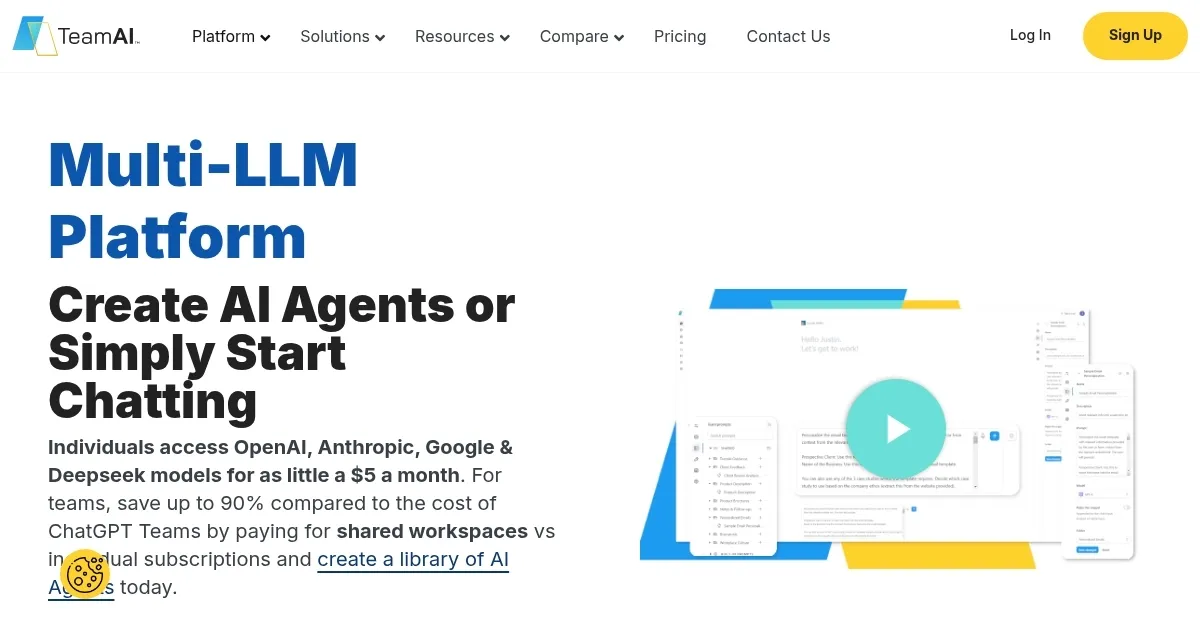
    Homepage Screenshot 📸

    TeamAI screenshot

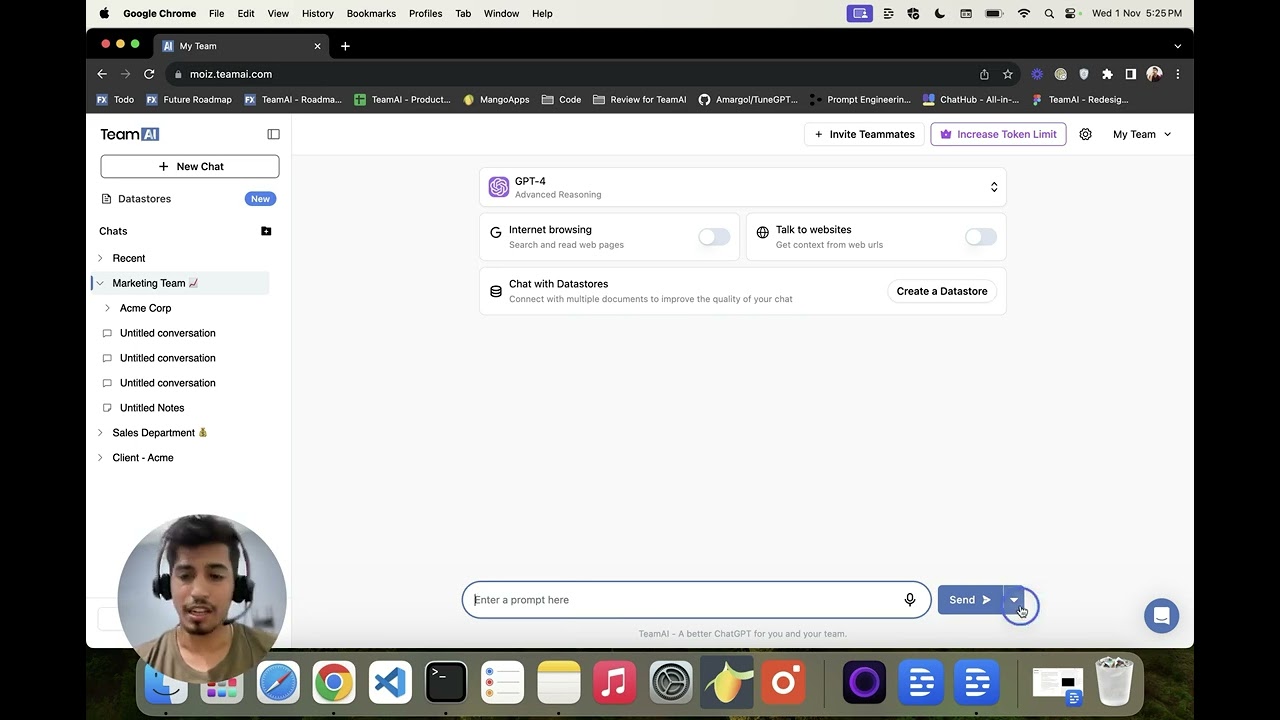
    Video Overview 🎬

    TeamAI - Video Overview

    What are the key features? ✨

    • Custom Workflows: Automates tailored business processes across departments.
    • Shared Prompt Libraries: Saves and shares prompts for consistent AI outputs.
    • Data Hubs: Uploads documents for instant AI-driven querying and insights.
    • Chrome Extension: Provides context-aware AI insights based on web content.
    • App Integrations: Connects with 8,000+ apps via Zapier for seamless workflows.

    Who is it for? 🤔

    TeamAI is ideal for businesses and teams seeking to streamline AI-driven collaboration, from small startups to large enterprises. Marketing teams benefit from crafting on-brand content, while sales teams automate lead generation workflows. Project managers and researchers find value in Data Hubs for querying documents, and developers appreciate the platform’s integrations and custom plugins. It suits organizations wanting a cost-effective, unified AI solution without managing multiple subscriptions.

    Examples of what you can use it for 💡

    • Marketing Manager: Uses Custom Workflows to generate on-brand social media content.
    • Sales Team Lead: Automates lead prioritization with AI-driven insights.
    • Project Manager: Queries project documents via Data Hubs for quick insights.
    • Developer: Integrates TeamAI with tools like Slack using Zapier.
    • Research Analyst: Saves reusable prompts in Shared Prompt Libraries for reports.

    Pros & Cons ⚖️

    • Unifies multiple AI models in one platform.
    • Powerful Chrome extension for browsing.
    • Extensive app integrations via Zapier.
    • Free plan requires API keys.
    • Occasional lag switching models.

    FAQs 💬

    What is TeamAI?
    TeamAI is a collaborative AI platform unifying models like GPT-4 and Claude for team workflows.
    Do I need API keys for TeamAI?
    Free plan requires API keys; premium plans don’t.
    Which AI models does TeamAI support?
    Supports GPT-4, Claude, Gemini, DeepSeek, and more.
    Can I use TeamAI on mobile?
    Yes, TeamAI offers a free iOS app for on-the-go access.
    How does TeamAI save costs?
    Workspace pricing saves up to 90% over per-seat models.
    Is TeamAI secure?
    Data is encrypted, with ISO 27001 compliance for enterprise plans.
    Can I integrate TeamAI with other tools?
    Yes, it connects with 8,000+ apps via Zapier.
    What is the Chrome extension for?
    Provides context-aware AI insights based on web content.
    Does TeamAI offer a free plan?
    Yes, with basic features and API key requirements.
    How long does it take to set up?
    Workspaces can be created in about 30 seconds.

    Ready to try TeamAI?

    Streamlines team collaboration with AI-driven workflows and unified model access

    Visit TeamAI ↗

    TeamAI alternatives 🔗

    1. ChatGPT ChatGPT All-round AI assistant generating human-like responses to user queries and tasks
    2. Poe Poe Aggregates top AI models for seamless chatting and bot creation
    3. ClickUp Brain ClickUp Brain Automates workflows with contextual AI for tasks, meetings, and content creation
    4. Juma Juma An AI-powered platform that integrates ChatGPT into a shared workspace
    5. Swiftask Swiftask Creates and deploys custom AI agents to boost business productivity without coding
    6. Chatbot App Chatbot App A neat platform that offers users access to multiple advanced AI models under one roof
    Share
    TeamAI screenshot enlarged
    Best AI Tools

    Discover the best AI tools for any use case

    Explore
    • Tool Categories
    • AI Use Cases
    • AI Events
    • AI News
    • Saved Tools
    Company
    • About Us
    • Contact Us
    • Media & Partnerships
    • Suggest a Tool
    Legal
    • Privacy Policy
    • Terms of Service
    Copyright © 2026 Best AI Tools 415 Mission Street, 37th Floor, San Francisco, CA 94105