logo-darklogo-darklogo-darklogo-dark
  • Home
  • Browse
    • Assistant
    • Coding
    • Image
    • Productivity
    • Video
    • Voice
    • Writing
    • All Categories
    • AI Use Cases
  • My Favorites
  • Suggest a Tool
✕
Home › Image Generation & Editing›
Published by Dusan Belic on August 30, 2023

EbSynth

EbSynth
EbSynth Homepage
Categories Image Generation & Editing
Transforms videos by propagating edits from one or few keyframes using texture synthesis

EbSynth

EbSynth is a cutting-edge software that enables users to transform videos by painting over a single frame. In other words, it can bring static paintings to vibrant, animated life — creating a seamless integration between traditional art techniques and digital animation.

In that sense, EbSynth is ideal for animators, digital artists, and anyone interested in exploring the intersection of painting and video.

By focusing on ease and accessibility, the tool encourages artistic experimentation and innovation. Users can simply paint over a single frame of their footage, and EbSynth will intelligently apply those alterations across the entire video clip — all while maintaining the original motion and dynamics.

This approach saves time and effort compared to traditional frame-by-frame animation techniques while ensuring a cohesive and visually stunning result that blurs the lines between painted art and video animation.

EbSynth Homepage
Categories Image Generation & Editing

Video Overview ▶️

EbSynth - Video Overview

What are the key features? ⭐

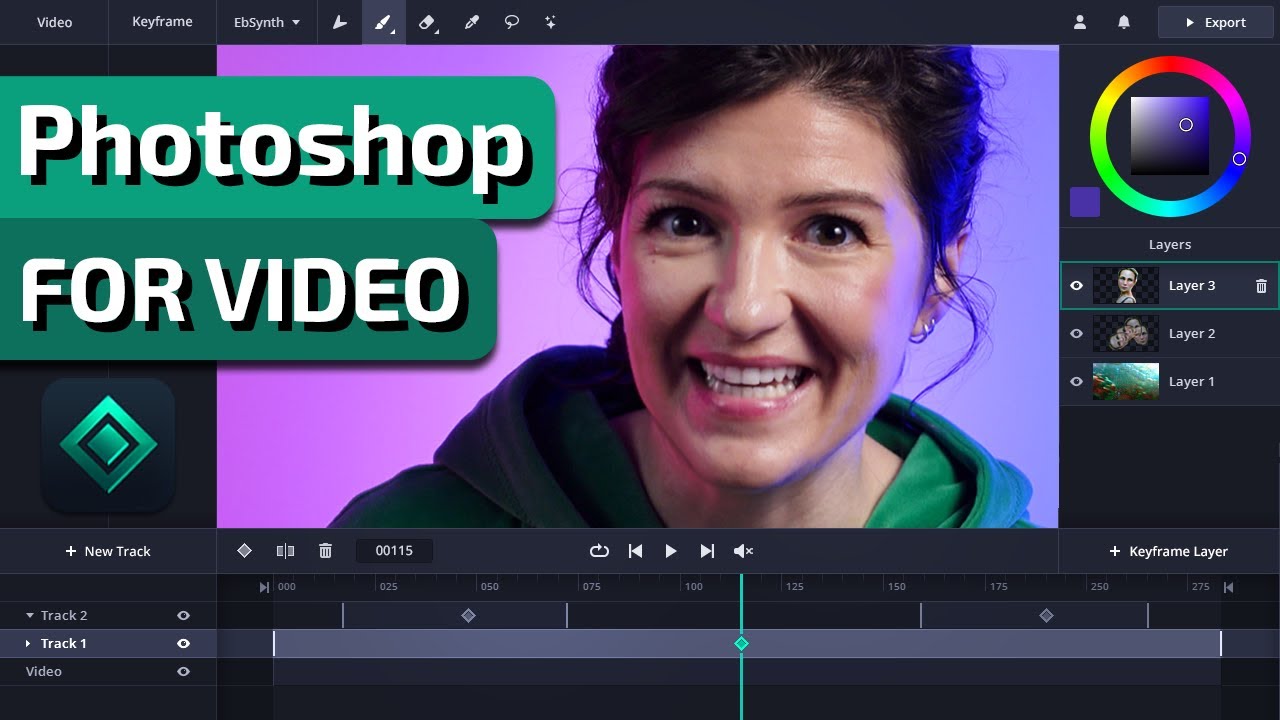
  • Keyframe Propagation: Automatically applies edits from user-defined keyframes across the full video using texture synthesis and optical flow.
  • Layer and Track Support: Separates elements like face, clothing, or background into independent tracks for precise control in complex shots.
  • Real-Time Preview: Shows instant feedback on style propagation while editing in the timeline interface.
  • In-App Brushes and Editing: Allows direct painting and retouching of keyframes within the browser tool.
  • Optional AI Keyframe Generation: Provides an AI assist to create starting styled frames when manual painting isn't desired.

Who is it for? 🤔

EbSynth helps digital artists, VFX professionals, animators, filmmakers, and content creators who want to apply consistent artistic styles, retouching, or rotoscoping to video footage without labor-intensive frame-by-frame work. It suits anyone needing precise control over propagated changes, especially those frustrated by unpredictable generative AI outputs or tedious manual tracking.

Examples of what you can use it for 💭

  • Animator: Turns live-action performance footage into hand-drawn animation styles by painting artistic keyframes and letting EbSynth propagate the look consistently.
  • VFX Artist: Applies digital makeup, skin retouching, or beauty fixes across an actor's performance without tracking each frame manually.
  • Filmmaker: Experiments with color grading or stylistic filters on test shots to visualize creative ideas quickly before committing to full production.
  • Content Creator: Converts talking-head videos into stylized cartoon or painterly versions for engaging social media or YouTube content.
  • Motion Graphics Artist: Transfers graphic treatments or textures from key illustrations onto video elements while maintaining temporal coherence.

Pros & Cons ⚖️

  • Precise artistic control
  • Fast iteration workflow
  • Free core features
  • No generative drift
  • Motion artifacts possible
  • Browser memory limits

FAQs 💬

Is EbSynth based on generative AI?
No, the core propagation uses a texture-synthesis algorithm that matches patches from keyframes to video frames without external training data or generative models. An optional AI feature exists only for generating keyframes.
What browser works best with EbSynth?
Chrome is recommended, especially for larger projects, as it handles memory and processing more reliably than other browsers.
Does EbSynth have a free version?
Yes, the free plan includes the full core experience with no time or functional limits, though Pro unlocks higher resolutions and extras.
How do I avoid artifacts in results?
Choose keyframes at clear poses, avoid mid-movement frames, separate moving elements into tracks, and use well-lit source video with visible texture for better optical flow.
Can EbSynth handle high-resolution video?
Yes, but high-res rendering and PNG sequence export require the Pro plan. Free works for standard resolutions.
Is my video stored on EbSynth servers?
Projects stay on your computer. Temporary uploads occur for rendering and are deleted immediately afterward.
What kinds of styles can I apply?
Any style you can paint or edit on keyframes, such as oil paint, watercolor, cel shading, or realistic retouching, propagates faithfully.
How does EbSynth compare to RunwayML?
EbSynth offers more predictable, user-defined propagation without creative drift, while RunwayML uses generative AI for broader but less controlled video transformations.
Visit EbSynth

Related tools ↙️

  1. Dawn AI Dawn AI Generates personalized avatars and images from selfies using advanced AI technology
  2. Cloudinary Cloudinary Manages, transforms, optimizes, and delivers images and videos with AI-powered features
  3. Imgix Imgix Optimizes images in real-time using AI for faster web delivery
  4. Imajinn Imajinn Transforms user photos into artistic images and custom visuals using AI
  5. SVG AI SVG AI Transforms text prompts into scalable vector icons and logos instantly
  6. Artisse Artisse Generates hyper-realistic photos using AI from user selfies and custom prompts
Last update: March 1, 2026
Share
Promote EbSynth
light badge
Copy Embed Code
dark badge
Copy Embed Code
neutral badge
Copy Embed Code
About Us | Contact Us | Suggest an AI Tool | Privacy Policy | Terms of Service

Copyright © 2026 Best AI Tools
415 Mission Street, 37th Floor, San Francisco, CA 94105