logo-darklogo-darklogo-darklogo-dark
  • Home
  • Browse
    • Assistant
    • Coding
    • Image
    • Productivity
    • Video
    • Voice
    • Writing
    • All Categories
    • AI Use Cases
  • My Favorites
  • Suggest a Tool
✕
Home › Image Generation & Editing ›

Erase bg

Published by Dusan Belic on July 10, 2023

Erase bg by PixelBin

Erase
Erase bg Homepage
Categories Image Generation & Editing
AI tool that easily removes backgrounds from images

Erase bg

Erase.bg is an advanced AI-powered tool designed to automatically remove the backgrounds from images in mere seconds, streamlining the process for users across various sectors such as e-commerce, professional photography, and marketing. It supports multiple image formats — including PNG, JPG, JPEG, WEBP, and HEIC — and can handle images up to 5000 x 5000 px and 25 MB in size.

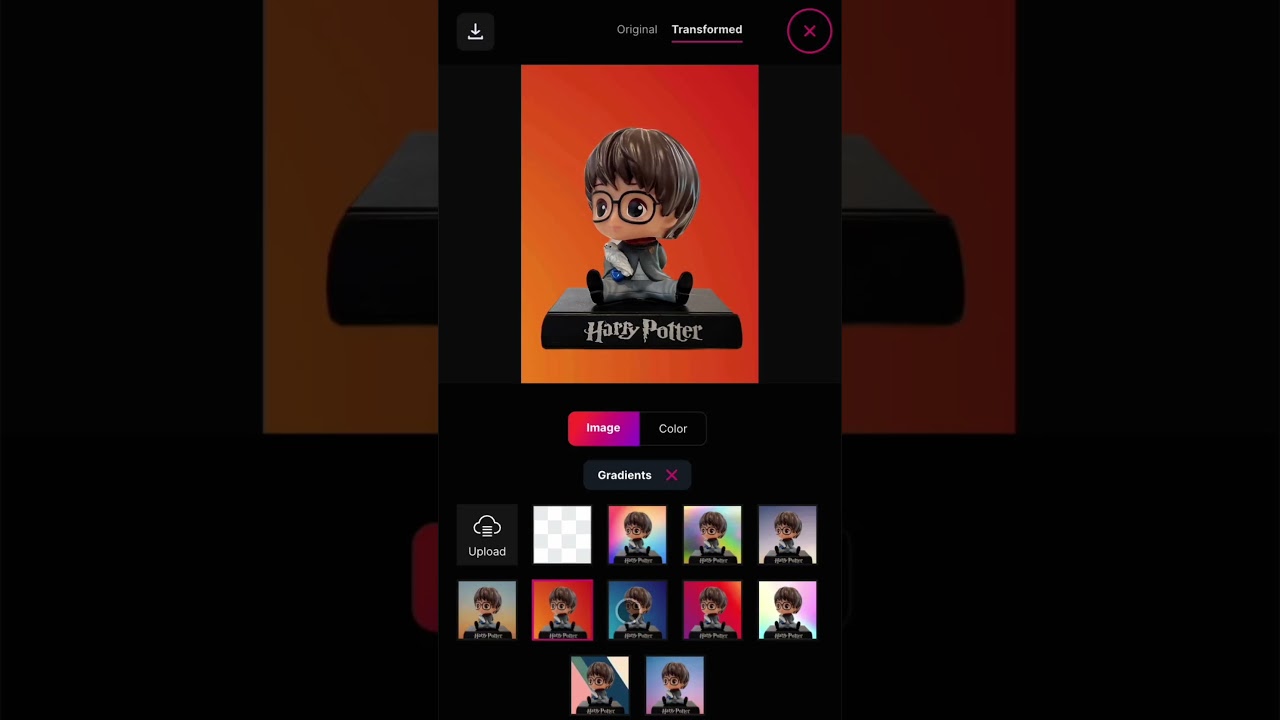
In other words, it offers users the convenience of not only removing backgrounds but also providing options to edit the resultant images by changing or adding new backgrounds — thus enhancing the tool’s usability for creating professional-quality visuals for personal or commercial use.

Moreover, Erase.bg offers various features such as bulk background removal, API integration for automated workflow enhancement, and additional editing options like changing the background color or adding thematic backgrounds. This makes it suitable for businesses, developers, and individuals looking to improve productivity and image quality.

The tool is free for personal use, with subscription plans available for commercial purposes — offering an easy and efficient solution for transforming images by removing unwanted backgrounds and replacing them with preferred ones, all done seamlessly online without the need for complex software.

Erase bg Homepage
Categories Image Generation & Editing

Video Overview ▶️

What are the key features? ⭐

  • AI background removal: The tool's key feature uses advanced AI tech to quickly remove backgrounds from images.
  • High resolution support: Capable of processing images up to 5000 x 5000 pixels, maintaining high quality and detail.
  • Multiple formats: Supports all the popular image formats, including PNG, JPG, JPEG, WEBP, and HEIC.
  • Bulk processing: Allows users to remove backgrounds from multiple images at once, saving time and effort.
  • API integration: Offers API integration for developers to incorporate background removal into their own applications.

Who is it for? 🤔

Erase.bg targets many users, including e-commerce businesses, photographers, graphic designers, marketers, and real estate professionals. It is made for anyone needing a reliable and efficient solution for removing backgrounds from images, whether for personal use or to enhance professional visuals. The service caters to individual users as well as large enterprises needing bulk processing capabilities.

Examples of what you can use it for 💭

  • Enhance product images by removing backgrounds to create a consistent and professional look for online stores
  • Edit photos for personal or professional use by eliminating distracting backgrounds
  • Create clean and compelling visuals for advertisements, social media posts, and other marketing materials
  • Streamline the process of isolating subjects for creative projects, making it easier to create composite images
  • Real estate agents can use it to improve property images by removing unwanted backgrounds

Pros & Cons ⚖️

  • An easy way to remove backgrounds from photos
  • Batch processing could be a big time saver
  • Super useful for online store operators
  • The competition in this space is fierce, not sure this is the best solution

FAQs 💬

What is Erase.bg?
Erase.bg is an AI-powered online tool that automatically removes backgrounds from images, making the subject transparent or allowing easy background changes. It works best for images with clear subjects like people, products, or animals.
How does Erase.bg work?
You upload an image or paste a URL, and the AI processes it in 3-5 seconds to remove the background. Then you can edit or download the result with a transparent background.
What file formats does Erase.bg support?
It supports PNG, JPEG, JPG, WEBP, and HEIC formats for uploads. Outputs are typically in high-resolution PNG for transparency.
Does Erase.bg maintain image quality?
Yes, it preserves the original HD or 4K quality with no loss, even for high-resolution images up to 10000 x 10000 pixels.
Is Erase.bg accurate for complex images?
The AI handles most images well, including tricky areas like hair, but results can vary with very complex backgrounds. Many users praise its precision for standard use.
Can I use Erase.bg on mobile devices?
Yes, there are free apps available for iOS and Android that let you remove backgrounds directly on your phone.
Does Erase.bg work well for hair and fine details?
It often does a solid job with hair and edges thanks to advanced AI, though some users note occasional needs for minor touch-ups on challenging shots.
Is there a limit on image size or resolution?
Images can be up to 25 MB in file size and 10000 x 10000 pixels in resolution, supporting HD and 4K quality.
Can Erase.bg process multiple images at once?
Yes, it offers bulk processing options, which is handy for handling several images quickly.
Are the results from Erase.bg suitable for professional use?
Many professionals use it for e-commerce, marketing, and photography because of its clean, high-quality outputs.

Related tools ↙️

  1. Creative Fabrica Studio Creative Fabrica Studio A suite of AI-powered digital creation tools that generates custom art, writing, and designs.
  2. Photoleap Photoleap AI tool that transforms your photos into works of art
  3. AIEASE AIEASE An AI-powered platform offering a suite of free photo editing tools
  4. NMKD Stable Diffusion GUI NMKD Stable Diffusion GUI A handy GUI to run a Stable Diffusion model to generate images from text, locally on your hardware
  5. Gigapixel AI Gigapixel AI Using AI to make small, blurry images look sharp and clear
  6. Let’s Enhance Let’s Enhance Upscales low-res images to 4K using AI for sharp, detailed results.
Last update: December 15, 2025
Share
Promote Erase bg
light badge
Copy Embed Code
light badge
Copy Embed Code
light badge
Copy Embed Code
About Us | Contact Us | Suggest an AI Tool | Privacy Policy | Terms of Service

Copyright © 2026 Best AI Tools
415 Mission Street, 37th Floor, San Francisco, CA 94105