
FakeYou by Storyteller.ai

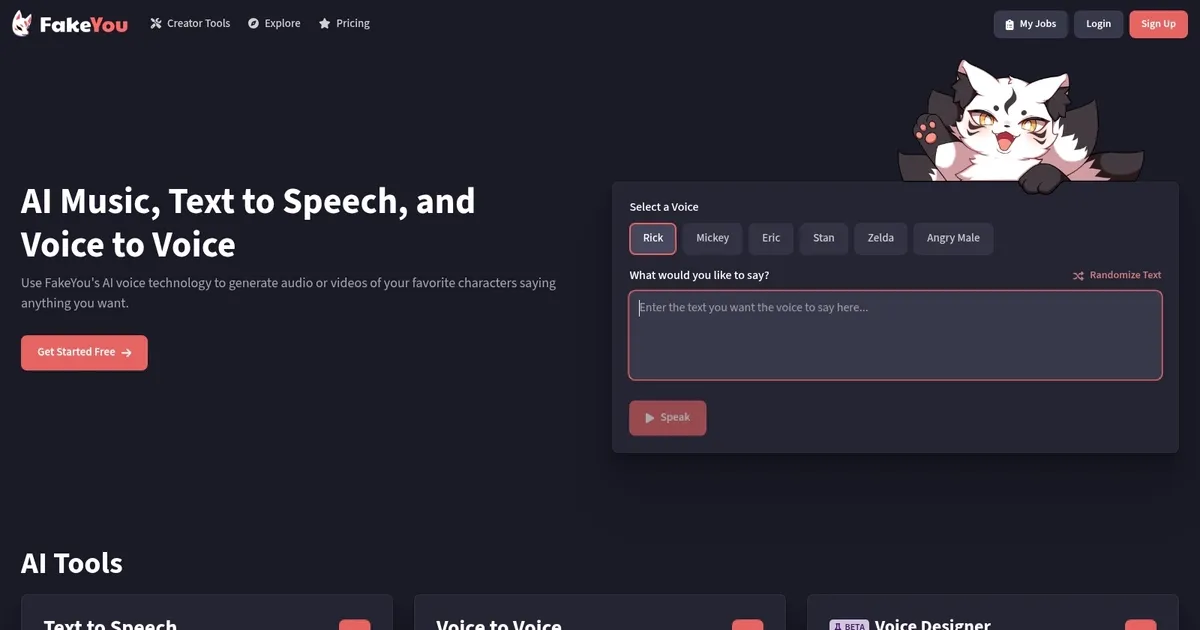
A text-to-speech voice generator for audio and video

Previously known as Vocodes, FakeYou offers a set of audio and video tools that are mostly made for content creators and, well, having fun with friends.
One of the tools lets you speak as your favorite characters, making it perfect for content creators and anyone looking to add personality to their messages.
Another one will convert text to speech, allowing you to choose between more than 3,000 characters.
Finally, there is the Video Lip Sync service that will create a video featuring your favorite characters saying something you’ve written. This is where the real fun starts.
FakeYou is not free, but you can try some of its services without paying a dime. Then, if you decide it works for you, select between the three plans FakeYou offers.
What are the key features? ⭐
- Text to Speech: Use FakeYou deep fake tech to say stuff with your favorite characters. And there are more than 3,000 characters to choose from.
- Voice to Voice: This tool lets you change your voice into your favorite characters. There are more than 1,800 target voices to choose from.
- Video Lip Sync: It's easy. Pick a template, and make it lip-sync. If you want to use your own video or image, you can do that, too.
- Upload models: Don't like the result you're getting? No problem - you can upload your own models for the AI to train on. This will make sure you get truly unique clips.
- Three different plans: Depending on your needs, you will want to select the plan that works best for you. As that's usually the case, the more you pay - the better service you'll get.
Who is it for? 🤔
FakeYou is made for audio and video content creators, marketers and small business owners. All of them could benefit from having a powerful AI tool like FakeYou in their arsenal. In addition, it is also a tool for fun, though in that sense - I doubt many people would pay for it just to be able to send funny clips to their friends. But you never know.
Examples of what you can use it for 💭
- Convert your text or voice into your favorite character's voice
- Easily add voice to your website or app
- Create professionally sounding audio commercials
- Create funny videos with the lip sync service
Pros & Cons ⚖️
- Lets anyone create professional-sounding voices
- Use voice to add personality to your messages
- Great for making "regular" PowerPoint presentations more fun
- No free plan, though you can test some services for free
FAQs 💬
What is FakeYou mainly used for?
FakeYou generates AI voice audio from text or converts existing audio to mimic celebrities, characters, or custom voices, often for fun content, memes, videos, or creative projects.
How many voices does FakeYou offer?
It provides access to thousands of voices, with over 3,500 community-created and official models including celebrities, game characters, and animated figures.
Can I create my own custom voice on FakeYou?
Yes, the Voice Designer feature lets you upload audio samples to train and clone a custom voice, though it works best with clear recordings and may take some tweaking.
Does FakeYou support video generation?
It includes lip-sync animation to create short videos where faces move in time with the generated audio, making it useful for talking avatars or dubbed clips.
Is FakeYou easy to use for beginners?
The web-based interface is simple—select a voice, input text or audio, and generate—so most people get started quickly without technical skills.
What languages does FakeYou support?
It primarily excels in English but includes voices that handle multiple languages, though quality and naturalness vary by model.
Do I need an account to use FakeYou?
Basic features work with a free account, which unlocks more options and helps avoid some limits compared to guest access.
How realistic are the voices on FakeYou?
Many voices sound quite natural and expressive, especially newer models, but results depend on the voice chosen and text complexity—some can feel robotic or off in pacing.
Can FakeYou be used for educational purposes?
Yes, educators often use it to create engaging lessons with historical figures or characters narrating content, adding variety to teaching materials.
What happens if generation gets stuck or fails?
Queues or errors sometimes occur on free use due to high demand, but retrying or checking status usually resolves it, and support is available via their community channels.




Last update:
December 23, 2025
Promote FakeYou


