logo-darklogo-darklogo-darklogo-dark
  • Home
  • Browse
    • Assistant
    • Coding
    • Image
    • Productivity
    • Video
    • Voice
    • Writing
    • All Categories
    • AI Use Cases
  • My Favorites
  • Suggest a Tool
✕
Home › Image Generation & Editing ›

Gigapixel AI

Published by Dusan Belic on May 15, 2025

Gigapixel AI

Gigapixel
Gigapixel AI Homepage
Categories Image Generation & Editing
Using AI to make small, blurry images look sharp and clear

Gigapixel AI

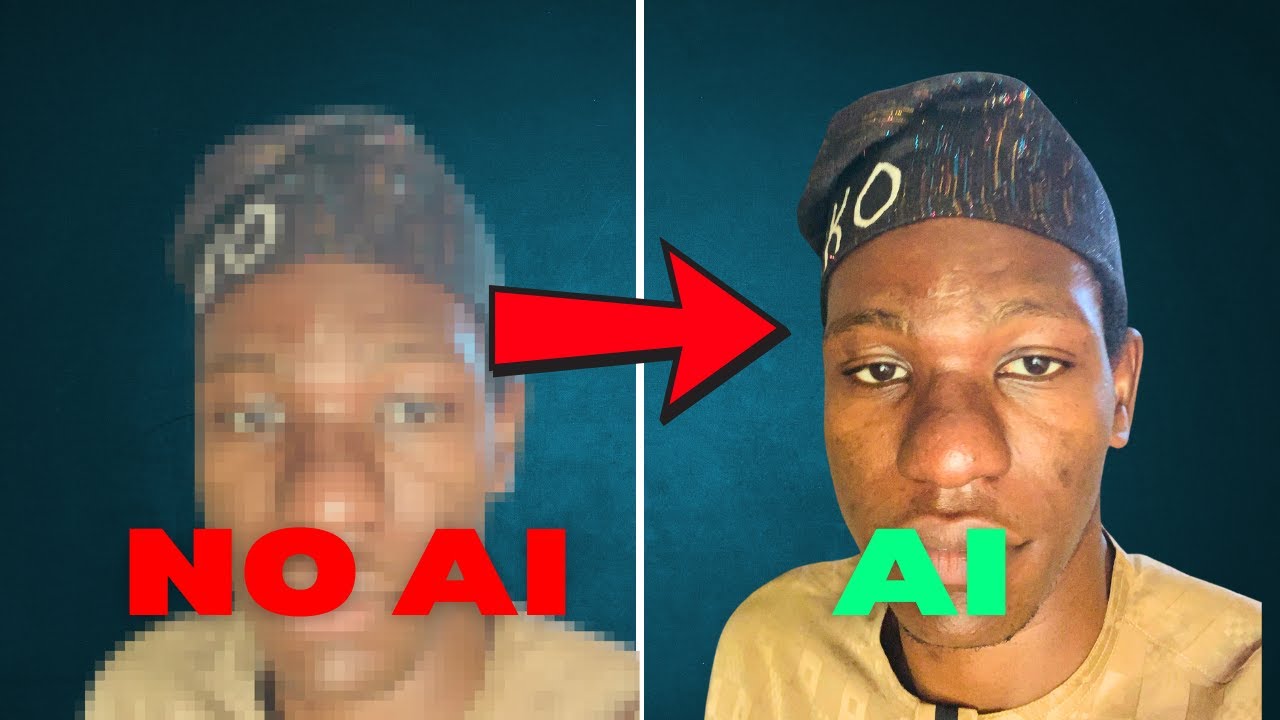
Gigapixel AI is a powerful tool that uses artificial intelligence to make small, blurry images look sharp and clear. It can enlarge pictures up to 600% without losing quality, meaning you can take an old, low-resolution photo and turn it into a high-quality image for printing or sharing online.

This, obviously, makes Gigapixel AI great for making old family photos look sharp and brand new. The tool will enhance the photos and reveal details you couldn’t see before. In a way, it’s like giving new life to your cherished memories.

All this has prompted photographers and artists to use Gigapixel AI to improve their work. For example, a wedding photographer once used it to enlarge a small JPEG image after losing the original RAW file. The result was a stunning 24×36-inch print that the couple proudly displayed in their home.

Beyond photos, some folks are using Gigapixel AI for enhancing digital art, illustrations, and even anime images. This, in turn, makes it a useful tool for all kinds of creative projects.

The bottom line is – Gigapixel AI can help you improve your images, save time, and achieve professional-quality results with ease.

Gigapixel AI Homepage
Categories Image Generation & Editing

Video Overview ▶️

What are the key features? ⭐

  • Advanced AI upscaling: Gigapixel AI uses smart technology to enlarge images up to 600% while keeping them clear and detailed.
  • Batch processing: You can enhance multiple images at once, saving you time and effort.
  • Specialized models: The tool offers different settings for various types of images, like portraits, landscapes, and artwork.
  • Noise reduction & sharpening: Gigapixel AI not only enlarges images but also reduces noise and sharpens details - making your photos look cleaner and more professional.
  • User-friendly interface: The software is easy to use, even for beginners. With just a few clicks, you can enhance your images without needing any advanced tech skills.

Who is it for? 🤔

Gigapixel AI is designed for anyone who wants to improve the quality of their images. This includes photographers, artists, designers, and hobbyists. So, whether you're working with old photos, digital art, or low-resolution images - Gigapixel AI can help you achieve better results.

Examples of what you can use it for 💭

  • Enhance old family photos to restore and preserve precious memories
  • Improve low-resolution images for professional printing or online sharing
  • Upscale digital art and illustrations for better clarity and detail
  • Prepare images for large-format prints, like posters or banners
  • Enhance screenshots or game textures for higher quality visuals

Pros & Cons ⚖️

  • High-quality image enlargement without losing detail
  • Supports batch processing
  • Easy to use, simple interface
  • Processing large images may take some time (makes sense)

FAQs 💬

What does Gigapixel AI actually do to images?
Gigapixel AI upscales and enhances photos using specialized AI models, adding clarity, detail, and better colors while keeping textures natural, especially for portraits, anime, or landscapes.
Which types of images work best with this tool?
It excels with portraits (retaining skin texture and expressions), anime (smooth lines and vivid colors), and nature/landscape shots (capturing fine details), though it handles most photo types reasonably well.
How many upscale options or magnification levels are available?
You can upscale images by 2x, 4x, 6x, 8x, or even 10x, depending on your needs and the selected model.
Are there different AI models to choose from?
Yes, options include Crystal (optimized for high-precision face and portrait work) and Gigapixel V1 (faster and more efficient for general use).
Can I process multiple images at once?
Batch processing is supported, so you can upload and enhance several images together instead of one by one.
What file formats does Gigapixel AI accept and output?
It accepts JPG, PNG, and JPEG uploads (up to 10 images at a time in the free tier), and outputs enhanced versions in PNG, JPG, JPEG, or WEBP.
Is my uploaded image data kept private and secure?
Images are encrypted during processing and deleted afterward, with no long-term storage, so your originals stay private.
Does the free version allow commercial use of enhanced images?
The free plan includes a commercial license, meaning you can use results for business, marketing, or e-commerce purposes.
How does this tool compare to desktop-only upscalers like Topaz?
Gigapixel AI runs entirely in the browser with no install needed, focuses on quick online enhancements, and adds extras like AI image/video generation, while desktop tools often emphasize deeper local control and extreme upscaling.
What happens if I need more than the daily free limit?
You can purchase one-time credit packs that never expire, letting you process additional images beyond the free daily allowance without a recurring subscription.

Related tools ↙️

  1. Artbreeder Artbreeder AI-powered creative tool that empowers users' creativity by making it easier to collaborate and explore
  2. The Influencer AI The Influencer AI Generates consistent AI influencers for photos, videos, and product integrations
  3. LogoAI LogoAI Generate your new logo & create matching stationery
  4. Flux1.AI Flux1.AI Generates high-quality images from text prompts with advanced AI models
  5. Colorcinch Colorcinch An AI-powered tool that turns images into cartoon-like images with just one click
  6. DreamUp DreamUp An AI-powered tool allowing users to generate unique artworks by inputting text prompts
Last update: January 4, 2026
Share
Promote Gigapixel AI
light badge
Copy Embed Code
light badge
Copy Embed Code
light badge
Copy Embed Code
About Us | Contact Us | Suggest an AI Tool | Privacy Policy | Terms of Service

Copyright © 2026 Best AI Tools
415 Mission Street, 37th Floor, San Francisco, CA 94105