logo-darklogo-darklogo-darklogo-dark
  • Home
  • Browse
    • Assistant
    • Coding
    • Image
    • Productivity
    • Video
    • Voice
    • Writing
    • All Categories
    • AI Use Cases
  • My Favorites
  • Suggest a Tool
✕
Home › Image Generation & Editing / Video Generation & Editing ›

Krea

Published by Dusan Belic on March 26, 2025

Krea

Krea
Krea Homepage
Categories Image Generation & EditingVideo Generation & Editing
Empowering users to generate and enhance images and videos using advanced AI

Krea

Krea is a fancy AI platform that empowers users to generate and enhance images and videos using advanced artificial intelligence. In that sense, it can transform your imaginative ideas into stunning visuals with minimal effort.

Users can input text prompts or sketches, and the platform will instantly bring these concepts to life — allowing for dynamic adjustments on the fly. This immediacy streamlines the creative process and fosters a more interactive and engaging experience.

Krea also offers video generation from text prompts, enabling users to craft fancy clips without extensive video editing skills. By simply describing a scene or sequence, the AI produces videos that align with the specified theme. This feature can be particularly beneficial for content creators seeking to diversify their media without investing significant time or resources.

It is also worth adding that Krea incorporates an image upscaling and enhancement tool, allowing users to transform low-resolution images into detailed, high-resolution visuals that are suitable for various applications — from digital art displays to print media.

The platform also provides features like AI Patterns and Logo Illusions, which enable users to generate intricate patterns and creatively integrate logos into diverse sceneries. Such functionalities make Krea a tool and even a smart companion for artists, designers, and marketers alike.

In summary, Krea is an innovative platform that aims to democratize the creative process through advanced AI capabilities. Check it out.

Krea Homepage
Categories Image Generation & EditingVideo Generation & Editing

Video Overview ▶️

What are the key features? ⭐

  • Near real-time image generation: Allows users to create images instantly from text prompts or sketches.
  • Video generation: Enables the creation of video clips based on textual descriptions, simplifying video content creation for everyone.
  • Image upscaling & enhancement: Transforms low-resolution images into high-quality visuals to ensure clarity and detail suitable for different applications.
  • AI patterns: Generates unique patterns from text prompts, offering designers a tool to create intricate and customizable designs.
  • Logo illusions: Integrates logos into diverse sceneries, allowing brands to present their identity in creative ways.

Who is it for? 🤔

Krea is designed for creatives, marketers, and businesses seeking to enhance their visual content creation processes. Its user-friendly interface and versatile features cater to both novices and professionals, enabling them to produce high-quality visuals without requiring extensive technical expertise. By automating aspects of the creative process, Krea allows users to focus more on ideation and strategy, making it a valuable asset across various industries.

Examples of what you can use it for 💭

  • Designers can swiftly generate unique visuals and patterns
  • Creators can produce engaging videos and images based on textual ideas
  • Marketers can craft distinctive visuals and integrate logos creatively
  • Educators can develop illustrative materials and dynamic content to enhance teaching materials and presentations
  • Online retailers can generate high-quality product images and promotional videos

Pros & Cons ⚖️

  • Designed for all skill levels
  • Enables quick generation of visuals with customization options
  • Variety of AI models available
  • Limited fine-grained controls (kinda expected)

FAQs 💬

What is Krea.ai, and what does it do?
Krea.ai is an AI-powered platform for generating, editing, and enhancing images, videos, and 3D assets. You describe visuals in text prompts, and it creates high-quality content in real-time, using models like Krea 1 for ultra-realistic results or Veo 3 for videos. It's great for designers, marketers, or hobbyists wanting fast, professional visuals.
Is there a free version of Krea.ai, and what are the limits?
Yes, the free plan gives daily generations, basic access to tools like real-time image creation, and upscaling, but with watermarks and lower resolution caps. It's perfect for testing, though heavy users might hit compute limits quickly. Paid plans unlock unlimited features and no watermarks.
How do I get started with Krea.ai as a beginner?
Sign up on krea.ai with email or Google, then head to the dashboard. Start with the real-time generator: type a prompt like "sunset over mountains," tweak styles, and watch images form instantly. Tutorials in the docs cover basics, and no prior AI knowledge needed, it feels like doodling with superpowers.
Can Krea.ai generate videos, and how good are they?
Absolutely, it handles text-to-video with models like Runway or Kling, creating short clips up to 10 seconds or animating images. Outputs are smooth for social media, but longer videos might need editing elsewhere. Users love the lip-sync and keyframe controls for quick prototypes.
What are the pricing plans for Krea.ai?
Free for basics, Basic at $10/month for ~1,000 images and some training, Pro at $35/month for heavier use like 5,000+ generations, and Max at $60/month for pros. Enterprise adds teams and custom support. It's compute-based, so value depends on your output needs, probably worth it for frequent creators.
Does Krea.ai let you train custom models?
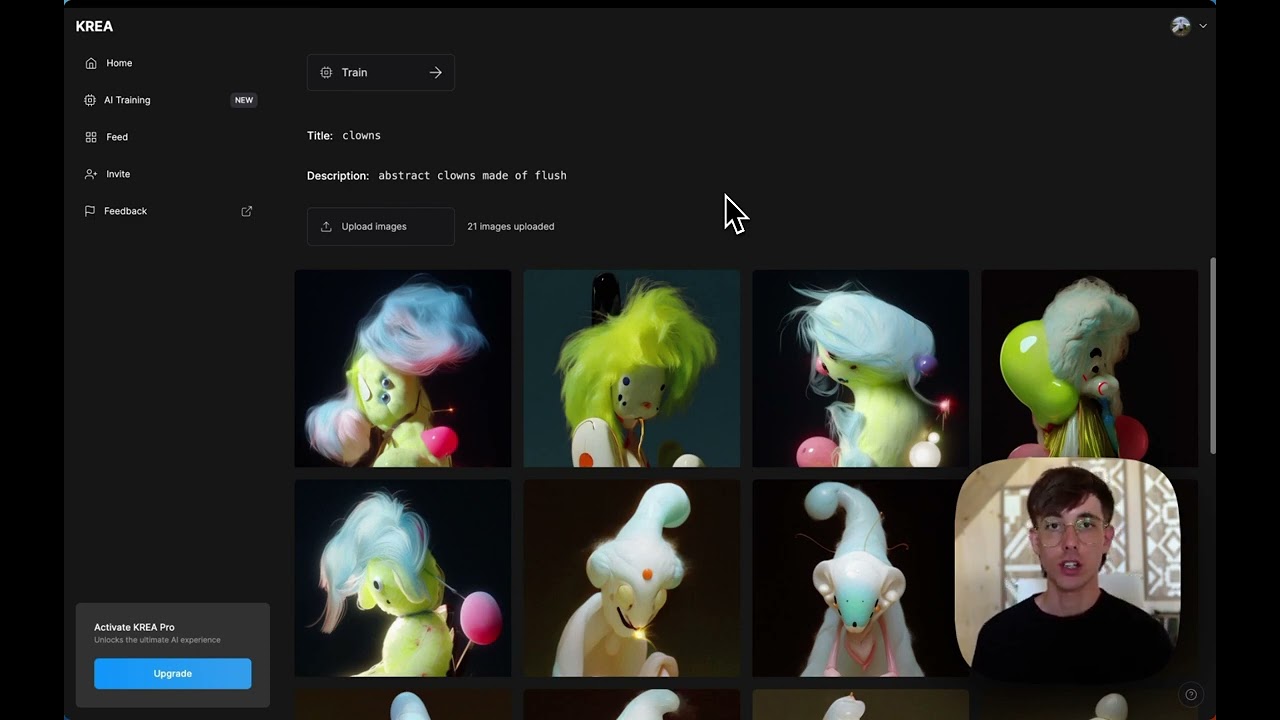
Yep, upload 10-20 images to fine-tune models like LoRAs for your style or face, great for consistent characters in books or branding. It takes minutes, but free tier limits jobs. This sets it apart for personalized work, though results vary with your dataset quality.
What are the main pros and cons of using Krea.ai?
Pros include blazing real-time speed, intuitive UI, and access to 60+ models under one sub, making it 50x cheaper than juggling tools. Cons? Occasional inconsistencies with humans or complex prompts, and free limits might frustrate. Overall, it's a creator's dream if you like experimenting.
Is Krea.ai safe for commercial use?
Yes, all plans include a commercial license, so generated assets are yours to sell or use in business. They have a no-train policy for proprietary data, keeping things secure. Just check outputs don't infringe copyrights, as with any AI tool.
How does Krea.ai compare to Midjourney or Leonardo.ai?
Krea's real-time canvas beats Midjourney's wait times for interactive edits, and it's more affordable than Leonardo for video. But Midjourney edges on community styles, while Leonardo offers deeper customization. Pick Krea if speed and all-in-one (images/videos/3D) matter most.
Can I cancel my Krea.ai subscription easily?
Sure, log in, go to settings, and cancel anytime, access lasts till billing ends. No long-term lock-in, which users appreciate. If unsure, the free tier lets you test without commitment.

Related tools ↙️

  1. AIEASE AIEASE An AI-powered platform offering a suite of free photo editing tools
  2. Architect Render Architect Render Generates photorealistic architectural renderings from sketches, photos, or designs in seconds
  3. SVG AI SVG AI Transforms text prompts into scalable vector icons and logos instantly
  4. Aftershoot Aftershoot Automates photo culling and editing for professional photographers using AI
  5. Creative Fabrica Studio Creative Fabrica Studio A suite of AI-powered digital creation tools that generates custom art, writing, and designs.
  6. ImgUpscaler ImgUpscaler AI image upscaler and enlarger
Last update: November 18, 2025
Share
Promote Krea
light badge
Copy Embed Code
light badge
Copy Embed Code
light badge
Copy Embed Code
About Us | Contact Us | Suggest an AI Tool | Privacy Policy | Terms of Service

Copyright © 2026 Best AI Tools
415 Mission Street, 37th Floor, San Francisco, CA 94105