
logo-darklogo-darklogo-darklogo-dark
  • Home
  • Browse
    • Assistant
    • Coding
    • Image
    • Productivity
    • Video
    • Voice
    • Writing
    • All Categories
    • AI Use Cases
  • My Favorites
  • Suggest a Tool
✕
Home › Productivity ›

MindMap AI

Published by Dusan Belic on April 27, 2025

MindMap AI

MindMap
MindMap AI Homepage
Categories Productivity
An online tool that helps users create mind maps using artificial intelligence

MindMap AI

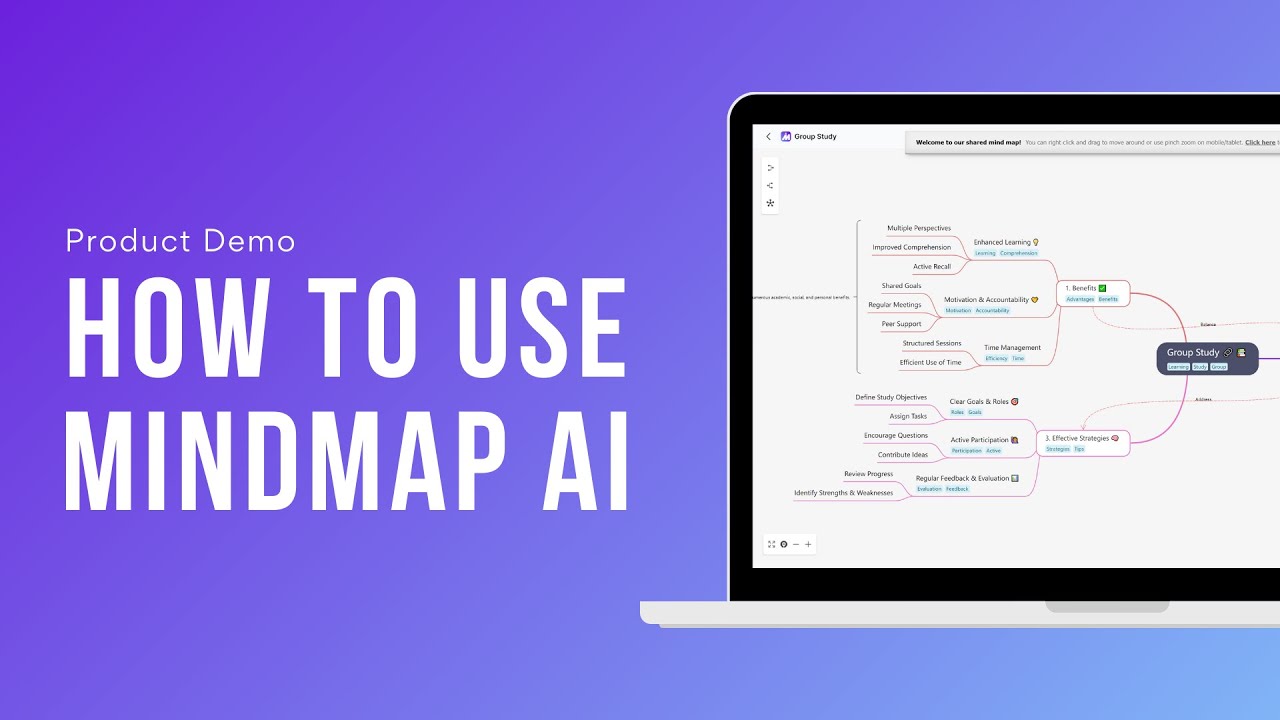
MindMap AI is an online tool that helps users create mind maps using artificial intelligence. You can use it to turn your notes, PDFs, images, or even videos into clear, organized diagrams. It’s like having a smart assistant that understands your ideas and arranges them neatly. This makes the tool handy for students, professionals, and anyone else who wants to visualize their thoughts.

Say you need to prepare for a presentation and have a lot of information scattered across different formats. MindMap AI can help by taking your text, audio, and video files and converting them into a structured mind map. This makes it easier to see connections between ideas and ensures you don’t miss any important points.

The tool also includes the AI Copilot Chat, an interactive assistant that helps you brainstorm by suggesting ideas and keeping track of your thought process. It’s like having a brainstorming partner who never gets tired. You can ask it questions, get suggestions, and refine your mind map in real-time.

MindMap AI also offers different customization options. You can edit the AI-generated mind maps, add your own stuff, and adjust the structure to fit your needs. So, whether you’re a visual learner or someone who prefers detailed outlines, this tool adapts to your style. Plus, it lets you export your mind maps in different formats like PNG, PDF, or Markdown — making it easy to share with others.

MindMap AI offers a free plan, which includes 100 AI credits per month. If you need more, there are paid (yet affordable) plans offering additional credits and features. This flexibility is there to ensure that both casual users and power users can find a plan that suits their needs. And that’s pretty much the way we like it.

MindMap AI Homepage
Categories Productivity

Video Overview ▶️

What are the key features? ⭐

  • Mind map generation: Automatically creates mind maps from various inputs like text, PDFs, images, audio, and video files - saving time and ensuring a structured output.
  • AI Copilot Chat: Engage in brainstorming sessions with an AI assistant that offers suggestions and keeps track of your ideas.
  • Multi-format input: MindMap AI accepts diverse input formats, allowing you to create mind maps from different types of content - making it suitable for all kinds of projects.
  • Customizable mind maps: Edit and refine AI-generated mind maps to add personal insights and adjust the structure.
  • Export options: Download your mind maps in formats like PNG, PDF, SVG, or Markdown for easy sharing.

Who is it for? 🤔

MindMap AI is designed for a broad audience, including students, educators, professionals, and creatives. Its versatile features make it suitable for anyone looking to organize information visually. So, whether you're preparing for exams, planning a business strategy, or outlining a novel - this tool can help you out.

Examples of what you can use it for 💭

  • Students can use it to convert lecture notes and research materials into organized mind maps for better understanding and revision
  • Professionals can outline strategies, project plans, and meeting notes to make complex information more digestible
  • Writers and marketers can structure articles, campaigns, and content ideas to ensure a coherent flow
  • Educators can present information in a visual format, enhancing engagement and retention among participants
  • Individuals can map out goals, habits, and personal projects to provide clarity and motivation

Pros & Cons ⚖️

  • Supports a wide range of file formats
  • Interactive assistance with the AI Copilot Chat
  • Offers a free plan and reasonably priced subscriptions
  • Limited free credits you'll quickly use

FAQs 💬

What is MindMap AI?
MindMap AI is an AI-powered tool that instantly creates editable mind maps from text, documents, images, audio, video, or data files, helping users brainstorm, study, or organize ideas visually.
How does MindMap AI generate mind maps?
You input content or upload files, the AI analyzes context and relationships using step-by-step reasoning, then builds a structured mind map with branches and subtopics automatically.
Can I edit the AI-generated mind maps?
Yes, you have full control to manually adjust branches, add or remove nodes, and use the Copilot Chat to expand or refine specific parts interactively.
What types of files can I upload to create mind maps?
It supports text, PDFs, images (PNG, JPG, etc.), audio, video, Markdown, CSV, JSON, XML, and HTML files for conversion into mind maps.
Does MindMap AI work for studying or learning?
Absolutely, it's popular among students for turning notes, books, research papers, or lectures into clear visual summaries that improve understanding and retention.
Is there an interactive AI assistant in MindMap AI?
Yes, the Copilot Chat lets you converse with the AI directly in your mind map to brainstorm, ask questions, or make targeted changes.
Can I change the layout or style of my mind maps?
You can switch between mind map, org chart, or logic chart views and customize colors, fonts, shapes, themes, and add widgets freely.
What export options does MindMap AI offer?
Mind maps export easily to PNG, SVG, PDF, CSV, or Markdown formats for sharing or use in other tools.
Does MindMap AI support collaboration or sharing?
You can share maps with others, and the tool includes version history and undo/redo for easy editing and teamwork.
Is MindMap AI suitable for professionals and teams?
Yes, it's used by teams for brainstorming, project planning, and organizing complex information, with features like stable co-editing and quick summarization.

Related tools ↙️

  1. Fluig Fluig Converts documents and ideas into professional diagrams instantly
  2. Asana AI Asana AI An AI helper built into the Asana platform to make managing projects and tasks easier
  3. Clado Clado Searches over 800 million profiles with AI agents to match complex people-finding needs
  4. FlowCharts.ai FlowCharts.ai An AI tool to easy creation of surveys, forms, questionnaires, and workflows
  5. FuseBase AI FuseBase AI An AI tool that enhances productivity and streamlines workflows for professional services
  6. CalStudio CalStudio Builds and monetizes custom AI apps without coding.
Last update: January 25, 2026
Share
Promote MindMap AI
light badge
Copy Embed Code
light badge
Copy Embed Code
light badge
Copy Embed Code
About Us | Contact Us | Suggest an AI Tool | Privacy Policy | Terms of Service

Copyright © 2026 Best AI Tools
415 Mission Street, 37th Floor, San Francisco, CA 94105