Skip to content
logo-darklogo-darklogo-darklogo-dark
  • Tool Categories
    • 🎨Art & Creative Design505
    • 🏢Business Management644
    • 💻Coding & Development514
    • 👮Detection83
    • 🧠General Use728
    • 🏥Health & Wellness55
    • 📷Image & Photo Analysis100
    • 🖼️Image Generation & Editing618
    • 📐Interior & Architectural Design37
    • 🎓Learning & Education483
    • ⚖️Legal & Finance90
    • 🎭Lifestyle & Entertainment236
    • 📢Marketing & Advertising627
    • 🎧Music & Audio138
    • 👔Office & Workplace1,014
    • 🔬Research & Data Analysis373
    • 👥Social Media245
    • 🎥Video Generation & Editing426
    • 👧🏻Virtual Companion135
    • 🎤Voice Generation & Editing381
    • ✍️Writing & Editing808
    • All Categories
    • AI Use Cases
  • News
  • Events
    • Academic Conferences
    • Developer Conferences
    • Expos / Trade Shows
    • Industry Summits
    • Workshops / Training
    • All Events
    • Past Events
  • Saved Tools
  • Suggest a Tool
    ✕
    Home › Voice Generation & Editing › Podcast› Podcastle
    Podcastle

    Podcastle

    Audio & video creation platform for the creation, editing, and distribution of podcasts

    Podcastle is an AI-powered audio and video creation platform that helps professional and amateur podcasters create, edit and distribute production-quality podcasts. In that sense, the company behind the tool aims to democratize access to broadcast storytelling through easy-to-use tools that are professional yet fun.

    Beyond audio and video recording capabilities, Podcastle features an online audio editor, Magic Dust for removing background noise, Revoice (to create a digital copy of your own voice), text-to-speech capabilities, silence removal, and a hosting hub, which is used for hosting and distribution of your content. Finally, there’s the iOS app offering a professional quality audio recorder for iPhone users. As of September 2023, the Android version is still not available.

    In other words, Podcastle offers an entire creator toolkit that is easy to use yet can produce exceptional quality audio and video recordings on a web-based platform. So, if you ever thought of launching your own podcast — or could use some help from AI — give Podcastle a try. Chances are it will make life easier for you.

    Visit Podcastle ↗
    Categories
    🎤 Voice
    🎙️ Podcast 🎤 Recording 📝 Transcriber 📢 Text-to-Speech 🗨️ Voice Generation 💬 Speech-to-Text 👯 Voice Cloning
    🎧 Music
    🎚️ Audio Editing 🎛️ Audio Enhancing 🔇 Noise Cancellation
    🎥 Video
    ✏️ Video Editing

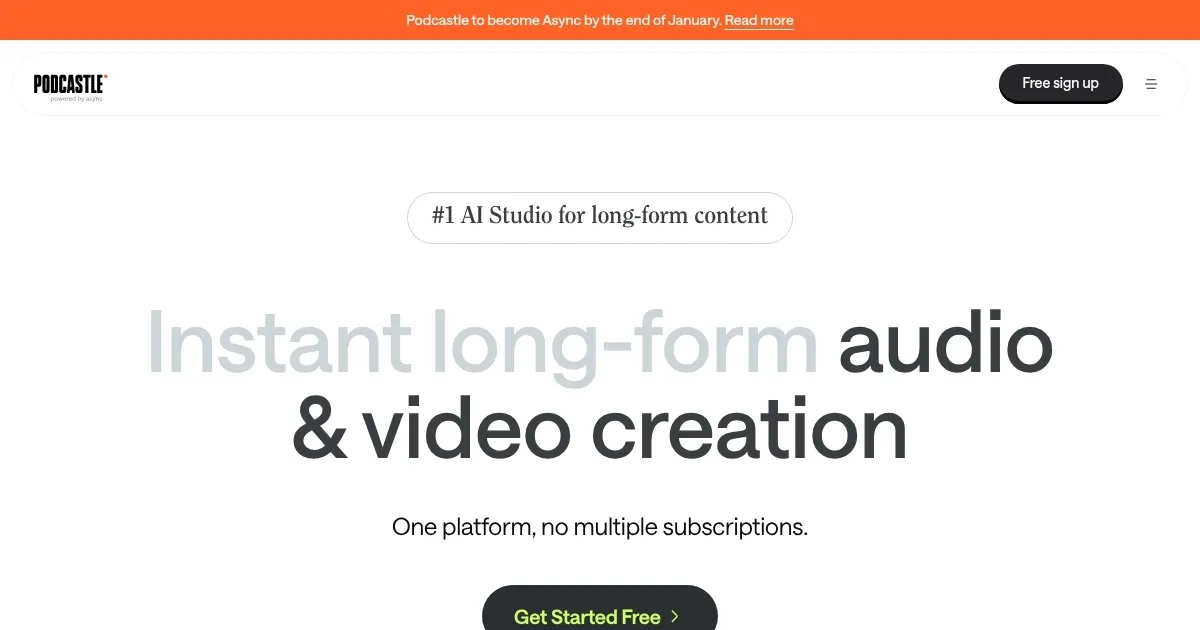
    Homepage Screenshot 📸

    Podcastle screenshot

    Video Overview 🎬

    Podcastle - Video Overview

    What are the key features? ✨

    • Multi-track recording: Podcastle lets you record remote interviews in studio quality with local recordings of each track.
    • Audio transcription: You can also convert your live speech or audio files into text in a matter of seconds.
    • Easy editing: Among the tools you can use are auto-leveling, dynamic fading, royalty-free music & effects, and more.
    • Text to speech: With cutting-edge voice skins that can turn any text into a variety of lifelike human voices.
    • Magic Dust: That's AI-powered noise cancellation that makes your audio files sound flawless with that professional studio touch.
    • Revoice: Create a digital copy of your own voice with AI and then generate audio just by typing.

    Who is it for? 🤔

    Podcastle is used by all kinds of folks. As its name says, it is designed to tune into the podcasting market, but its market extends to marketers, small business owners, bloggers, journalists, educators, website operators, and everyone else looking to add a "touch of audio" to his product or service. Podcastle is easy to use, yet all the features it offers are nothing short of amazing.

    Examples of what you can use it for 💡

    • Creating podcasts even by those who haven't done it before
    • Turn books into audiobooks with ease
    • Make educational videos in multiple languages
    • Streamline communication with text-to-speech and other tools
    • Create engaging online courses

    Pros & Cons ⚖️

    • Easy to use, yet powerful with studio-level quality recording
    • Creating a digital copy of your own voice is pretty cool
    • Especially great for podcast newbies
    • Where's the Android app?
    • AI tools are not included in the free plan

    FAQs 💬

    What is Podcastle mainly used for?
    Podcastle helps people record, edit, enhance, transcribe, and publish high-quality podcasts, videos, voiceovers, and audiobooks using AI tools in one platform.
    Do I need special equipment to use Podcastle?
    No, it works right in your browser with any decent microphone and webcam, though better hardware improves results. The AI tools handle a lot of cleanup automatically.
    How accurate is the AI transcription?
    The transcription is generally accurate for clear speech and supports multiple languages, making it great for editing, captions, or repurposing content into text.
    Can Podcastle clone my voice?
    Yes, with Revoice you record a short sample and create an AI version of your voice to use for text-to-speech in episodes, narrations, or when you can't record.
    Is Podcastle good for beginners?
    Absolutely, its intuitive interface and one-click AI features like noise removal and silence cutting make it beginner-friendly while still offering pro-level options.
    Does it support video podcasts?
    Yes, you record and edit video with AI enhancements like background blur, eye contact fix, and auto-subtitles, perfect for YouTube or video-first shows.
    Can multiple people collaborate on a project?
    Yes, teams use shared workspaces for real-time feedback, especially useful for businesses or group podcasts.
    How does Podcastle handle background noise?
    Magic Dust AI removes noise, echo, and artifacts with one click, turning average recordings into clear, professional-sounding audio.
    Is it suitable for remote interviews or guests?
    Yes, the browser-based studio lets you invite guests easily for high-quality remote recording without downloads.
    What makes Podcastle's AI voices special?
    It offers one of the largest libraries of lifelike voices powered by their own model, with natural tones, accents, and fast generation for voiceovers or full episodes.

    Ready to try Podcastle?

    Audio & video creation platform for the creation, editing, and distribution of podcasts

    Visit Podcastle ↗

    Podcastle alternatives 🔗

    1. ElevenLabs ElevenLabs Generates lifelike, expressive AI voices for diverse applications
    2. Streamlabs Podcast Editor Streamlabs Podcast Editor A podcast editing solution that transcribes audio and video to text for easy edits and repurposing content
    3. Wondercraft Wondercraft Turn existing content into captivating podcasts, effortlessly
    4. Cleanvoice Cleanvoice Removes filler sounds, mouth clicks, and background noise from podcast audio automatically
    5. Auphonic Auphonic Automates professional audio enhancement, leveling, noise reduction, and mastering for spoken content
    6. Audo AI Audo AI Automatically remove background noise and enhance your speech using the power of AI
    Share
    Podcastle screenshot enlarged
    Best AI Tools

    Discover the best AI tools for any use case

    Explore
    • Tool Categories
    • AI Use Cases
    • AI Events
    • AI News
    • Saved Tools
    Company
    • About Us
    • Contact Us
    • Media & Partnerships
    • Suggest a Tool
    Legal
    • Privacy Policy
    • Terms of Service
    Copyright © 2026 Best AI Tools 415 Mission Street, 37th Floor, San Francisco, CA 94105