logo-darklogo-darklogo-darklogo-dark
  • Home
  • Browse
    • Assistant
    • Coding
    • Image
    • Productivity
    • Video
    • Voice
    • Writing
    • All Categories
    • AI Use Cases
  • My Favorites
  • Suggest a Tool
✕
Home › Assistant›
Published by Dusan Belic on July 10, 2023

TypingMind

TypingMind
TypingMind Homepage
Categories Assistant

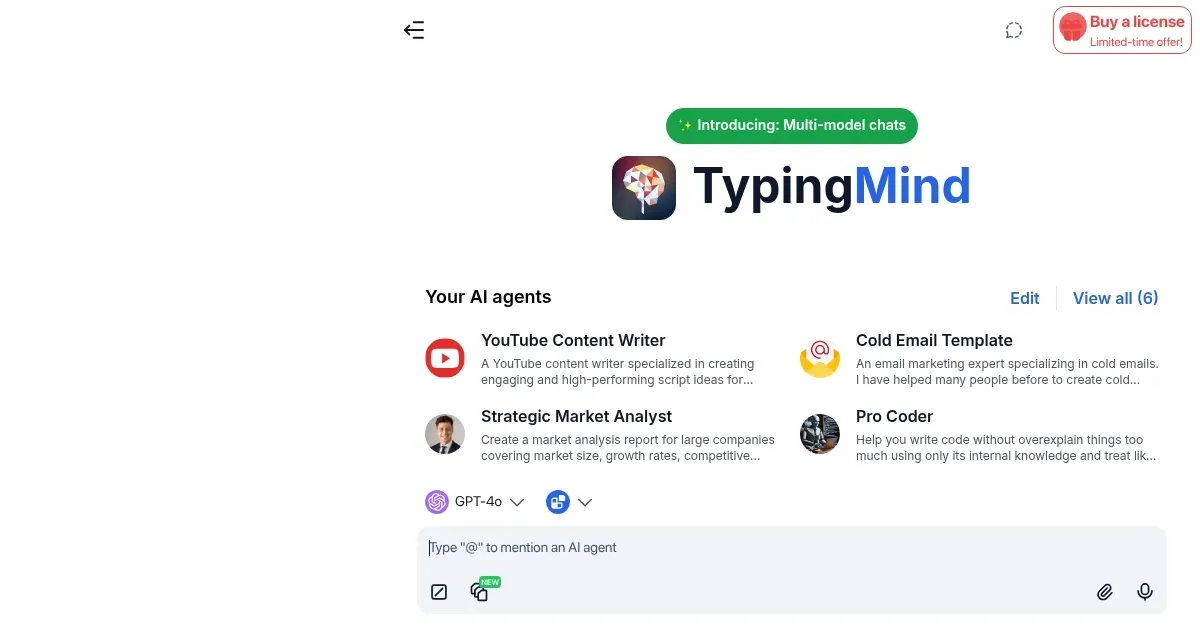
TypingMind - screenshot

A better UI for ChatGPT with folders, search, export, prompt library, and more

TypingMind

TypingMind is a chat frontend UI designed to enhance the experience of interacting with various AI models such as ChatGPT, Gemini, and Claude, among others. It offers a platform where users can bring their own API keys to connect with these AI models without any usage limits or monthly fees.

TypingMind provides an array of features, including the ability to manage chats through searching, creating folders, tagging, and exporting data. It supports multiple AI chat models, allows for model customization, and includes built-in AI characters and community prompts for diverse applications. In addition, there are functionalities like text-to-speech, voice input, web search, and image processing through DALL-E.

TypingMind emphasizes privacy and security by storing data locally on the user’s device, ensuring that conversations are not used for training purposes unless the optional cloud sync and backup feature is activated. It offers advanced customization options through plugins, allowing users to extend functionalities like HTML rendering and web searching.

All in all, TypingMind is a cool chat AI app with configuration options for model parameters, language output control, conversation management, and integration capabilities — making it useful for enhancing AI chat interactions.

TypingMind Homepage
Categories Assistant

What are the key features? ⭐

  • Multi-model support: Seamlessly switch between leading AI models like ChatGPT, Claude, Gemini, and others using your own API keys in one interface.
  • Advanced plugins: Extend functionality with tools for web search, chart rendering, image generation, code execution, and more.
  • Custom AI agents: Build and use specialized agents with prompt chaining, file attachments, and plugin integrations for complex tasks.
  • Privacy-focused storage: Keep conversations local by default with encryption and no data used for external training.
  • Organization tools: Manage chats efficiently with folders, tags, search, pinning, and parallel chat comparison.

Who is it for? 🤔

TypingMind suits professionals, developers, researchers, content creators, and teams who interact with AI models daily and want greater control, privacy, and efficiency. It benefits anyone already using API access from providers like OpenAI or Anthropic who feels limited by official interfaces, as well as users who need to organize large numbers of conversations, compare model outputs, or extend basic chat with plugins and custom agents. Beginners comfortable with API keys can grow into its advanced features, while heavy users appreciate the one-time cost and local-first design.

Examples of what you can use it for 💭

  • Content creator: Organizes research chats, generates ideas with custom prompts, and uses web search to fact-check articles quickly.
  • Developer: Runs code snippets in the interactive canvas, compares model suggestions for debugging, and builds agents for repetitive coding tasks.
  • Researcher: Uploads PDFs for summarization, activates deep research mode for multi-step analysis, and visualizes data trends with automatic charts.
  • Marketer: Creates campaign copy with specialized agents, generates presentation slides via plugins, and compares model tones side by side.
  • Student: Manages study notes across subjects in folders, uses voice input for brainstorming, and chats with multiple models to understand complex topics.

Pros & Cons ⚖️

  • One-time payment
  • Strong privacy
  • Rich plugins
  • Multi-model chats
  • API key setup needed
  • Cloud sync extra cost

FAQs 💬

What is TypingMind exactly?
TypingMind is a frontend chat interface that connects to various AI models using your own API keys, offering better organization, plugins, and customization than official web apps.
Do I need to pay monthly for TypingMind?
No, it uses a one-time lifetime license payment. You only pay ongoing API usage fees to the model providers you choose.
Which AI models can I use with TypingMind?
It supports OpenAI (ChatGPT), Anthropic (Claude), Google (Gemini), Mistral, Grok, DeepSeek, and many others through integrations like OpenRouter.
Is my data private when using TypingMind?
Yes, conversations are stored locally by default, nothing is used for training, and you can add password encryption for extra security.
Can TypingMind replace ChatGPT Plus?
For many users yes, especially if you value organization, multi-model support, and no message limits, though you supply your own API key.
Does TypingMind have plugins?
Yes, it includes many built-in plugins for web search, charts, image generation, code execution, document analysis, and more.
Can I build my own AI agents in TypingMind?
Yes, you can create custom agents with prompt chaining, file uploads, plugins, and assign different models to them.
Is there a free version of TypingMind?
The core app is paid via one-time license, but you can test features before buying, and some basic usage may be available in trial contexts.
How does TypingMind compare to LibreChat?
TypingMind offers easier setup and more polished features while LibreChat is free and open-source but usually requires more technical configuration.
Can I use TypingMind on multiple devices?
Yes, local storage works per device, and optional paid cloud sync lets you access chats across machines.
Visit TypingMind

Related tools ↙️

  1. Hoody AI Hoody AI Provides anonymous access to multiple LLMs in one dashboard.
  2. Sidekick AI Sidekick AI Automates meeting bookings via email forwarding and smart pages
  3. Private LLM Private LLM Runs local AI chatbots offline on Apple devices, ensuring privacy
  4. Chat 4O AI Chat 4O AI Generates images, videos, and assists with AI-powered chats and tasks
  5. PromptLayer PromptLayer Streamlines prompt engineering through visual management and evaluations
  6. AI Perfect Assistant AI Perfect Assistant Integrates AI into Office apps for instant content generation and editing
Last update: February 3, 2026
Share
Promote TypingMind
light badge
Copy Embed Code
dark badge
Copy Embed Code
neutral badge
Copy Embed Code
About Us | Contact Us | Suggest an AI Tool | Privacy Policy | Terms of Service

Copyright © 2026 Best AI Tools
415 Mission Street, 37th Floor, San Francisco, CA 94105