logo-darklogo-darklogo-darklogo-dark
  • Home
  • Browse
    • Assistant
    • Coding
    • Image
    • Productivity
    • Video
    • Voice
    • Writing
    • All Categories
    • AI Use Cases
  • Events
  • My Favorites
  • Suggest a Tool
✕
Home â€ș Assistantâ€ș
Published by Dusan Belic on August 30, 2023

Voila

Voila
Voila Homepage
Categories Assistant
Personal AI assistant for supercharged productivity, use ChatGPT on any website

Voila

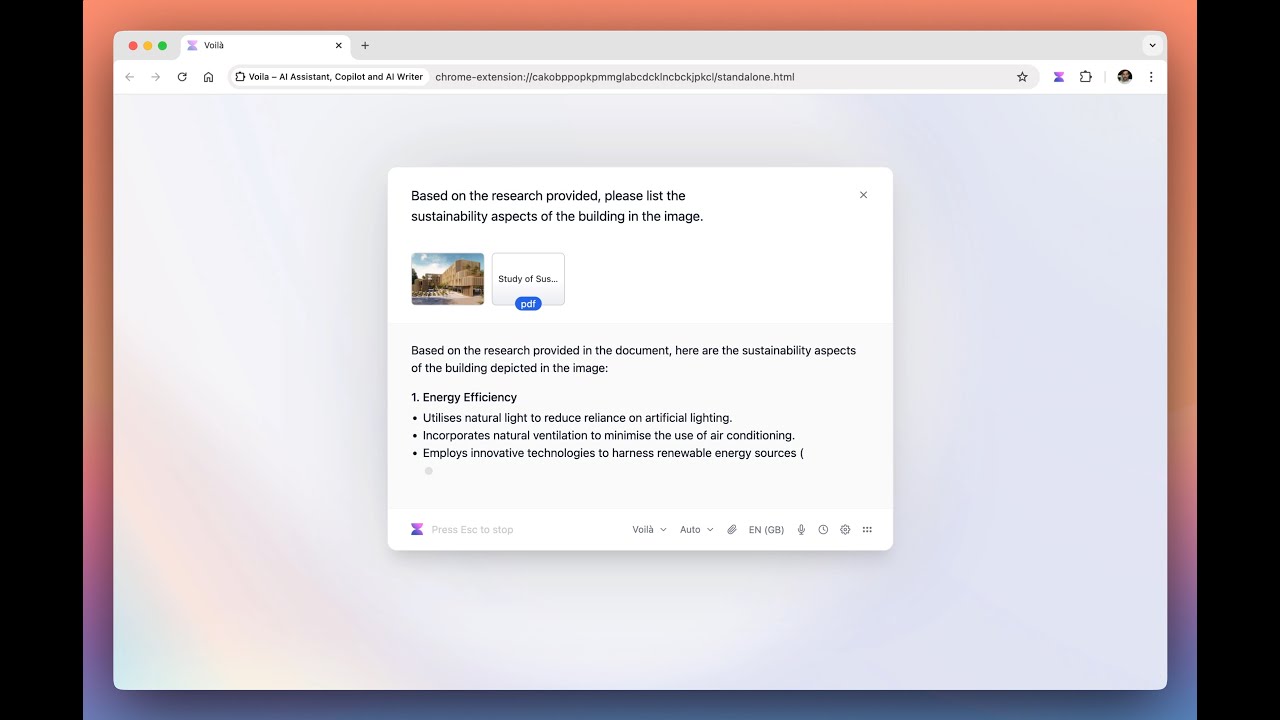
VoilĂ  is an AI-powered browser assistant that boosts productivity by enabling users to create high-quality content, conduct deep research, and efficiently manage writing tasks across various domains. It features a library of expertly curated, battle-tested prompts designed to assist in the generation of a wide array of content types — including ad campaigns, blog posts, resumes, social media content, email replies, and more.

In addition, VoilĂ  allows users to effectively manage their email inbox with AI-powered instant reply suggestions, and improve their writing quality across languages. It supports many different tasks, from summarizing web pages to creating compelling ad copies or detailed market research reports.

The tool’s creators emphasize user privacy, ensuring that content and AI interactions are not stored or used for AI training — aligning with GDPR and CCPA standards.

Finally, you’d like to know that VoilĂ  seamlessly integrates with popular browsers such as Chrome, Edge, Firefox, and Safari — and is also available for iOS and Android devices.

Voila Homepage
Categories Assistant

Video Overview ▶️

Voila - Video Overview

What are the key features? ⭐

  • Context-Aware Assistance: Interacts directly with the current webpage, document, or email for relevant responses without manual copying.
  • Expert Prompt Library: Provides battle-tested templates for content creation, plus the ability to save and organize custom prompts.
  • Email Drafting & Instant Reply: Generates professional email responses and drafts based on full thread context.
  • Research with Reliable Sources: Delivers real-time answers and insights from credible web sources with citations.
  • Multi-Device Support: Available as browser extension, desktop apps (Mac/Windows), and mobile apps (iOS/Android).

Who is it for? 🤔

VoilĂ  suits busy professionals, content creators, marketers, researchers, salespeople, and anyone who spends significant time online and wants to streamline writing, email handling, summarization, and quick research without switching tools or tabs constantly.

Examples of what you can use it for 💭

  • Content Creator: Uses expert prompts and rewriting tools to draft blog posts, social media content, or ad copy efficiently from web research.
  • Busy Professional: Summarizes long articles, emails, or documents instantly and drafts quick, professional replies to stay on top of inbox.
  • Researcher/Student: Asks questions about any topic or webpage, gets cited answers from reliable sources, and analyzes uploaded PDFs or images.
  • Marketer/SEO Specialist: Generates domain-specific content, improves copy tone, and researches trends directly on competitor sites.
  • Team Collaborator: Shares custom workflows and prompts with colleagues for consistent output across projects.

Pros & Cons ⚖️

  • Seamless browser integration
  • Strong privacy focus
  • Multi-device availability
  • Occasional prompt inconsistencies
  • Limited free tier requests

FAQs 💬

What is VoilĂ  mainly used for?
VoilĂ  serves as an all-in-one productivity assistant for writing, summarizing, researching, emailing, and creating content directly in your browser or apps.
Does VoilĂ  work on any browser?
It supports Chrome, Firefox, and Edge, with full features available through the extension.
Is my data private with VoilĂ ?
Yes, your content and conversations are never stored on servers or used for AI training, and it complies with GDPR and CCPA.
Can I use VoilĂ  on mobile devices?
Yes, dedicated apps exist for iOS and Android, plus desktop versions for Mac and Windows.
How does the free plan compare to paid ones?
The free plan offers limited requests, while paid plans provide more usage, advanced models, priority access, and team features.
Does it support image generation?
Yes, it includes text-to-image generation for quick visuals.
Can I chat with documents or images?
Absolutely, upload PDFs, docs, or pictures to summarize, analyze, or rewrite content.
How does it handle email?
It offers Instant Reply and templates to draft or improve responses right in your inbox.
What models power VoilĂ ?
It uses advanced models including options like GPT-5 and others for high-quality output.
Is there team collaboration support?
Yes, shared workflows, templates, and team plans make it suitable for groups.
Visit Voila

Related tools ↙

  1. Hoody AI Hoody AI Provides anonymous access to multiple LLMs in one dashboard.
  2. Sidekick AI Sidekick AI Automates meeting bookings via email forwarding and smart pages
  3. Private LLM Private LLM Runs local AI chatbots offline on Apple devices, ensuring privacy
  4. Chat 4O AI Chat 4O AI Generates images, videos, and assists with AI-powered chats and tasks
  5. AI Perfect Assistant AI Perfect Assistant Integrates AI into Office apps for instant content generation and editing
  6. PromptLayer PromptLayer Streamlines prompt engineering through visual management and evaluations
Last update: January 10, 2026
Share
Promote Voila
light badge
Copy Embed Code
dark badge
Copy Embed Code
neutral badge
Copy Embed Code
About Us | Contact Us | Suggest an AI Tool | Privacy Policy | Terms of Service

Copyright © 2026 Best AI Tools
415 Mission Street, 37th Floor, San Francisco, CA 94105