logo-darklogo-darklogo-darklogo-dark
  • Home
  • Browse
    • Assistant
    • Coding
    • Image
    • Productivity
    • Video
    • Voice
    • Writing
    • All Categories
    • AI Use Cases
  • My Favorites
  • Suggest a Tool
✕
Home › Design Generation›
Published by Dusan Belic on November 7, 2024

Architect AI

Architect AI
Architect AI Homepage
Categories Design Generation

Architect AI - screenshot

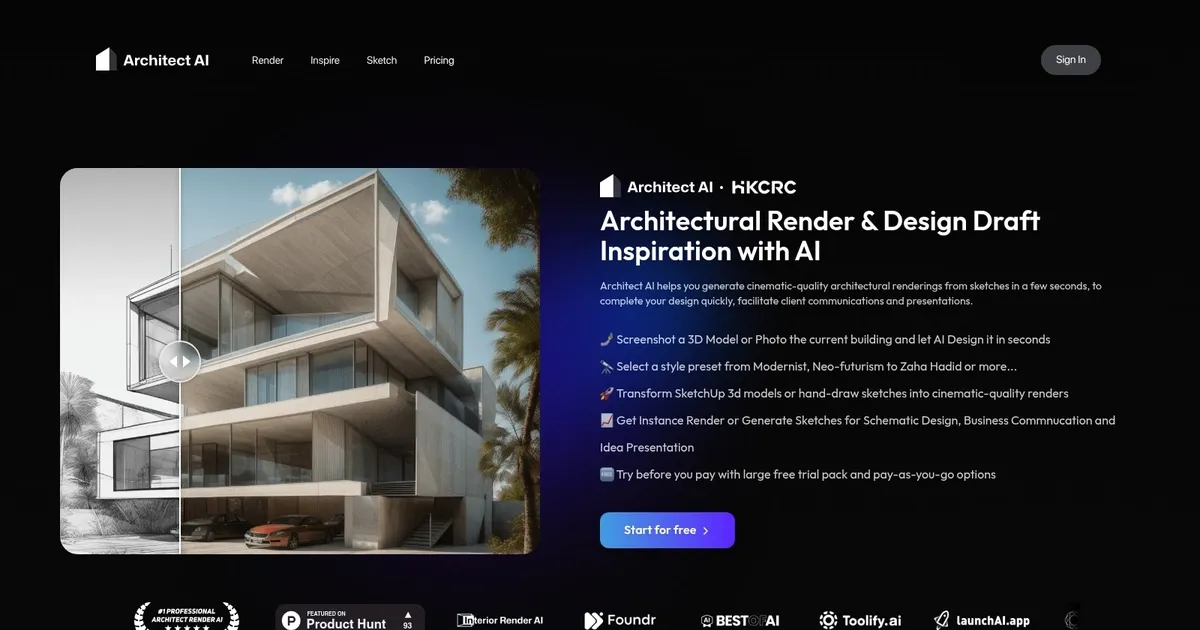
Transform conceptual sketches into high-quality renderings within seconds

Architect AI

Architect AI is a fancy platform that leverages artificial intelligence to transform conceptual sketches into high-quality renderings within seconds. The tool streamlines the design process, enabling architects and designers to quickly visualize their ideas and enhance client presentations. By automating the rendering process, Architect AI reduces the time and effort traditionally required — allowing professionals to focus more on creativity and design development.

Users can upload various inputs, including hand-drawn sketches, 3D models, or photographs of existing structures. The platform offers a range of style presets, from Modernist and Neo-futurism to designs inspired by famous architects like Zaha Hadid. In addition, users can customize environmental settings such as weather conditions and landscapes.

Architect AI boasts a user-friendly interface requiring no subscription or contract commitments. The platform operates on a pay-as-you-go model, offering a generous free trial and flexible credit-based pricing options. This approach makes it accessible to many users, from individual designers to large architectural firms.

Privacy and data security are also prioritized, as the platform ensures that user-uploaded content is not used for AI training or shared with third parties.

Ultimately, by integrating advanced AI capabilities with a focus on user experience and data security – Architect AI represents a significant advancement in architectural design tools.

Architect AI Homepage
Categories Design Generation

What are the key features? ⭐

  • Sketch-to-Render: Converts hand-drawn sketches or rough drafts into photorealistic exterior architectural visuals in seconds.
  • 3D Model & Snapshot Support: Processes screenshots from modeling software or photos to create polished renderings.
  • Customizable Environments & Weather: Applies user-selected settings like desert, forest, seaside, sunny, stormy for contextual realism.
  • Architectural Style Presets: Includes influences such as Zaha Hadid or Renaissance to guide aesthetic direction.
  • Natural Language Prompting: Allows text-based refinements to adjust lighting, mood, materials, and other details.

Who is it for? 🤔

Architect AI helps architects, interior and exterior designers, architecture students, freelance practitioners, real estate developers, urban planners, and even architectural photographers who need fast, high-quality renderings for concepts, client presentations, competitions, portfolios, or previsualization. Its especially useful for anyone frustrated by long wait times in traditional rendering workflows or those who want to explore many visual directions quickly without heavy software investment.

Examples of what you can use it for 💭

  • Practicing architect: Uploads early concept sketches to generate client-ready exterior visuals during initial meetings.
  • Architecture student: Creates polished portfolio images from competition hand drawings in time for submission deadlines.
  • Freelance designer: Produces multiple stylistic variations for a developer pitch without waiting on external render artists.
  • Real estate developer: Visualizes potential building designs in different environments to evaluate site suitability.
  • Urban planner: Tests massing ideas with realistic surroundings to communicate proposals to stakeholders.

Pros & Cons ⚖️

  • Very fast rendering
  • Strong style control
  • Handles rough inputs
  • Free starting access
  • Best for exteriors
  • Occasional odd details

FAQs 💬

What types of inputs does Architect AI accept?
It works with hand-drawn sketches, screenshots from 3D modeling software like SketchUp or Revit, and photos of models or buildings.
How long does it take to generate a rendering?
Most renders complete in just a few seconds after upload and parameter selection.
Can I customize the style of the output?
Yes, choose presets like Zaha Hadid or Renaissance, or use natural language prompts for specific adjustments.
Is there a free option to try Architect AI?
You can start for free, with paid options available for more frequent or advanced use.
Does it support interior renderings?
The primary focus is on exterior architectural visuals, though related tools from the same group handle interiors.
What makes Architect AI different from general image AI tools?
It understands architectural context, applies believable lighting and materials, and offers architecture-specific presets and environments.
Can I use it for client presentations?
Many users rely on it exactly for that, creating quick, professional-looking options to discuss during meetings.
Do I need advanced modeling skills to use it?
No, even very rough sketches or photos produce strong results, making it accessible for early-stage ideas.
Visit Architect AI

Related tools ↙️

  1. MyArchitectAI MyArchitectAI Transforms architectural designs and sketches into photorealistic renders in seconds using AI
  2. Typeset Typeset Automates design and writing for ebooks, presentations, and social graphics quickly
  3. Architect Render Architect Render Generates photorealistic architectural renderings from sketches, photos, or designs in seconds
  4. Flowstep Flowstep Generates user flows, wireframes, and UI designs from simple text prompts
  5. MenuGen MenuGen Transforms menu photos into AI-generated dish images.
  6. Bugfree.ai Bugfree.ai Prepares users for system design and behavioral interviews with AI mocks and practice
Last update: February 23, 2026
Share
Promote Architect AI
light badge
Copy Embed Code
dark badge
Copy Embed Code
neutral badge
Copy Embed Code
About Us | Contact Us | Suggest an AI Tool | Privacy Policy | Terms of Service

Copyright © 2026 Best AI Tools
415 Mission Street, 37th Floor, San Francisco, CA 94105