logo-darklogo-darklogo-darklogo-dark
  • Home
  • Browse
    • Assistant
    • Coding
    • Image
    • Productivity
    • Video
    • Voice
    • Writing
    • All Categories
    • AI Use Cases
  • My Favorites
  • Suggest a Tool
✕
Home › Image Generation & Editing›
Published by Dusan Belic on August 30, 2023

Artguru Avatar Generator
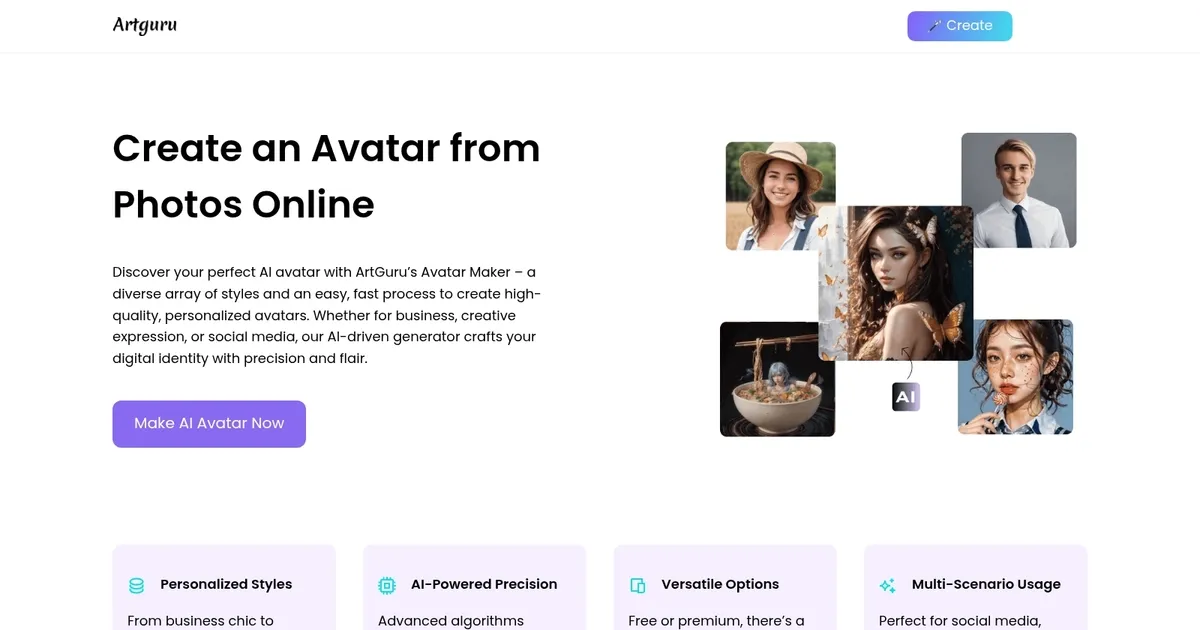
Artguru Avatar Generator Homepage
Categories Image Generation & Editing

Artguru Avatar Generator - screenshot

Create highly realistic and expressive avatars with Artguru's advanced AI model

Artguru Avatar Generator

The Artguru AI Avatar Generator is an online tool designed to create highly personalized and realistic avatars based on user input and photos. It allows users to customize their avatars from various styles, including Cyberpunk City, Watercolor Art, Spidey 2023, and many more — ensuring a unique and expressive outcome.

The process involves selecting the avatar’s gender, choosing up to ten preferred styles, uploading between 6 to 30 selfies showcasing different expressions and backgrounds – and then letting the AI model generate custom avatars. This user-friendly tool aims to enhance digital representation by allowing users to easily generate avatars in various artistic expressions.

The Artguru AI Avatar Generator also offers features like automatic image enhancement to ensure the avatars look their best. Users can generate up to 100 avatars at once, providing a plethora of options to choose from. This service is meant for those looking to create a digital representation of themselves or others for various online platforms.

While it raises questions about the type of photos required for accuracy and the cost of generating avatars, the tool positions itself as a straightforward solution for anyone looking to experiment with AI-generated personal avatars.

Artguru Avatar Generator Homepage
Categories Image Generation & Editing

What are the key features? ⭐

  • AI avatars: The tool creates highly realistic and expressive avatars, making them look lifelike and detailed.
  • Trending styles: Users can choose from a variety of popular and current styles.
  • Easy to use: The four-step process to create an avatar is straightforward, allowing anyone to generate an avatar quickly.
  • Bulk generation: Users can generate up to 100 avatars at once, providing a broad range of options to choose from.
  • Automatic image enhancement: The tool automatically enhances images for better quality and appearance.

Who is it for? 🤔

The Artguru AI Avatar Generator is designed for a diverse audience, including social media users, gamers, marketers, content creators, and anyone else looking to personalize their digital presence. Its user-friendly interface and different applications make it accessible to individual users and businesses alike, helping them enhance their online identities.

Examples of what you can use it for 💭

  • Create unique and personalized profile pictures for social media platforms
  • Gamers can use it for their customized avatars that reflect their in-game characters
  • Businesses can use it to create avatars for marketing materials, branding, and promotional content
  • Enhance virtual meetings or events with personalized avatars
  • Content creators can create avatars for videos, blogs, and other media

Pros & Cons ⚖️

  • If you ever wanted to create a custom avatar - this is the tool to try
  • Use an avatar to revamp your social media presence
  • Also great for online gaming
  • Standard image-generating tools like Midjourney could also create avatars

FAQs 💬

What is ArtGuru AI Avatar Maker?
ArtGuru AI Avatar Maker is an online AI tool that turns your selfies or photos into personalized avatars, portraits, or headshots in various styles like cyberpunk, anime, or professional business looks. It uses advanced AI models to create realistic and expressive digital versions of you, perfect for social media, gaming, or professional profiles. You can generate up to 100 avatars at once from just a few uploads.
How do I get started with ArtGuru AI Avatar Maker?
Head to artguru.ai, upload 6 to 30 selfies showing different expressions and angles, pick your gender and up to 10 styles, then hit generate. The AI processes everything in a simple four-step flow, and most results come back in minutes, though bulk generations might take a couple hours. No sign-up needed for basic free tries.
Is ArtGuru AI Avatar Maker free to use?
Yes, it offers free avatar creation with daily credits, like 6 to 8 for basic generations using the AI art or face swap features. Premium options unlock more credits and styles, but you can test it out without paying upfront. I think that's a smart way to dip your toes in before committing.
What styles can I choose for my avatars?
You'll find over 100 options, from realistic ID photos and business headshots to fun ones like cyberpunk cityscapes, nostalgic art, anime, or even custom descriptions if you skip predefined styles. Popular picks include Impressionist paintings or futuristic palettes, and the tool auto-enhances for high quality.
How long does it take to generate avatars?
Quick tools like face swaps or single art generations wrap up in seconds, but the full AI Avatar or Headshot Generator might need a few minutes to hours for bulk sets. It depends on how many photos and styles you throw at it, but users say it's faster than most competitors.
What makes ArtGuru different from other avatar tools?
It stands out with its easy four-step process, automatic enhancements for crisp results, and a mix of free and premium access via web or mobile app. Unlike some that lock everything behind paywalls, you get solid free outputs, plus integrations like face swapping for quick fun edits. Probably the best for beginners who want variety without hassle.
Can I use ArtGuru on mobile?
Absolutely, download the Pica AI Magic Avatar App from the App Store or Google Play for on-the-go creation. It supports login-free use, HD exports, daily style updates, and unlimited swaps, making it handy for tweaking avatars anywhere.
Is my data safe with ArtGuru?
Yes, your uploaded photos stay private, and you can delete them anytime. The tool uses secure AI models like Stable Diffusion, and it doesn't share your images without permission. Reviews from 2025 confirm it's trustworthy for personal use.
What's the pricing for more features?
Free gives you daily credits for basics, then premium starts around $3.99 per week or $4.99 monthly for 400 credits, unlocking unlimited generations and advanced styles. It's credit-based, so one avatar set might use several, but it's affordable for regular creators.
What do users say about the quality?
Most 2025 reviews praise the polished, realistic outputs, especially for professional headshots that beat pricey photoshoots. Some note occasional "uncanny valley" weirdness in free tiers, but overall, it's quick and fun, with high satisfaction for creative tweaks.
Visit Artguru Avatar Generator

Related tools ↙️

  1. Dawn AI Dawn AI Generates personalized avatars and images from selfies using advanced AI technology
  2. Cloudinary Cloudinary Manages, transforms, optimizes, and delivers images and videos with AI-powered features
  3. Imgix Imgix Optimizes images in real-time using AI for faster web delivery
  4. Imajinn Imajinn Transforms user photos into artistic images and custom visuals using AI
  5. SVG AI SVG AI Transforms text prompts into scalable vector icons and logos instantly
  6. Artisse Artisse Generates hyper-realistic photos using AI from user selfies and custom prompts
Last update: November 24, 2025
Share
Promote Artguru Avatar Generator
light badge
Copy Embed Code
dark badge
Copy Embed Code
neutral badge
Copy Embed Code
About Us | Contact Us | Suggest an AI Tool | Privacy Policy | Terms of Service

Copyright © 2026 Best AI Tools
415 Mission Street, 37th Floor, San Francisco, CA 94105




