logo-darklogo-darklogo-darklogo-dark
  • Home
  • Browse
    • Assistant
    • Coding
    • Image
    • Productivity
    • Video
    • Voice
    • Writing
    • All Categories
    • AI Use Cases
  • My Favorites
  • Suggest a Tool
✕
Home › Design Generation›
Published by Dusan Belic on August 30, 2023

Bravo Studio

Bravo Studio
Bravo Studio Homepage
Categories Design Generation
Converts Figma designs into native iOS and Android apps with AI assistance

Bravo Studio

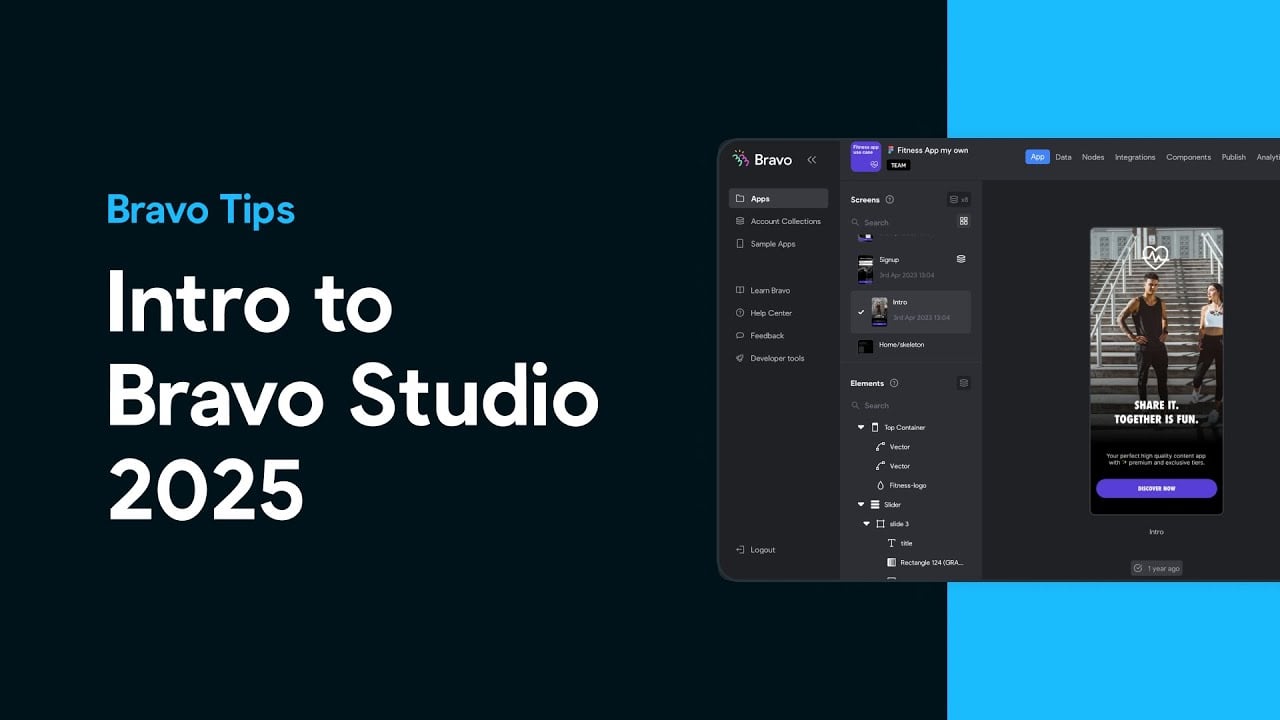
Bravo Studio is an AI tool that allows users to transform their Figma designs into fully functional native mobile apps for both iOS and Android, without the need for complex coding.

It does its magic by relying on a powerful Figma plugin to make the app development process seamless, offering a quick transition from a design prototype to a market-ready product. By supporting a design-first approach, Bravo Studio opens up app development to designers and product teams — enabling them to prototype, publish, and iterate their apps with ease and flexibility. Users can also connect their apps to any third-party tool or service that provides a REST API, further enhancing functionality and user experience.

Bravo Studio offers a range of templates and integrations, covering various types of apps like meditation, fitness, CRM, and event apps. The platform simplifies the app development cycle, from initial design in Figma to MVP in hours, and also takes care of the stressful app store submission process.

In other words, Bravo Studio empowers users to create lifelike prototypes with native features such as haptic feedback, audio, and camera interactions — all with real-time changes and rapid testing. Pretty cool!

Bravo Studio Homepage
Categories Design Generation

Video Overview ▶️

Bravo Studio - Video Overview

What are the key features? ⭐

  • Figma to App Conversion: turns Figma designs into native iOS and Android apps without coding.
  • AI-Enhanced Workflow: uses AI to generate backends and custom components quickly.
  • Web Components: adds custom HTML, JavaScript, and CSS for extended functionality.
  • Real-Time Previews: tests apps instantly on devices via Bravo Vision app.
  • API Integrations: connects to external data sources like REST APIs or Airtable.

Who is it for? 🤔

Bravo Studio helps designers, founders, creators, personal trainers, nutritionists, and entrepreneurs who already use Figma and want to build professional native mobile apps without learning to code or hiring developers. Its especially useful for those focused on high-fidelity UI who need fast iteration and app-store publishing.

Examples of what you can use it for 💭

  • Designer with Figma prototype: converts static designs into interactive native app for client demo or launch.
  • Founder building MVP: creates fitness or meditation app with custom content and API-connected data quickly.
  • Content creator: builds branded mobile experience with dynamic feeds and user interactions from external sources.
  • Personal trainer or coach: develops client-facing app for schedules, progress tracking, and media without coding.
  • Small business owner: launches custom iOS and Android app for services or community with pixel-perfect design.

Pros & Cons ⚖️

  • Pixel-perfect from Figma
  • Fast native publishing
  • AI speeds backend
  • Easy iteration
  • Tagging learning curve
  • Needs external backend

FAQs 💬

What is Bravo Studio mainly used for?
Bravo Studio converts Figma designs into fully functional native iOS and Android mobile apps without writing code.
Do I need coding skills to use Bravo Studio?
No, its designed as a no-code tool, though some API knowledge helps for data connections and custom Web Components involve basic code pasting.
Can I publish apps to the App Store and Google Play?
Yes, Bravo supports native publishing to both Apple App Store and Google Play Store.
How does the AI feature work in Bravo Studio?
AI helps generate backends externally and create custom code for Web Components, often guided by Figma screenshots for style accuracy.
Is there a free plan available?
Yes, a free Starter plan exists with unlimited projects but limits on imported screens and features.
What design tool does Bravo Studio integrate with?
It primarily integrates with Figma for importing and syncing designs directly.
How do I preview my app during building?
Use the Bravo Vision app on your phone to scan a QR code and see real-time native previews.
Can I update my live app easily?
Yes, many updates sync from Figma without needing full app store resubmissions for minor changes.
Does Bravo Studio support custom code?
Yes, through Web Components where you paste HTML, JavaScript, and CSS for advanced features.
What data sources can I connect?
It connects to REST APIs, Airtable, Firebase, Google Sheets, and other external backends via API imports.
Visit Bravo Studio

Related tools ↙️

  1. MyArchitectAI MyArchitectAI Transforms architectural designs and sketches into photorealistic renders in seconds using AI
  2. Typeset Typeset Automates design and writing for ebooks, presentations, and social graphics quickly
  3. Flowstep Flowstep Generates user flows, wireframes, and UI designs from simple text prompts
  4. Architect Render Architect Render Generates photorealistic architectural renderings from sketches, photos, or designs in seconds
  5. MenuGen MenuGen Transforms menu photos into AI-generated dish images.
  6. Bugfree.ai Bugfree.ai Prepares users for system design and behavioral interviews with AI mocks and practice
Last update: March 9, 2026
Share
Promote Bravo Studio
light badge
Copy Embed Code
dark badge
Copy Embed Code
neutral badge
Copy Embed Code
About Us | Contact Us | Suggest an AI Tool | Privacy Policy | Terms of Service

Copyright © 2026 Best AI Tools
415 Mission Street, 37th Floor, San Francisco, CA 94105