logo-darklogo-darklogo-darklogo-dark
  • Home
  • Browse
    • Assistant
    • Coding
    • Image
    • Productivity
    • Video
    • Voice
    • Writing
    • All Categories
    • AI Use Cases
  • My Favorites
  • Suggest a Tool
✕
Home › Coding & Development›
Published by Dusan Belic on July 10, 2023

Deepnote AI Copilot

Deepnote AI Copilot
Deepnote AI Copilot Homepage
Categories Coding & Development

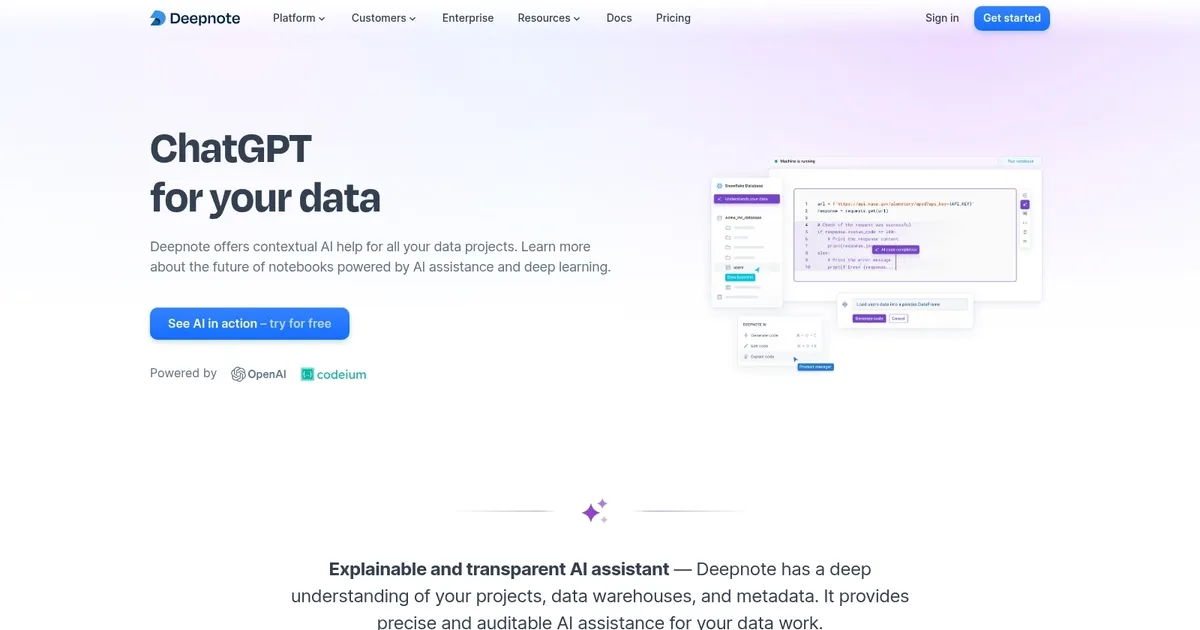
Deepnote AI Copilot - screenshot

Provides code suggestions while understanding the full scope of your Deepnote notebook

Deepnote AI Copilot

Deepnote AI is an AI tool designed to enhance data projects by providing users with an explainable and transparent AI assistant that possesses a deep understanding of the users’ data projects, data warehouses, and metadata. This “understanding” enables Deepnote AI to deliver precise and auditable assistance for a variety of data tasks.

The tool’s notebook-like structure ensures that every suggestion made by the AI is translated into transparent and reproducible results. This, they claim, then empowers data teams by allowing them to place their trust in AI assistance.

Deepnote AI is also equipped with capabilities such as automatically generating entire data notebooks from simple prompts or instructions — which includes code, SQL queries, and text — thereby simplifying the process of starting from scratch on complex data projects.

In addition, it’s worth adding that Deepnote AI is context-aware and can significantly reduce the time spent on tedious and repetitive coding tasks. Users can also leverage the AI to generate code by asking questions in natural language, essentially having a personal code expert at their disposal. We kinda like how that sounds, don’t you?

Deepnote AI Copilot Homepage
Categories Coding & Development

What are the key features? ⭐

  • Auto Notebook Generation: Creates complete, runnable notebooks including code, SQL, visualizations, and text from natural language prompts describing analysis goals.
  • Context-Aware Code Completion: Provides real-time, project-specific suggestions in Python, SQL, or R blocks based on notebook context, metadata, and prior code.
  • Natural Language Code Generation: Translates plain-English instructions into accurate, executable code snippets tailored to the connected data sources.
  • Code Explanation & Debugging: Offers concise breakdowns of complex code and identifies/fixes bugs with suggested corrections and rationales.
  • Transparent & Reproducible AI: Turns every AI suggestion into editable, auditable notebook cells for team trust and reproducibility.

Who is it for? 🤔

Deepnote AI suits data analysts, data scientists, and collaborative teams who work frequently in notebooks, need to accelerate exploration and analysis, connect to data warehouses, and value real-time teamwork. Its especially helpful for mixed-skill groups where some members prefer no-code prompts while others dive into Python or SQL, plus educators or individual users prototyping ideas quickly without heavy setup.

Examples of what you can use it for 💭

  • Data Analyst: Quickly generates full exploratory analysis notebooks from business questions like "show retention by cohort" without writing every query or plot manually.
  • Data Scientist: Gets instant code completions and refactors for machine learning pipelines while maintaining reproducible steps for sharing with colleagues.
  • Team Lead: Uses AI explanations to onboard juniors faster by clarifying legacy code and lets the tool debug common errors during collaborative reviews.
  • Business User: Describes desired insights in plain language to produce charts and summaries from warehouse data without learning advanced coding.
  • Researcher: Automates repetitive data cleaning and visualization tasks across multiple experiments, keeping everything versioned and shareable.

Pros & Cons ⚖️

  • Excellent context understanding
  • Fast notebook auto-generation
  • Strong collaboration features
  • Transparent AI outputs
  • Prompt tweaks sometimes needed
  • Heavy use may hit limits

FAQs 💬

What is Deepnote AI exactly?
Deepnote AI is the built-in AI assistant for the Deepnote platform that provides contextual help for data tasks, including generating and editing code, explaining snippets, debugging, and creating entire notebooks from natural language.
Do I need coding skills to use Deepnote AI?
No, you can start with plain-English prompts for analyses, though basic familiarity helps when reviewing or tweaking outputs.
How does Deepnote AI differ from ChatGPT for data work?
It uses project context like schemas, variables, and metadata for more accurate, relevant suggestions, and outputs live in editable notebook cells for reproducibility.
Is Deepnote AI free to try?
Yes, a free tier exists with core AI features, and you can sign up without a credit card to test it immediately.
What data sources does it connect to?
It integrates with Snowflake, BigQuery, and over 60 others, plus CSV uploads and dbt metadata.
Can teams collaborate while using AI features?
Yes, real-time editing, comments, and sharing work seamlessly alongside AI generation and edits.
Is the AI output trustworthy?
It emphasizes explainability and reproducibility by placing suggestions in auditable notebook cells, though always verify critical results.
Does Deepnote support self-hosting?
Since going open-source in 2025, yes, you can self-host for full control over data and AI usage.
How does pricing work for heavier use?
Freemium for basics, with paid plans adding team seats, advanced compute, and enterprise security; scales with collaborators.
Can I use my own AI models?
Enterprise users can connect custom OpenAI-compatible endpoints for Deepnote Agent features.
Visit Deepnote AI Copilot

Related tools ↙️

  1. Amplication Amplication Generates scalable Node.js backends from data models in minutes.
  2. DocuWriter.ai DocuWriter.ai Generates automated code documentation, tests, and refactors from source files
  3. Plandex Plandex Handles large coding tasks in terminal using AI for real-world projects
  4. Hyperbrowser Hyperbrowser Scales headless browsers for AI agent web automation and data extraction
  5. Chunkr Chunkr Transforms complex documents into structured chunks for RAG and LLM applications
  6. Snapps Snapps Generates AI-powered websites with drag-and-drop ease and built-in hosting
Last update: February 11, 2026
Share
Promote Deepnote AI Copilot
light badge
Copy Embed Code
dark badge
Copy Embed Code
neutral badge
Copy Embed Code
About Us | Contact Us | Suggest an AI Tool | Privacy Policy | Terms of Service

Copyright © 2026 Best AI Tools
415 Mission Street, 37th Floor, San Francisco, CA 94105