Skip to content
logo-darklogo-darklogo-darklogo-dark
  • Tool Categories
    • 🎨Art & Creative Design505
    • 🏢Business Management644
    • 💻Coding & Development514
    • 👮Detection83
    • 🧠General Use728
    • 🏥Health & Wellness55
    • 📷Image & Photo Analysis100
    • 🖼️Image Generation & Editing618
    • 📐Interior & Architectural Design37
    • 🎓Learning & Education483
    • ⚖️Legal & Finance90
    • 🎭Lifestyle & Entertainment236
    • 📢Marketing & Advertising627
    • 🎧Music & Audio138
    • 👔Office & Workplace1,014
    • 🔬Research & Data Analysis373
    • 👥Social Media245
    • 🎥Video Generation & Editing426
    • 👧🏻Virtual Companion135
    • 🎤Voice Generation & Editing381
    • ✍️Writing & Editing808
    • All Categories
    • AI Use Cases
  • News
  • Events
    • Academic Conferences
    • Developer Conferences
    • Expos / Trade Shows
    • Industry Summits
    • Workshops / Training
    • All Events
    • Past Events
  • Saved Tools
  • Suggest a Tool
    ✕
    Home › Coding & Development › Code Assistant› DocuWriter.ai
    DocuWriter.ai

    DocuWriter.ai

    Generates automated code documentation, tests, and refactors from source files

    DocuWriter.ai is an AI-powered platform designed to automate code documentation, testing, refactoring, and related tasks from source code files across all programming languages. It analyzes uploaded code to produce accurate documentation, including comments, DocBlocks, and full API specs in Swagger format, ensuring consistency and reducing manual effort. The tool also generates UML diagrams to visualize code structure and supports knowledge base management through customizable Spaces for organizing outputs.

    Key functionalities include code refactoring for improved readability and maintainability, adhering to coding standards without altering core logic. For testing, it creates comprehensive suites using appropriate frameworks, identifying potential issues to enhance reliability. Code conversion between languages or frameworks, such as Java to Dart or Bootstrap to Tailwind CSS, facilitates multi-language projects. Integrations with n8n and Zapier allow automation, like triggering updates on code changes, while MCP enables use within AI assistants.

    Compared to competitors, DocuWriter.ai offers broader AI-driven features than Mintlify, which emphasizes customizable doc sites, or Swimm, focused on repo-linked interactive docs. Pricing provides flexible tiers starting affordably for individuals, with advanced options for teams including Git repo access, often more accessible than enterprise-focused rivals. Security measures ensure code is processed temporarily without storage or use in model training.

    Users may appreciate the time savings and multi-language support, but processing larger files can take longer, potentially impacting workflows. Outputs are generally accurate, though verification is recommended for complex codebases. The platform includes export options in Markdown and PDF, compatible with tools like Notion or Confluence.

    Practical advice includes beginning with small files to test accuracy, then integrating with version control for ongoing automation, and leveraging Spaces for team collaboration to maintain organized documentation.

    Visit DocuWriter.ai ↗
    Categories
    💻 Coding
    🤖 Code Assistant 🔍 Code Review ⌨️ Code Generation ✅ Testing 👨‍💻 Development
    👔 Work
    📄 Document Generation
    ✍️ Writing
    🤖 Writing Assistant 🅰️ Text Generation

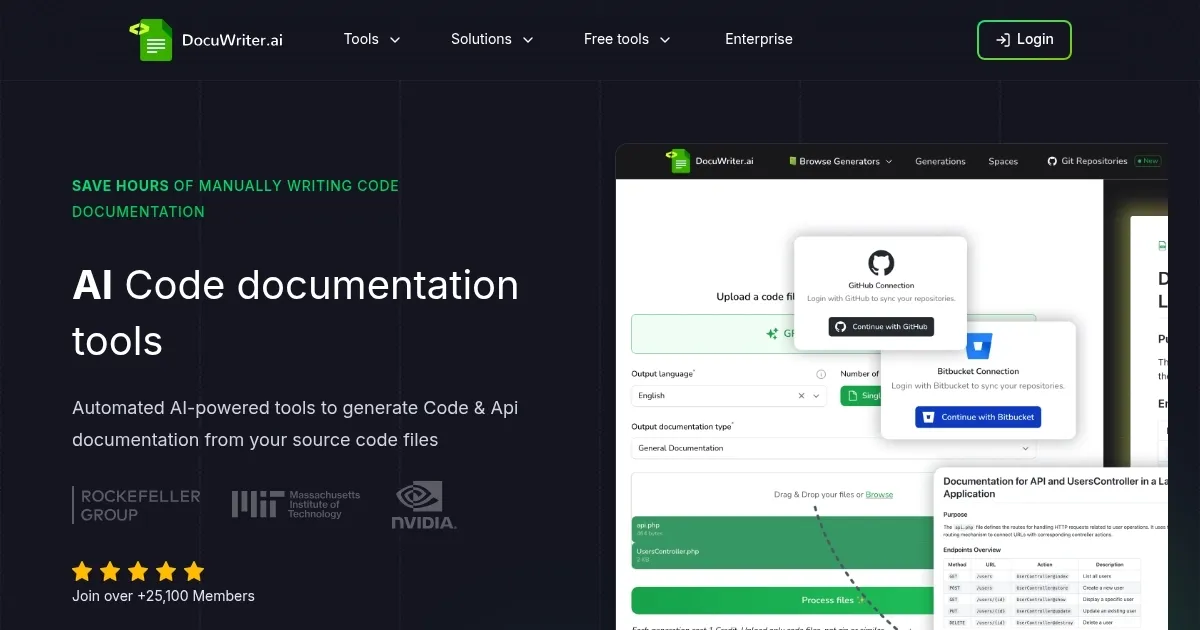
    Homepage Screenshot 📸

    DocuWriter.ai screenshot

    Video Overview 🎬

    DocuWriter.ai - Video Overview

    What are the key features? ✨

    • Automated Code Documentation: Generates accurate and consistent documentation from source code using AI analysis.
    • Swagger API Documentation: Produces Swagger-compliant JSON files compatible with tools like Postman.
    • AI-Powered Tests Generation: Creates comprehensive test suites to ensure code reliability and catch bugs early.
    • Intelligent Code Refactoring: Optimizes code for readability, maintainability, and adherence to best practices.
    • Code Language Converter: Translates code between languages or frameworks quickly and efficiently.

    Who is it for? 🤔

    This tool proves helpful for software developers, engineering teams, and technical writers who manage codebases, especially those dealing with legacy systems or multi-language projects, as it streamlines documentation and testing to boost productivity and collaboration without requiring extensive manual input.

    Examples of what you can use it for 💡

    • Software Developer: Generates quick API documentation from source code to share with team members.
    • QA Engineer: Creates automated test suites to verify code functionality and identify issues.
    • Project Manager: Uses refactoring tools to optimize legacy code for better maintainability.
    • Freelance Coder: Converts code between frameworks like Bootstrap to Tailwind for client projects.
    • Tech Lead: Builds UML diagrams to visualize codebase structure for onboarding new hires.

    Pros & Cons ⚖️

    • Time-saving automation
    • Multi-language support
    • Consistent outputs
    • Integration options
    • Longer processing times
    • Needs output verification

    FAQs 💬

    What programming languages does DocuWriter.ai support?
    It supports all programming languages, including popular ones like Python, Java, and even legacy like COBOL.
    How does DocuWriter.ai ensure code security?
    Code is processed temporarily and deleted after generation, without storage or use for AI training.
    What integrations are available?
    It integrates with n8n, Zapier, and MCP for tools like Claude or ChatGPT.
    Can it handle large codebases?
    Yes, but processing time may increase for larger files or repositories.
    What export formats are supported?
    Outputs can be exported in Markdown and PDF formats.
    Is there a free trial?
    Yes, a free trial is available to test the features.
    How does pricing work?
    Plans start affordably and scale based on generations and features needed.
    What is a generation?
    Each processing task, like documentation or refactoring, counts as one generation.
    Does it generate UML diagrams?
    Yes, it automates UML diagram creation from code.
    Is it suitable for teams?
    Higher plans include team features like role-based access and unlimited spaces.

    Ready to try DocuWriter.ai?

    Generates automated code documentation, tests, and refactors from source files

    Visit DocuWriter.ai ↗

    DocuWriter.ai alternatives 🔗

    1. GitHub Copilot GitHub Copilot Enhances coding with AI-driven completions and chat assistance
    2. Cursor Cursor Supercharges coding with AI agents that build, edit, and review code autonomously.
    3. Windsurf Windsurf Empowers developers with AI-driven code generation and real-time collaboration.
    4. Kodezi Kodezi Dubbed "Grammarly for programmers," it auto-corrects programmers as they code
    5. ZZZ Code AI ZZZ Code AI A set of tools offering code generation & explanation, bug detector, code review, documentation, and more
    6. CodePal CodePal AI code generation tool with support for multiple programming languages
    Share
    DocuWriter.ai screenshot enlarged
    Best AI Tools

    Discover the best AI tools for any use case

    Explore
    • Tool Categories
    • AI Use Cases
    • AI Events
    • AI News
    • Saved Tools
    Company
    • About Us
    • Contact Us
    • Media & Partnerships
    • Suggest a Tool
    Legal
    • Privacy Policy
    • Terms of Service
    Copyright © 2026 Best AI Tools 415 Mission Street, 37th Floor, San Francisco, CA 94105