logo-darklogo-darklogo-darklogo-dark
  • Home
  • Browse
    • Assistant
    • Coding
    • Image
    • Productivity
    • Video
    • Voice
    • Writing
    • All Categories
    • AI Use Cases
  • My Favorites
  • Suggest a Tool
✕
Home › Logo Generator ›

Designs.ai Logomaker

Published by Dusan Belic on May 31, 2023

Designs.ai Logomaker by Inmagine

Designs.ai
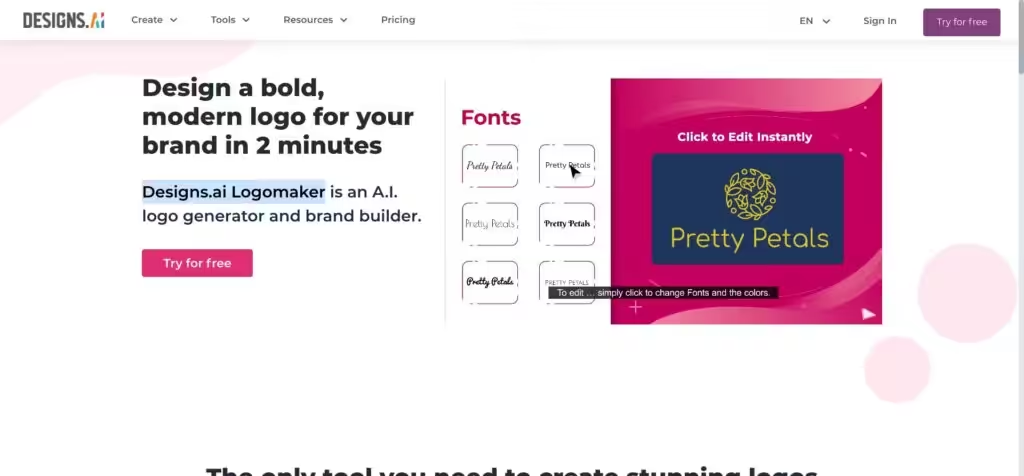
Designs.ai Logomaker Homepage
Categories Logo Generator
An AI logo generator and brand builder

Designs.ai Logomaker

Designs.ai Logomaker is just one of the services of the Designs.ai online platform that uses proprietary AI technology to make design accessible to everyone.

This means the service goes beyond logos and includes other services, such as Videomaker, Mockupmaker, Designmaker, Speachmaker, and AI Writer. Nevertheless, you can still order just one logo if that’s what you need.

As you would expect from an AI service, Designs.ai Logomaker will let you create a fancy logo even if you never designed anything before. It includes access to thousands of images, icons, and fonts to ensure you get the desired result. And if you don’t like the initial design, you can always tweak it.

Then, when you get the logo you like, the service will help you compile your full brand story along with mockup samples and your very own social media kit.

Designs.ai Logomaker Homepage
Categories Logo Generator

Video Overview ▶️

What are the key features? ⭐

  • Make a logo in seconds: Logomaker uses AI to analyze your brand information and generates thousands of logos in seconds. Quick, easy, and cost-effective.
  • Brand identity package: In addition to the logo, Logomaker also offers a brand identity kit that includes social media logos, branded merchandise mockups, and style guidelines. This way, you can get a better feel for your (new) brand.
  • Smart logo editor: When you're "almost there," you get to use the built-in smart logo editor that lets you fine-tune it in just a few clicks. This tool runs entirely on your browser, and there is no need to install any special software on your computer.

Who is it for? 🤔

Logomaker is dubbed to be perfect for every type of content creator, including influencers, small businesses, startups, educators, enterprises, agencies, NGOs, and government agencies. Beyond logos, these folks also rely on the tool to create the entire brand for their offering(s) - which is also easy and powered by AI.

Examples of what you can use it for 💭

  • Create a new logo for your company or an NGO
  • Get the entire brand identity package with social media graphics, business cards, and more
  • Get a logo for your new product or service

Pros & Cons ⚖️

  • Every plan includes access to 15 million images and video clips
  • Beyond logos - you get access to other tools, as well
  • Includes full branding, mockup samples & social media kit
  • There are more affordable options if you need just one logo

FAQs 💬

What is Designs.ai Logomaker?
It's an AI-powered tool that generates professional logos and full brand kits in seconds by analyzing your brand name, industry, and preferences. You get thousands of options to choose from, and it works great for beginners who want quick results without design skills.
How does Logomaker create logos?
You input your company name, slogan if you have one, and select styles or icons you like, then the AI produces variations instantly. Pick one, tweak colors or fonts if needed, and it's ready, all in a simple step-by-step process.
Do I need design experience to use it?
No, it's built for anyone, even if you've never designed before. The AI handles the heavy lifting, suggesting icons, fonts, and colors that fit your brand vibe.
What files do I get with a logo?
You receive high-resolution files in PNG, JPEG, SVG, and PDF formats. Plus, it includes a brand kit with mockups for business cards, social media, and more.
Is Logomaker suitable for commercial use?
Yes, all created logos are yours to use for business promotion, advertising, or reselling as a service to clients. Just don't sell the individual assets from the platform.
Can I customize the generated logos?
Absolutely, there's an easy editor to adjust layouts, colors, fonts, and elements. It gives you control while keeping things professional and on-brand.
What makes Logomaker different from free tools?
It uses advanced AI for smarter suggestions and includes a complete brand identity kit with guidelines and mockups. This helps ensure consistency across your materials, which basic tools often skip.
Does it work for any industry?
Yeah, it adapts to whatever field you're in, from tech startups to cafes or nonprofits. The AI pulls from a huge library of over 10,000 icons to match your needs.
Are the logos unique?
The AI generates original designs based on your inputs, so they're tailored to you. They might feel modern and clean, but always review to make sure it stands out for your brand.
Can I try it before committing?
You can create and preview logos for free right away. Experiment as much as you want to see if it fits your style.

Related tools ↙️

  1. Brandmark Brandmark Creates unique logos and branding assets using AI in minutes
  2. BrandCrowd BrandCrowd Creates customizable logos, business cards, and social media designs in minutes
  3. Kittl Kittl A collection of AI-powered design tools & mockups for marketing purposes
  4. SVG AI SVG AI Transforms text prompts into scalable vector icons and logos instantly
  5. Logopony Logopony Get 1000's of custom logo designs and instantly create designs for social media, business cards, and more
  6. Looka Looka A fancy tool for making good-looking logos & brands
Last update: January 5, 2026
Share
Promote Designs.ai Logomaker
light badge
Copy Embed Code
light badge
Copy Embed Code
light badge
Copy Embed Code
About Us | Contact Us | Suggest an AI Tool | Privacy Policy | Terms of Service

Copyright © 2026 Best AI Tools
415 Mission Street, 37th Floor, San Francisco, CA 94105