logo-darklogo-darklogo-darklogo-dark
  • Home
  • Browse
    • Assistant
    • Coding
    • Image
    • Productivity
    • Video
    • Voice
    • Writing
    • All Categories
    • AI Use Cases
  • My Favorites
  • Suggest a Tool
✕
Home › Image Generation & Editing›
Published by Dusan Belic on July 7, 2024

Dewatermark.ai by XTeam


Dewatermark.ai
Dewatermark.ai Homepage
Categories Image Generation & Editing
An AI tool designed to remove watermarks from images

Dewatermark.ai

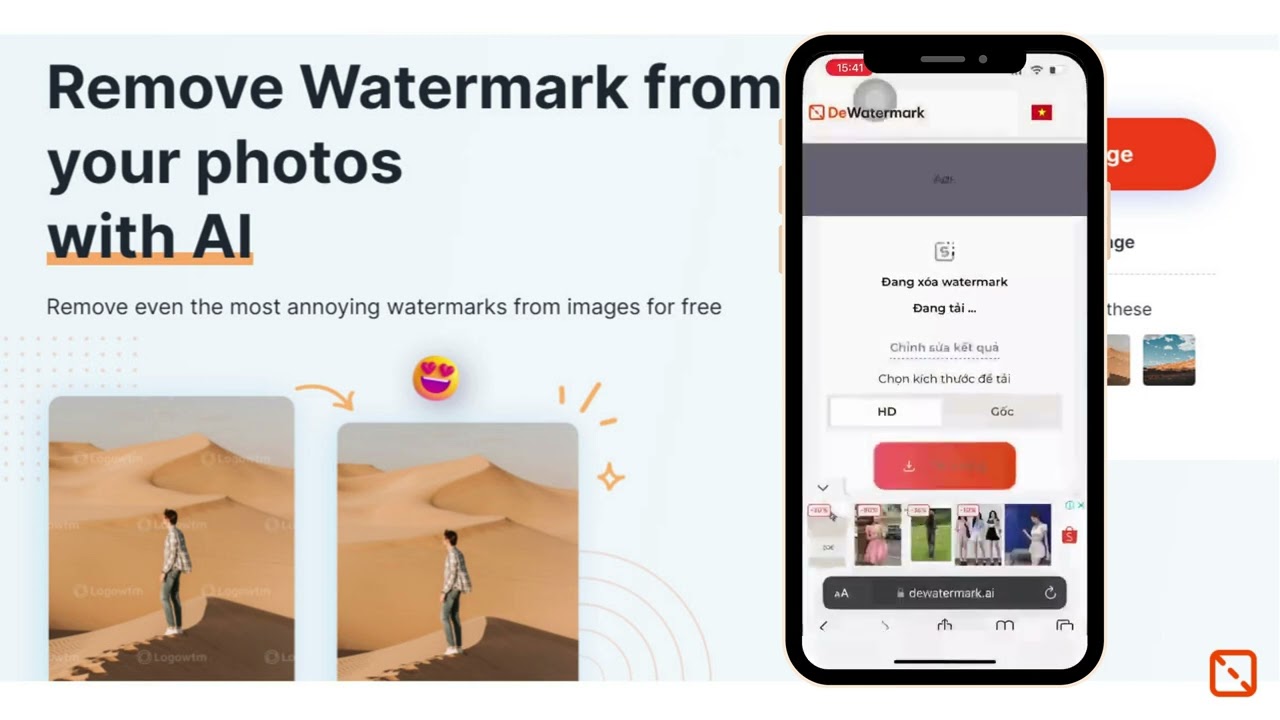
As you can guess from its name, Dewatermark.ai is an AI tool designed to remove watermarks from images. Using advanced algorithms, it identifies and removes watermarks without compromising image quality.

The process is simple: upload a photo and let the AI ​​do the rest, making the tool accessible even to those with minimal technical skills.

Dewatermark.ai is also very fast and accurate, and is able to distinguish the watermark from the rest of the image. This, in turn, makes sure the original details are preserved without any manual adjustments.

The tool also protects the user’s privacy, with the service not storing any information once the process of removing watermarks is complete. Needless to say, this commitment to privacy is important for users who exchange sensitive or copyrighted content and must be assured that their images are not being misused.

All in all, Dewatermark.ai is a valuable tool for anyone who needs to effortlessly remove watermarks from images. Its blend of advanced AI, friendly user interface, and strong privacy makes it ideal for professionals and casual users alike.

So, whether you’re a photographer, graphic designer, or social media manager – this tool can simplify your workflow and even enhance the quality of your content.

Dewatermark.ai Homepage
Categories Image Generation & Editing

Video Overview ▶️

Dewatermark.ai - Video Overview

What are the key features? ⭐

  • AI-powered tech: Dewatermark.ai uses advanced AI algorithms to remove watermarks from images with high precision. This ensures that the original image quality is preserved without leaving any traces of the watermark.
  • Easy to use: Designed with simplicity in mind, the tool allows users to easily upload images and process them with just a few clicks.
  • Batch processing: It allows users to remove watermarks from multiple images simultaneously, saving time and effort along the way.
  • High-quality output: Dewatermark.ai ensures that the final images are of high quality, maintaining the integrity and original resolution of the photos.
  • Cross-platform compatibility: The tool is accessible from any device with an internet connection.

Who is it for? 🤔

Dewatermark.ai targets photographers, content creators, businesses, e-commerce platforms, and graphic designers. Its easy-to-use interface and powerful AI capabilities make it accessible to both professionals and amateurs who need to remove watermarks quickly and efficiently from their images. Ultimately, the service appeals to anyone who requires high-quality, watermark-free images for various purposes.

Examples of what you can use it for 💭

  • Remove watermarks from images for portfolio updates or client deliveries
  • Social media influencers and bloggers can use it to clean up images before posting them online
  • Companies can use it to prepare clean images for marketing materials, presentations, and websites
  • Online stores can create watermark-free images to showcase their products more effectively
  • Designers will use it to remove watermarks for creating composites or editing purposes

Pros & Cons ⚖️

  • Watermarks are no longer a problem
  • Batch processing is cool
  • All you need is a web browser to use Dewatermark.ai
  • Doesn't work with all images

FAQs 💬

What is Dewatermark.ai?
Dewatermark.ai is an AI-powered online tool that removes watermarks from images, videos, and PDFs quickly and automatically. It uses advanced algorithms to detect and erase logos, text, or other overlays while keeping the original image quality intact. I think it's especially handy for photographers or content creators who need clean visuals without fancy editing software.
How does Dewatermark.ai work?
You start by uploading your file through drag-and-drop or the upload button, then the AI scans it and removes the watermark in seconds. For tough spots, there's a manual brush tool to touch up details. Finally, you preview and download the result, either in standard or HD quality. It's that simple, though results might vary a bit with super complex watermarks.
What file types does Dewatermark.ai support?
It handles common image formats like PNG, JPG, WEBP, and AVIF, plus videos in MP4 and MOV, and even PDFs for the first page in free mode. Batch uploads work too, so you can process multiple files at once. Just keep files under 10MB and 6000x6000 pixels for best results.
Is Dewatermark.ai free to use?
Yes, it's free for basic use with a daily limit of a few images, and no login required to start. Registered users get a bit more access, like higher resolution downloads. Advanced features might nudge you toward credits, but most folks find the free tier plenty useful.
Does Dewatermark.ai preserve image quality?
Absolutely, the tool focuses on retaining details and colors without blurring or artifacts. It even offers auto-enhancement options to upscale if needed. From what I've seen in tests, it holds up well on high-res photos, though faint watermarks on busy backgrounds can sometimes leave minor traces.
Can Dewatermark.ai remove watermarks from videos?
It can, by processing frames automatically, but it's trickier than images since watermarks might shift. Expect good results on static overlays, and use the brush for moving ones. Processing takes a few seconds longer, but it's a game-changer for quick edits without pro software.
How accurate is Dewatermark.ai for complex watermarks?
Pretty solid for layered or blended watermarks, thanks to its AI detection. It separates the overlay from the background smartly. That said, it might need a manual pass for emojis or dense text, and it's not perfect every time. Users often say it's better than basic tools for pro-level cleans.
Is Dewatermark.ai safe and private?
Files are processed in the cloud and deleted after, with no storage of your uploads. It's got a clean rep, no major scam flags, and works on secure connections. Just avoid uploading sensitive stuff, as with any online editor. I reckon it's trustworthy for everyday use.
Does Dewatermark.ai work on mobile devices?
Yep, it's fully responsive and has apps on iOS and Android for on-the-go edits. Upload from your gallery, process, and download right there. No app glitches reported lately, making it feel seamless across phones, tablets, or desktops.
What if the watermark isn't fully removed?
Hit the manual AI brush to target leftovers, or try the auto-enhance for a fresh pass. If it's still off, the tool suggests tweaking upload resolution. Most users fix it in under a minute, but for pixel-perfect needs, pair it with something like Photoshop afterward.
Visit Dewatermark.ai

Related tools ↙️

  1. Dawn AI Dawn AI Generates personalized avatars and images from selfies using advanced AI technology
  2. Cloudinary Cloudinary Manages, transforms, optimizes, and delivers images and videos with AI-powered features
  3. Imgix Imgix Optimizes images in real-time using AI for faster web delivery
  4. Imajinn Imajinn Transforms user photos into artistic images and custom visuals using AI
  5. SVG AI SVG AI Transforms text prompts into scalable vector icons and logos instantly
  6. Artisse Artisse Generates hyper-realistic photos using AI from user selfies and custom prompts
Last update: November 26, 2025
Share
Promote Dewatermark.ai
light badge
Copy Embed Code
dark badge
Copy Embed Code
neutral badge
Copy Embed Code
About Us | Contact Us | Suggest an AI Tool | Privacy Policy | Terms of Service

Copyright © 2026 Best AI Tools
415 Mission Street, 37th Floor, San Francisco, CA 94105