logo-darklogo-darklogo-darklogo-dark
  • Home
  • Browse
    • Assistant
    • Coding
    • Image
    • Productivity
    • Video
    • Voice
    • Writing
    • All Categories
    • AI Use Cases
  • My Favorites
  • Suggest a Tool
✕
Home › Design Generator ›

DiagramGPT

Published by Dusan Belic on August 30, 2023

DiagramGPT by Eraser


DiagramGPT
DiagramGPT Homepage
Categories Design Generator
Generates technical diagrams from natural language or code prompts.

DiagramGPT

DiagramGPT is an AI-enabled tool that lets you generate technical diagrams from code or plain language prompts.

Powered by OpenAI’s GPT tech, it lets you start quickly by selecting one of the presets, or browse the use case video library for more inspiration. Alternatively, you can start from scratch and generate a new diagram from your data or from a text prompt.

Once created, diagrams can be edited using the diagram-as-code syntax.

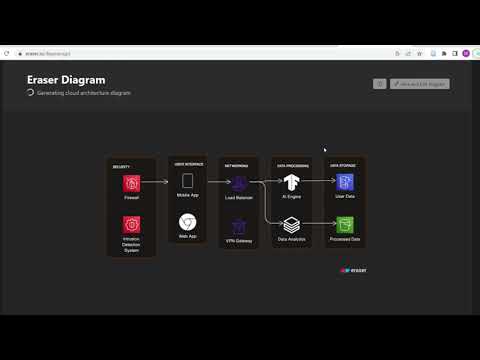
At the moment, DiagramGPT supports 4 diagram types, including flow charts, entity relationship diagrams, cloud architecture diagrams, and sequence diagrams.

The tool also offers an API to its paid customers, who also get the option to opt out of sharing their data. DiagramGPT may use it for the purpose of improving the product.

DiagramGPT Homepage
Categories Design Generator

Video Overview ▶️

What are the key features? ⭐

  • AI Diagram Generation: Creates diagrams from natural language prompts or code snippets using GPT-4.
  • Specific Diagram Types: Supports flow charts, entity relationship diagrams, cloud architecture diagrams, and sequence diagrams.
  • Diagram-as-Code Editing: Generates editable code syntax for easy modifications in Eraser.
  • Cloud Service Icons: Includes accurate icons for major cloud providers in architecture diagrams.
  • Integration with Eraser: Seamless saving and collaboration within the Eraser whiteboard platform.

Who is it for? 🤔

DiagramGPT helps software engineers, architects, and technical teams who need to create and maintain diagrams for system designs, databases, processes, or cloud infrastructures quickly, especially those who prefer starting from text rather than manual drawing and value editable, code-based outputs for collaboration.

Examples of what you can use it for 💭

  • Software Architects: Generate cloud architecture diagrams from descriptions of infrastructure components.
  • Database Designers: Create entity relationship diagrams by describing tables and relationships.
  • Developers: Build sequence diagrams to visualize object interactions in code flows.
  • Technical Writers: Produce flow charts for documenting processes or user journeys.
  • Engineering Teams: Quickly sketch ideas during meetings or brainstorming sessions.

Pros & Cons ⚖️

  • Generate diagrams with ease
  • Fast start with one of the presets or examples
  • API access (for paid customers)
  • Only 4 diagram types available at the moment

FAQs 💬

What types of diagrams can DiagramGPT generate?
It supports flow charts, entity relationship diagrams, cloud architecture diagrams, and sequence diagrams.
Does DiagramGPT require a login to try?
No, you can experiment with prompts on the homepage without signing in, but saving or editing requires an Eraser account.
Is my data used to train AI models?
No, neither OpenAI nor Eraser uses your inputs for training purposes.
Can I edit the generated diagrams?
Yes, outputs use diagram-as-code syntax that is fully editable in the Eraser platform.
Is there a free version available?
Yes, a free tier includes limited AI generations, with paid plans for more usage.
Does it support cloud provider icons?
Yes, it includes icons for major providers like AWS in architecture diagrams.
Can I use code snippets as input?
Yes, you can paste code or schema to generate relevant diagrams.
Is there an API for DiagramGPT?
Yes, API access is available on professional or higher plans.
How accurate are the generated diagrams?
They are usually strong starting points but may need minor adjustments for complex or ambiguous prompts.
Does it integrate with other tools?
It integrates fully with Eraser, which supports GitHub sync and exports.

Related tools ↙️

  1. VModel AI VModel AI An efficient and cost-effective solution for on-model fashion photography
  2. Gleek Gleek Generates diagrams from text descriptions using keyboard-only input
  3. Mood Board AI Mood Board AI An AI tool that helps you create mood boards quickly and easily
  4. Lummi Lummi Offering a treasure trove of AI-generated visuals that cater to different creative needs
  5. Scenario Scenario Craft unique and style-consistent game assets with custom-trained AI models
  6. Locofy Locofy An AI tool that can turn your designs into real code
Last update: December 14, 2025
Share
Promote DiagramGPT
light badge
Copy Embed Code
light badge
Copy Embed Code
light badge
Copy Embed Code
About Us | Contact Us | Suggest an AI Tool | Privacy Policy | Terms of Service

Copyright © 2026 Best AI Tools
415 Mission Street, 37th Floor, San Francisco, CA 94105