
logo-darklogo-darklogo-darklogo-dark
  • Home
  • Browse
    • Assistant
    • Coding
    • Image
    • Productivity
    • Video
    • Voice
    • Writing
    • All Categories
    • AI Use Cases
  • My Favorites
  • Suggest a Tool
✕
Home › Art & Creative Design / Image Generation & Editing ›

getimg.ai

Published by Dusan Belic on July 10, 2023

getimg.ai

getimg.ai
getimg.ai Homepage
Categories Art & Creative DesignImage Generation & Editing

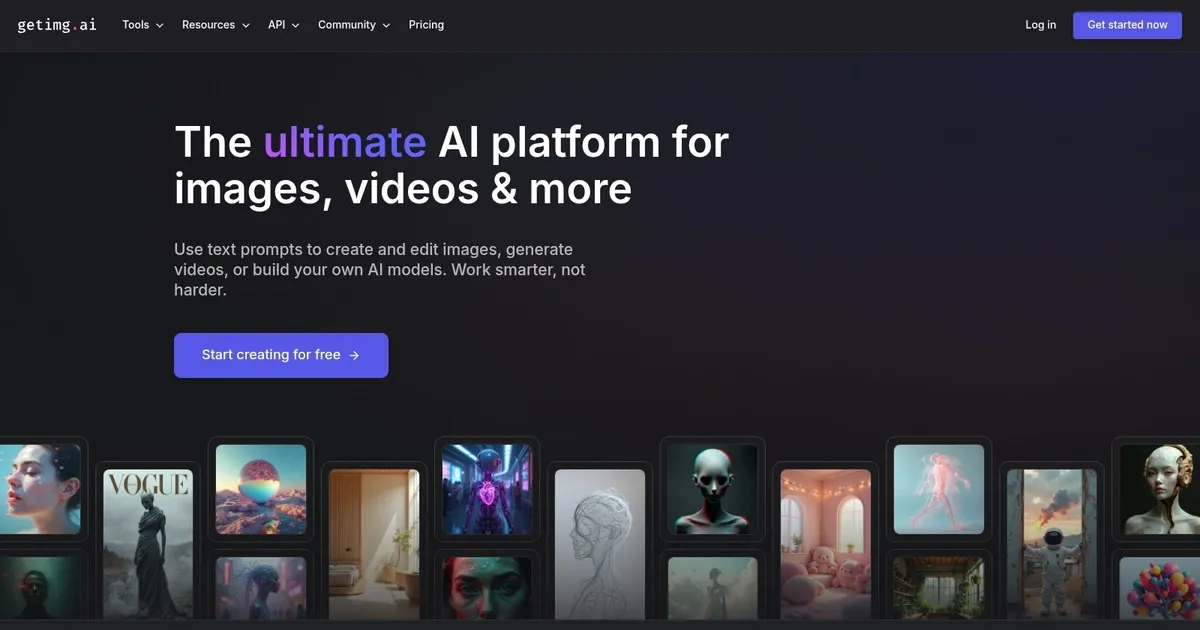
getimg.ai - screenshot

Create amazing art, images and photos with the power of AI

getimg.ai

getimg.ai is an AI-powered platform designed to revolutionize how images are created and edited. It allows users to generate images from text descriptions, edit photos using textual inputs, extend pictures beyond their original borders, and even train custom AI models for a more personalized creativity experience.

Among its many features are the creation of high-resolution illustrations, anime art, architectural designs, and photorealistic images, among others. Users can leverage over 60 AI models to produce art, replace or remove image backgrounds, create outpaintings, convert sketches to images, and more. It supports a variety of use cases, including generating headshots, stock images, product photography, and even creating unique avatars or character designs for different projects.

getimg.ai has also been engineered to cater to a wide range of creative needs, making it an ideal tool for professionals and hobbyists alike. It promises to simplify the image creation process by providing tools like the AI Generator, which turns text prompts into vivid images, and the Image Editor, which allows for fast and easy modifications of photos through AI.

Additionally, features like DreamBooth enable users to create custom AI models based on their own images, enhancing the personalization of generated content. The platform supports the creation of moving images through its Image to Video tool and offers an API for integrating its capabilities into other applications. With a model of providing 100 images for free per month without requiring a credit card, getimg.ai is positioned as both an accessible and powerful.

getimg.ai Homepage
Categories Art & Creative DesignImage Generation & Editing

Video Overview ▶️

What are the key features? ⭐

  • Text to image generation: Create original images by simply describing what you want, with access to over 60 community-trained models.
  • Image editing: Edit photos using text prompts to modify small details or change entire visual features.
  • Image to video: Easily turn static images into short, 4-second video clips.
  • AI canvas: Expand images beyond their original borders, allowing for large-scale artwork creation.
  • Custom models: Train personalized AI models for specific needs, like avatars or product shots with just 10 pictures.

Who is it for? 🤔

Getimg.ai is made for different kinds of users, including businesses, marketers, content creators, artists, and educators who need simple tools for generating and editing images. It appeals to anyone looking to enhance their visual content with minimal effort and time. The platform's diverse set of tools caters to anyone from small businesses to large enterprises seeking to streamline their creative workflows.

Examples of what you can use it for 💭

  • Generate visually appealing images and short videos for social media
  • Create custom images that align with your brand's style and messaging
  • Produce high-quality product images in various settings to attract customers
  • Expand and refine artwork or create new pieces using AI tools
  • Develop unique visual aids and materials for educational purposes

Pros & Cons ⚖️

  • Access to many AI models
  • Animating your images can produce great results
  • Train your own custom AI model
  • We prefer Midjourney for image generation

FAQs 💬

What is Getimg.ai?
Getimg.ai is an all-in-one AI platform that lets users generate and edit images or videos from simple text descriptions. It handles everything from model selection to prompt tweaks automatically, making it easy for beginners and pros alike to create visuals without hassle.
Who should use Getimg.ai?
It's great for freelancers, designers, marketers, and content creators who need quick, high-quality images or short videos for social media, ads, or projects. Teams can collaborate in real-time too, so it's ideal if you're working solo or with others.
How does the image generation work?
You just type a description, like "a cozy mountain cabin at sunset," and the AI picks the best models from Stable Diffusion, Google, or OpenAI to create up to 10 variations. It auto-improves your prompt for better results, and you can tweak styles or resolutions on the fly.
What editing tools does Getimg.ai offer?
Tools include inpainting to add or remove elements, outpainting to expand images beyond borders, background removal, upscaling for sharper details, and style swaps like turning photos into sketches. It's all done with text prompts, so no design skills needed.
Can I generate videos with Getimg.ai?
Yes, it turns text ideas or static images into short clips, up to 4 seconds long, with added sound like music or dialogue. Formats fit social media, and it uses models like Stable Video Diffusion for smooth results.
Is there a free version of Getimg.ai?
Absolutely, the free plan gives you about 100 images or credits per month to test features like generation and basic edits. It's enough to see if it fits your workflow before committing more.
How easy is Getimg.ai for beginners?
The interface is straightforward with an infinite canvas for editing and no need for prompt engineering, though it might take a few tries to nail prompts. I think most folks get the hang of it in under an hour.
What AI models does Getimg.ai support?
It pulls from over 60 models, including Stable Diffusion for custom styles, Google Veo for videos, and OpenAI options for photorealism. You don't pick them manually; the platform chooses the best fit.
Can teams collaborate on Getimg.ai?
Sure, it has shared workspaces where teams access assets in real-time, leave feedback, and organize by folders. This beats emailing files back and forth, keeping everyone on the same page.
Are the generated images safe for commercial use?
Yes, images from Getimg.ai are generally okay for commercial projects like ads or products, but always check the terms for specifics on your plan. It's a big plus for businesses creating branded content.

Related tools ↙️

  1. Flowstep Flowstep Generates user flows, wireframes, and UI designs from simple text prompts
  2. Fluig Fluig Converts documents and ideas into professional diagrams instantly
  3. Locofy Locofy An AI tool that can turn your designs into real code
  4. Motiff Motiff An AI-powered design tool that helps create user interfaces (UI) more efficiently
  5. GeniusUI GeniusUI The AI-powered UI component generator
  6. Kaedim Kaedim Generate stunning 3D art with nothing more than an image
Last update: December 10, 2025
Share
Promote getimg.ai
light badge
Copy Embed Code
light badge
Copy Embed Code
light badge
Copy Embed Code
About Us | Contact Us | Suggest an AI Tool | Privacy Policy | Terms of Service

Copyright © 2026 Best AI Tools
415 Mission Street, 37th Floor, San Francisco, CA 94105




