logo-darklogo-darklogo-darklogo-dark
  • Home
  • Browse
    • Assistant
    • Coding
    • Image
    • Productivity
    • Video
    • Voice
    • Writing
    • All Categories
    • AI Use Cases
  • My Favorites
  • Suggest a Tool
✕
Home › Coding & Development›
Published by Dusan Belic on July 10, 2023

gradio

gradio
gradio Homepage
Categories Coding & Development

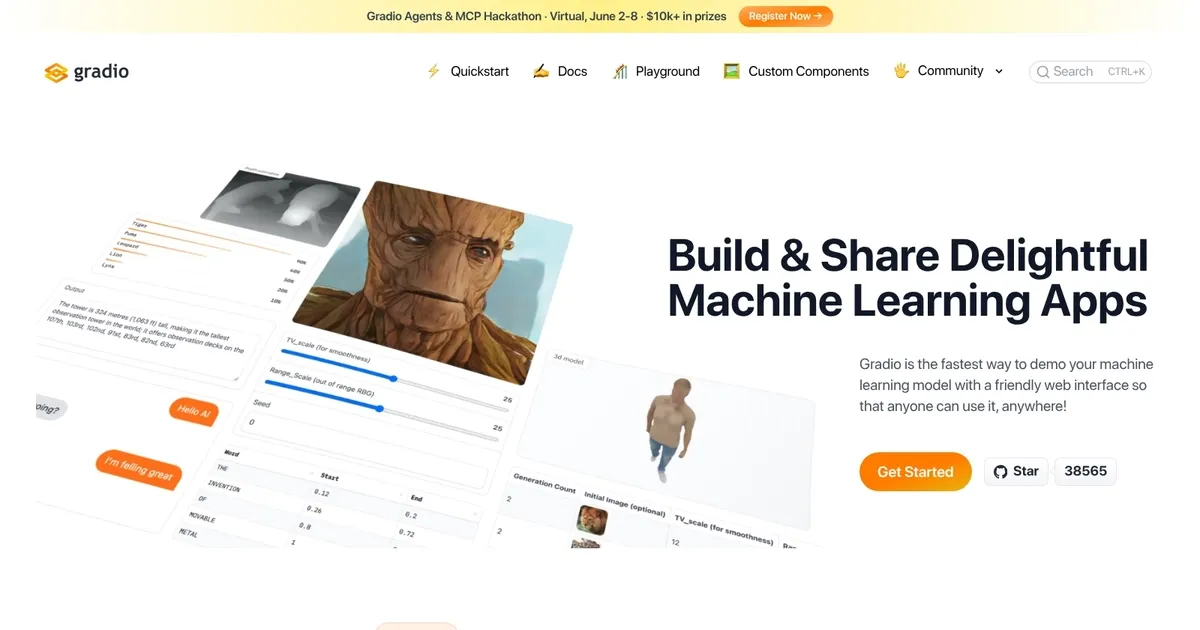
gradio - screenshot

Creates interactive web interfaces for machine learning models in Python quickly and easily

gradio

Gradio is a user-friendly software library designed to help machine learning practitioners demo their models through web interfaces swiftly and with minimal effort. It caters to a broad spectrum of applications, allowing users to create interactive demos for various types of models, including but not limited to text, image, and audio data processing.

Gradio simplifies the process of connecting a Python function to a web interface, making a machine-learning model accessible to anyone, anywhere. Users can build interfaces directly in Python scripts or notebooks and launch them as web pages. Moreover, Gradio facilitates sharing these interfaces by generating public links that allow remote access, enabling colleagues and stakeholders to interact with the model from their devices without setup or installation hassles.

Beyond local demonstrations, Gradio offers permanent hosting through integration with Hugging Face Spaces. This service hosts the user’s machine learning interface on its servers, providing a stable link for widespread sharing. This feature expands the reach of machine learning models, making them accessible to a broader audience without requiring users to manage their hosting infrastructure.

Gradio has garnered positive feedback from the machine learning community for its ease of use, flexibility, and the professional appearance of its interfaces. Whether for showcasing projects, conducting real-time AI trials, or for educational purposes – the tool has proven valuable for making machine learning models more accessible and interactive.

gradio Homepage
Categories Coding & Development

What are the key features? ⭐

  • Lightning Fast Setup: install with one pip command and launch an interface with just a few lines of Python code
  • 40+ Components: supports a wide range of input and output types including text, image, audio, video, 3D models, chatbots, and dataframes
  • Instant Sharing: generate public shareable links instantly or deploy permanently to Hugging Face Spaces for free hosting
  • Streaming Support: enables real-time streaming outputs for chat, audio, and other dynamic responses
  • Custom HTML/JS Components: allows inline custom frontend elements without external build tools

Who is it for? 🤔

Gradio helps data scientists, machine learning engineers, AI researchers, students, and developers who want to prototype, demonstrate, or share models quickly. It suits anyone tired of keeping models trapped in Jupyter notebooks and anyone who needs to let non-technical people try an AI idea without installing anything. Educators use it for interactive classroom demos, hobbyists share fun experiments, and teams show progress to stakeholders. If your work involves ML or Python functions and you value speed over pixel-perfect design, Gradio fits well.

Examples of what you can use it for 💭

  • ML researcher: creates a quick demo of a new image generation model so conference attendees can try it live
  • Student: builds an interactive homework tool that lets classmates upload audio and see real-time speech-to-text results
  • Data scientist: shares a text classifier with product managers by sending a link that opens a simple input-output page
  • Hobbyist: deploys a fun chatbot or voice changer to Hugging Face Spaces so friends can play with it anytime
  • Developer: prototypes a multimodal app combining text prompts, images, and audio feedback before building a full product

Pros & Cons ⚖️

  • Extremely fast to start
  • Great ML components
  • Free permanent hosting
  • Strong sharing options
  • Basic default styling
  • Performance tuning needed for scale

FAQs 💬

What is Gradio mainly used for?
Gradio is mainly used to build interactive web demos for machine learning models and Python functions without writing frontend code.
Do I need to know JavaScript or HTML to use Gradio?
No, Gradio handles the frontend so you only write Python. Custom HTML/JS is optional for advanced tweaks.
Is Gradio free to use?
Yes, Gradio is completely open-source and free. Hosting on Hugging Face Spaces is also free with generous limits.
Can I use Gradio for production apps?
Gradio works well for prototypes and demos. For full production, many pair it with other tools or use its API features.
How do I share my Gradio app with others?
Use demo.launch(share=True) for a temporary public link or deploy to Hugging Face Spaces for permanent, always-on hosting.
Does Gradio support streaming outputs?
Yes, recent versions include strong streaming support for chatbots, audio, and other real-time responses.
What kinds of inputs and outputs does Gradio handle?
It supports text, images, audio, video, 3D models, dataframes, chatbots, files, and many more through over 40 components.
Is Gradio good for chatbots?
Yes, the Chatbot component plus streaming makes it popular for building and sharing LLM interfaces quickly.
Visit gradio

Related tools ↙️

  1. Amplication Amplication Generates scalable Node.js backends from data models in minutes.
  2. DocuWriter.ai DocuWriter.ai Generates automated code documentation, tests, and refactors from source files
  3. Plandex Plandex Handles large coding tasks in terminal using AI for real-world projects
  4. Chunkr Chunkr Transforms complex documents into structured chunks for RAG and LLM applications
  5. Hyperbrowser Hyperbrowser Scales headless browsers for AI agent web automation and data extraction
  6. Snapps Snapps Generates AI-powered websites with drag-and-drop ease and built-in hosting
Last update: February 4, 2026
Share
Promote gradio
light badge
Copy Embed Code
dark badge
Copy Embed Code
neutral badge
Copy Embed Code
About Us | Contact Us | Suggest an AI Tool | Privacy Policy | Terms of Service

Copyright © 2026 Best AI Tools
415 Mission Street, 37th Floor, San Francisco, CA 94105