logo-darklogo-darklogo-darklogo-dark
  • Home
  • Browse
    • Assistant
    • Coding
    • Image
    • Productivity
    • Video
    • Voice
    • Writing
    • All Categories
    • AI Use Cases
  • My Favorites
  • Suggest a Tool
✕
Home › 3D Imaging›
Published by Dusan Belic on December 29, 2024

Hyper3D

Hyper3D
Hyper3D Homepage
Categories 3D Imaging
An AI-powered platform that streamlines the creation of 3D models from text descriptions or images

Hyper3D

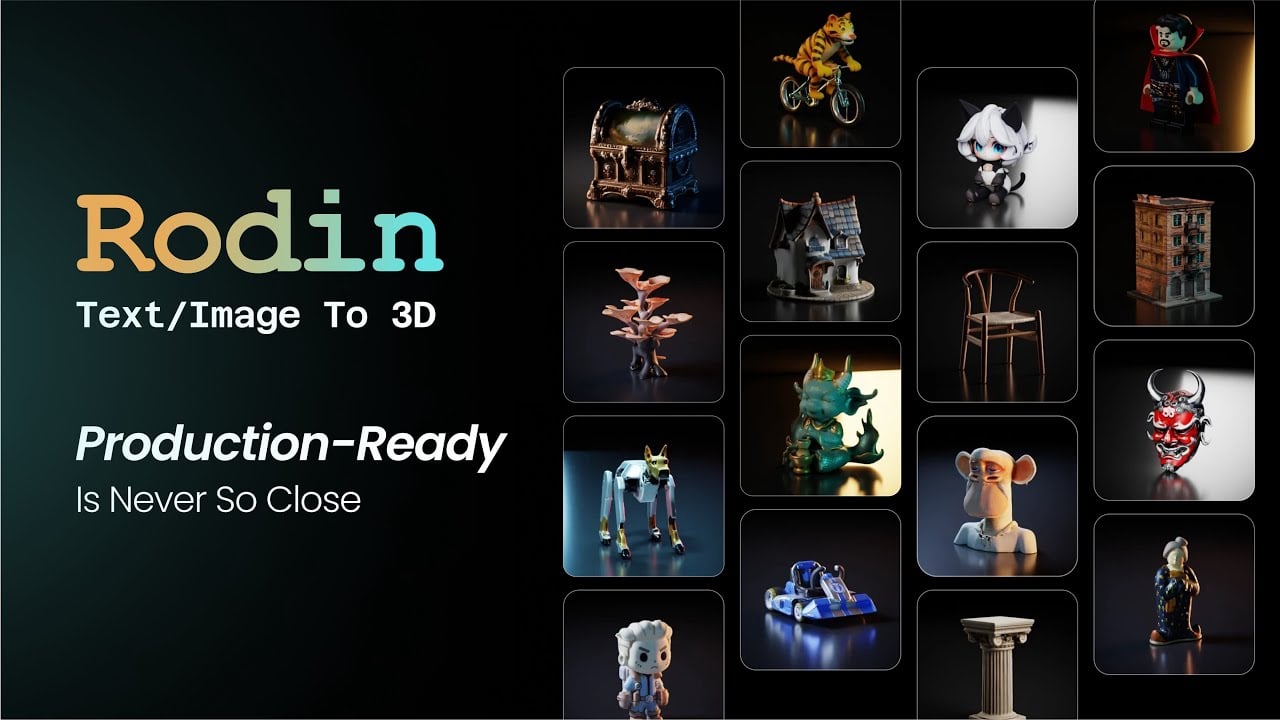
Hyper3D is an AI-powered platform that streamlines the creation of 3D models from text descriptions or images. Its flagship tool, Rodin, enables users to swiftly generate realistic, production-ready 3D assets — catering to industries such as gaming, animation, and virtual reality. By simplifying the traditionally complex and time-consuming process of 3D modeling, Hyper3D allows creators to focus more on design and innovation.

Rodin offers two primary generation modes: Text-to-3D and Image-to-3D. In the former, users input descriptive prompts to produce 3D models that align with their vision. And in the latter, users upload one or more images, with the option to select “fuse” mode for combining features from multiple images or “concat” mode for generating models from multi-view images of a single object.

Rodin also provides different tiers of generation quality. The “Sketch” tier facilitates rapid prototyping by producing low-resolution models suitable for early-stage visualization. The “Regular” tier delivers detailed models with customizable polygon counts and high-quality textures, striking a balance between detail and efficiency. And finally, for projects demanding higher resolution, the “High Pack” option offers 4K textures and high-poly models — enhancing the visual fidelity of the generated assets.

Hyper3D provides an API to enable seamless integration of its 3D generation capabilities into existing workflows and applications. This feature can be particularly beneficial for developers and businesses looking to incorporate AI-driven 3D modeling into their platforms.

Ultimately, with comprehensive documentation and support – Hyper3D ensures that users can effectively leverage its technology to enhance their creative processes and deliver high-quality 3D content.

Hyper3D Homepage
Categories 3D Imaging

Video Overview ▶️

What are the key features? ⭐

  • Text-to-3D & Image-to-3D generation: Hyper3D's Rodin tool allows users to create detailed 3D models directly from textual descriptions or images, simplifying the asset creation process.
  • High-quality outputs: The platform produces hyper-realistic 3D assets with Physically Based Rendering (PBR) textures, ensuring compatibility with industry-standard tools like Unity, Unreal Engine, and Maya.
  • Customizable model specifications: Users can adjust parameters such as polygon count and texture resolution to meet specific project requirements, offering flexibility for various use cases.
  • No-code integration: Hyper3D provides a user-friendly interface that allows users to generate 3D models without requiring programming skills, making it accessible to a broad audience.
  • API access: For developers seeking deeper integration, Hyper3D offers API access to its 3D generation capabilities, enabling seamless incorporation into existing workflows and applications.

Who is it for? 🤔

Hyper3D is designed for a range of professionals and enthusiasts in fields such as game development, virtual and augmented reality, product design, education, and marketing. Its user-friendly interface and no-code integration make it accessible to individuals without extensive technical backgrounds, while API access offers advanced capabilities for developers seeking to incorporate 3D model generation into their applications. By streamlining the 3D asset creation process, Hyper3D appeals to users aiming to enhance productivity and creativity in their respective domains.

Examples of what you can use it for 💭

  • Game developers can quickly generate diverse 3D assets for characters, environments, and props
  • VR and AR creators can produce realistic 3D models for immersive experiences
  • Designers can visualize concepts by generating 3D models from sketches or descriptions
  • Educators and students can create 3D visual aids for subjects like biology, engineering, or art
  • Marketers can develop compelling 3D visuals for product showcases, advertisements, and virtual demonstrations

Pros & Cons ⚖️

  • Easily generates 3D models easily
  • Two distinctive modes - text-to-3D and image-to-3D
  • Supports commercial use
  • Limited free credits (computing costs to blame)

FAQs 💬

What is Hyper3D exactly?
Hyper3D is an AI-powered platform that lets you generate high-quality 3D models and assets from text prompts or images, powered by its Rodin engine. It focuses on creating production-ready meshes with clean geometry, PBR textures, and good topology.
How does Hyper3D turn text or images into 3D models?
You simply type a description or upload one or more images, and the AI generates a detailed 3D model in seconds to minutes. It supports text-to-3D, single-image-to-3D, and multi-view image fusion for more accurate results.
Is Hyper3D suitable for beginners with no 3D modeling experience?
Yes, the interface is straightforward and user-friendly, so you don't need advanced skills to get started. Many hobbyists and newcomers use it to quickly create assets for games, prints, or prototypes.
What kinds of 3D models does Hyper3D work best for?
It excels at characters, objects, props, environments, and even complex items like robotic arms or stylized figurines. Users often praise its clean, sharp geometry and realistic textures.
Can Hyper3D generate models ready for games or animation?
Absolutely, it produces models with good edge flow, quad meshes, and PBR materials that work well in tools like Unity, Unreal Engine, Blender, or Maya. Features like normal baking and pose options help make them animation-ready.
Does Hyper3D support multi-view images for better accuracy?
Yes, you can upload multiple angles of the same object, and the AI fuses them into a more precise 3D model. This works especially well for real-world objects or photos.
How does Hyper3D compare to other AI 3D tools like Meshy or Tripo?
Many users say Hyper3D's Rodin delivers smoother geometry, fewer artifacts, and higher overall quality, especially for professional or game-ready assets. It's often called one of the top options in 2025 reviews.
Can I edit or refine the generated 3D models inside Hyper3D?
Yes, it includes tools like a web-based mesh editor, image remixing, and refinement options to tweak details before exporting.
What file formats can I export from Hyper3D?
Models export in common formats like GLB, OBJ, and others, making them easy to import into most 3D software or game engines.
Is Hyper3D good for 3D printing or prototyping?
Definitely, people frequently use it for quick prototypes and prints because the models have clean topology and solid structures that slice well.
Visit Hyper3D

Related tools ↙️

  1. Blackshark.ai Blackshark.ai Creates photorealistic 3D digital twins from satellite imagery using AI
  2. 3Dpresso 3Dpresso Transforms short videos into editable 3D models using AI.
  3. VisualizeAI VisualizeAI Transforms sketches and text into 3D designs
  4. Odyssey Odyssey Generates cinematic 3D worlds from images for film and gaming
  5. NewArc NewArc Transforms sketches into realistic images and 3D renders in seconds
  6. Visoid Visoid Creates stunning 3D architectural visualizations from models in minutes using AI
Last update: December 9, 2025
Share
Promote Hyper3D
light badge
Copy Embed Code
dark badge
Copy Embed Code
neutral badge
Copy Embed Code
About Us | Contact Us | Suggest an AI Tool | Privacy Policy | Terms of Service

Copyright © 2026 Best AI Tools
415 Mission Street, 37th Floor, San Francisco, CA 94105