logo-darklogo-darklogo-darklogo-dark
  • Tool Categories
    • 🎨Art & Creative Design505
    • 🏢Business Management644
    • 💻Coding & Development515
    • 👮Detection83
    • 🧠General Use727
    • 🏥Health & Wellness55
    • 📷Image & Photo Analysis100
    • 🖼️Image Generation & Editing618
    • 📐Interior & Architectural Design37
    • 🎓Learning & Education483
    • ⚖️Legal & Finance90
    • 🎭Lifestyle & Entertainment236
    • 📢Marketing & Advertising627
    • 🎧Music & Audio138
    • 👔Office & Workplace1,014
    • 🔬Research & Data Analysis372
    • 👥Social Media245
    • 🎥Video Generation & Editing426
    • 👧🏻Virtual Companion135
    • 🎤Voice Generation & Editing381
    • ✍️Writing & Editing808
    • All Categories
    • AI Use Cases
  • News
  • Events
    • Academic Conferences
    • Developer Conferences
    • Expos / Trade Shows
    • Industry Summits
    • Workshops / Training
    • All Events
    • Past Events
  • Saved Tools
  • Suggest a Tool
✕
Home › Art & Creative Design › 3D Modeling› 3Dpresso
3Dpresso

3Dpresso

Transforms short videos into editable 3D models using AI.

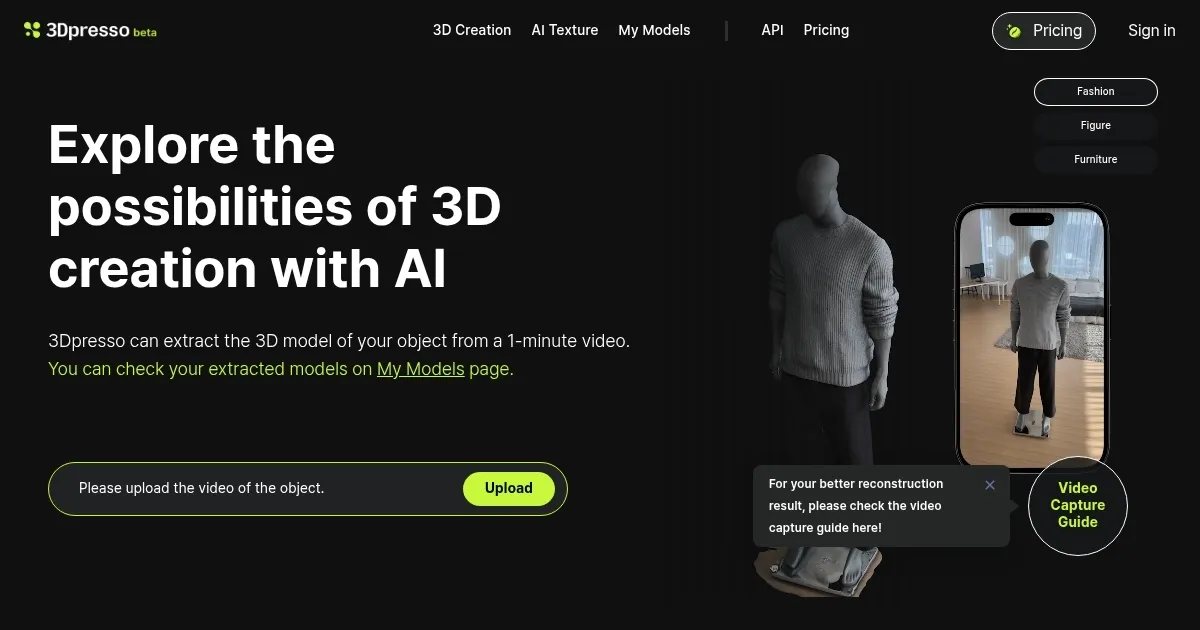
3Dpresso is an AI-powered platform that generates 3D models from short videos of objects. Users record a one to two-minute clip using a smartphone and upload it for processing. The system extracts a detailed mesh with textures, viewable in the My Models dashboard. It supports modifications through the AI Texture feature, where text prompts alter surface appearances. Exports include GLB, OBJ, STL, and others, plus web viewer links and HTML embeds.

The tool targets creators needing quick 3D assets from physical items. It processes videos via neural networks for reconstruction, handling depth and motion data efficiently. The iOS Capture App provides real-time guidance for optimal scans, improving accuracy over standard camera apps. Integration with creative software like Blender or Unity occurs through standard file formats.

Competitors include Luma AI, which focuses on image-based photogrammetry but requires more setup for similar results. Tripo3D emphasizes text-to-3D generation, differing from 3Dpressos video input method. Meshy AI offers faster texturing for generative models, though 3Dpresso excels in realistic object captures. Pricing features a free trial with limited credits, followed by subscription tiers for higher volumes, generally more accessible than enterprise scanners.

Users appreciate the speed and ease, reducing modeling time from hours to minutes. Common likes include intuitive interfaces and community resources like Discord for tips. Drawbacks involve occasional artifacts on reflective surfaces and queue times during peak usage. The platform updates regularly, enhancing mesh quality and prompt responsiveness.

For best results, capture in diffused light and steady motion. Test prompts iteratively for textures. Combine outputs with external tools for complex scenes. This approach maximizes utility for prototyping or content creation.

Visit 3Dpresso ↗
Categories
🎨 Art
🧊 3D Modeling 🎲 Text to 3D Design
🖼️ Image
🧊 3D Imaging

Homepage Screenshot 📸

3Dpresso screenshot

Video Overview 🎬

3Dpresso - Video Overview

What are the key features? ✨

  • Video-to-3D Extraction: Converts one-minute videos into detailed, textured 3D models using AI reconstruction.
  • AI Texture Modification: Alters model surfaces with generative AI based on descriptive text prompts.
  • Capture App Integration: iOS app guides users for high-quality video scans with real-time feedback.
  • Multi-Format Export: Supports GLB, OBJ, STL, and more, plus web viewers and HTML embeds.
  • My Models Dashboard: Centralized hub for viewing, editing, and managing generated 3D assets.

Who is it for? 🤔

3Dpresso suits creators, designers, and developers who want to digitize real objects without deep technical skills, like indie game makers prototyping assets, e-commerce pros building virtual catalogs, or educators crafting interactive models for lessons, empowering anyone with a smartphone to jump into 3D workflows quickly and affordably.

Examples of what you can use it for 💡

  • Game Developer: Scans prototypes from video to import textured props into Unity for rapid iteration.
  • E-commerce Seller: Captures product videos to generate 3D views for online stores, boosting engagement.
  • Film Prop Maker: Edits scanned real items with AI textures for custom digital assets in post-production.
  • Educator: Creates 3D models of historical artifacts from videos for interactive classroom visualizations.
  • Fashion Designer: Digitizes garment samples to experiment with virtual fabric textures and fits.

Pros & Cons ⚖️

  • Fast model generation
  • Easy video input
  • Versatile exports
  • Intuitive app guide
  • Artifacts on shiny objects
  • Processing queues

FAQs 💬

What input does 3Dpresso require for model creation?
It uses one to two-minute videos of the object filmed from multiple angles.
Can I edit the generated models?
Yes, via the AI Texture feature, which applies changes through text prompts.
What file formats are supported for export?
GLB, OBJ, STL, FBX, USDZ, and HTML embeds for web viewing.
Is there a mobile app for capturing videos?
An iOS Capture App provides guided scanning for better results.
How long does processing take?
Typically five to ten minutes, depending on video complexity.
Does it offer a free trial?
Yes, new users get 30 credits to generate initial models.
What are common use cases?
Prototyping for games, virtual product showcases, and educational visuals.
How does it compare to photogrammetry tools?
Video input captures motion better than static images, with easier setup.
Can I use it for commercial projects?
Subscription plans include commercial rights for generated models.
Is there community support?
Join the Discord for tips, shared models, and user discussions.

Ready to try 3Dpresso?

Transforms short videos into editable 3D models using AI.

Visit 3Dpresso ↗

3Dpresso alternatives 🔗

  1. Leonardo.Ai Leonardo.Ai A tool that helps artists create stunning game assets with the help of AI
  2. Krea Krea Empowering users to generate and enhance images and videos using advanced AI
  3. Meshy Meshy Transforms text prompts and images into high-quality 3D models instantly.
  4. Tripo3D Tripo3D An AI-driven platform designed to transform text into 3D animations
  5. Luma Interactive Scenes Luma Interactive Scenes Capture and experience the world in lifelike 3D
  6. Homestyler AI Designer Homestyler AI Designer Choose design style and room type, and let AI design the room for you
Share
3Dpresso screenshot enlarged
Promote 3Dpresso
light badge
Copy Embed Code
dark badge
Copy Embed Code
neutral badge
Copy Embed Code
Best AI Tools

Discover the best AI tools for any use case

Explore
  • Tool Categories
  • AI Use Cases
  • AI Events
  • AI News
  • Saved Tools
Company
  • About Us
  • Contact Us
  • Media & Partnerships
  • Suggest a Tool
Legal
  • Privacy Policy
  • Terms of Service
Copyright © 2026 Best AI Tools 415 Mission Street, 37th Floor, San Francisco, CA 94105