logo-darklogo-darklogo-darklogo-dark
  • Home
  • Browse
    • Assistant
    • Coding
    • Image
    • Productivity
    • Video
    • Voice
    • Writing
    • All Categories
    • AI Use Cases
  • Events
  • My Favorites
  • Suggest a Tool
✕
Home › Image Generation & Editing›
Published by Dusan Belic on August 30, 2023

jpgRM

jpgRM
jpgRM Homepage
Categories Image Generation & Editing

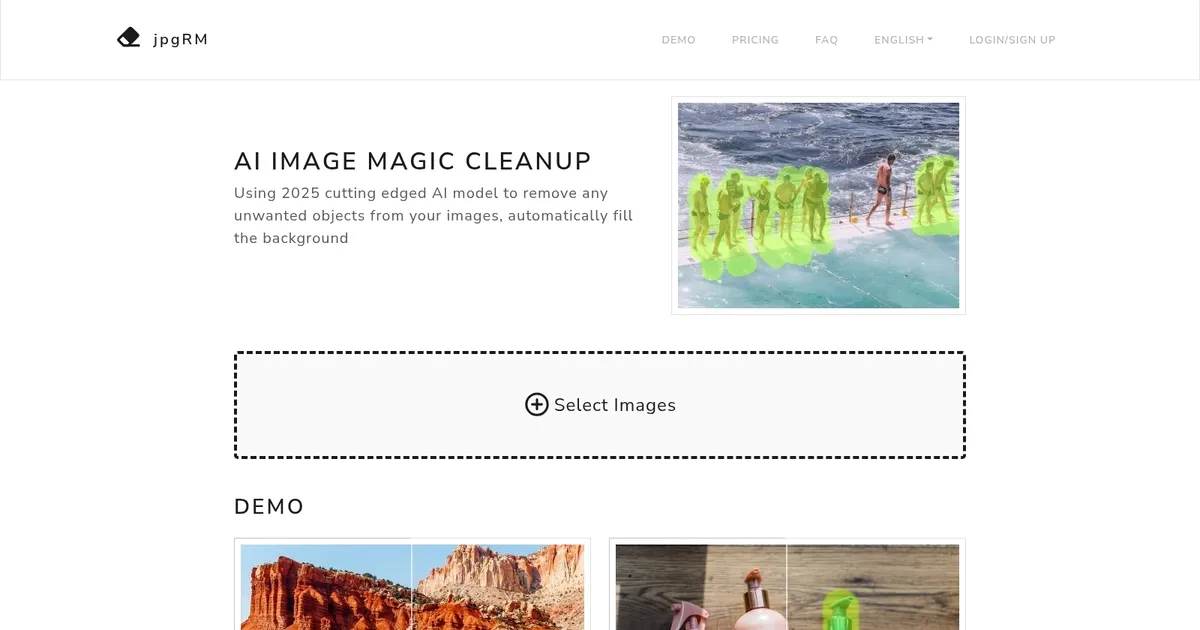
jpgRM - screenshot

Removes unwanted objects and backgrounds from images then fills gaps intelligently with AI

jpgRM

jpgRM, or AI Image Magic Cleanup, leverages a cutting-edge AI model to intelligently erase unwanted objects from images and seamlessly fill in the background. It can distinguish between the content and background of an image, allowing users to effortlessly remove objects, product logos, dense crowds, and watermarks — thereby enhancing the visual appeal of their photos.

jpgRM is designed to work efficiently with varying image resolutions, with processing times ranging from a couple of seconds for images under 1000 pixels to longer for higher-resolution images. It supports both desktop and mobile devices, ensuring accessibility and convenience for users.

Both free and VIP services are available with free users being able to download processed images at a maximum resolution of 720 pixels, while VIP members have the privilege of downloading images in 4K resolution and benefit from unlimited image processing.

Finally, we should add that jpgRM ensures the privacy of users by deleting images immediately after processing and addresses potential issues such as server errors or network issues.

jpgRM Homepage
Categories Image Generation & Editing

What are the key features? ⭐

  • Object Removal: Brush over any unwanted item like people, logos, watermarks, or objects and the AI erases it while filling the space realistically.
  • Background Removal: Automatically detect and remove the entire background, leaving the main subject isolated with clean edges.
  • Smart Inpainting: Uses advanced GAN technology to generate seamless, context-aware background content in removed areas.
  • Mobile-Friendly Editing: Full brush-based interface works smoothly on phones and tablets for on-the-go touch-ups.
  • Quick Processing & Compare View: Edits complete in seconds for standard sizes, with instant before-and-after comparison to check quality.

Who is it for? 🤔

jpgRM helps casual photographers, social media creators, e-commerce sellers, content marketers, and anyone who occasionally needs to tidy up photos without learning complex software. Its especially useful for people who shoot travel pictures, product shots, or group photos and want fast removal of distractions like photobombers, logos, watermarks, or busy backgrounds, all while keeping edits simple and mobile-accessible.

Examples of what you can use it for 💭

  • Travel photographer: Removes photobombers or crowds from scenic shots and fills the background naturally so the landscape looks untouched.
  • E-commerce seller: Erases logos, watermarks, or unwanted props from product photos to create clean, professional images ready for listings.
  • Social media creator: Quickly cleans up selfies or group pictures by brushing away strangers or distractions before posting online.
  • Content marketer: Strips unwanted text or branding from stock-style images to repurpose them for blogs or ads without visible edits.
  • Everyday user: Fixes vacation photos on a phone by removing random objects or people in the frame with a few brush strokes.

Pros & Cons ⚖️

  • Fast processing speed
  • Realistic inpainting results
  • Mobile support works well
  • Simple intuitive brush
  • Free resolution limited
  • Complex scenes need multiple passes

FAQs 💬

What does jpgRM actually do to my images?
It lets you brush over unwanted objects, backgrounds, logos, watermarks or crowds, then uses AI to erase them and fill the empty space with matching generated content.
Is jpgRM free to use?
Yes for basic editing and 720px downloads; higher resolution like 4K requires a paid VIP upgrade to support server costs.
Does it work on my phone?
Yes, the full brush interface and editing tools function on mobile browsers without needing an app.
How private is my uploaded photo?
Images are deleted from the server immediately after processing to protect your privacy.
What kind of results can I expect on tricky areas like hair or fur?
Background removal usually handles fine edges well, though very intricate details sometimes benefit from careful brushing and a second pass.
How does jpgRM compare to Photoshop's AI tools?
Its much simpler and web-based with no install needed, though Photoshop gives more manual control for professional work.
Can I remove multiple objects in one image?
Yes, just paint over each one separately and process again until everything looks right.
Is there a limit on image size or number of edits?
Free tier handles typical uploads but speed and resolution are capped; VIP removes those restrictions.
Visit jpgRM

Related tools ↙️

  1. Dawn AI Dawn AI Generates personalized avatars and images from selfies using advanced AI technology
  2. Imajinn Imajinn Transforms user photos into artistic images and custom visuals using AI
  3. Imgix Imgix Optimizes images in real-time using AI for faster web delivery
  4. Cloudinary Cloudinary Manages, transforms, optimizes, and delivers images and videos with AI-powered features
  5. SVG AI SVG AI Transforms text prompts into scalable vector icons and logos instantly
  6. Blackshark.ai Blackshark.ai Creates photorealistic 3D digital twins from satellite imagery using AI
Last update: February 25, 2026
Share
Promote jpgRM
light badge
Copy Embed Code
dark badge
Copy Embed Code
neutral badge
Copy Embed Code
About Us | Contact Us | Suggest an AI Tool | Privacy Policy | Terms of Service

Copyright © 2026 Best AI Tools
415 Mission Street, 37th Floor, San Francisco, CA 94105




