logo-darklogo-darklogo-darklogo-dark
  • Tool Categories
    • 🎨Art & Creative Design505
    • 🏢Business Management644
    • 💻Coding & Development515
    • 👮Detection83
    • 🧠General Use727
    • 🏥Health & Wellness55
    • 📷Image & Photo Analysis100
    • 🖼️Image Generation & Editing618
    • 📐Interior & Architectural Design37
    • 🎓Learning & Education483
    • ⚖️Legal & Finance90
    • 🎭Lifestyle & Entertainment236
    • 📢Marketing & Advertising627
    • 🎧Music & Audio138
    • 👔Office & Workplace1,014
    • 🔬Research & Data Analysis372
    • 👥Social Media245
    • 🎥Video Generation & Editing426
    • 👧🏻Virtual Companion135
    • 🎤Voice Generation & Editing381
    • ✍️Writing & Editing808
    • All Categories
    • AI Use Cases
  • News
  • Events
    • Academic Conferences
    • Developer Conferences
    • Expos / Trade Shows
    • Industry Summits
    • Workshops / Training
    • All Events
    • Past Events
  • Saved Tools
  • Suggest a Tool
✕
Home › Writing & Editing › Subtitle Generation› EasySub
EasySub

EasySub

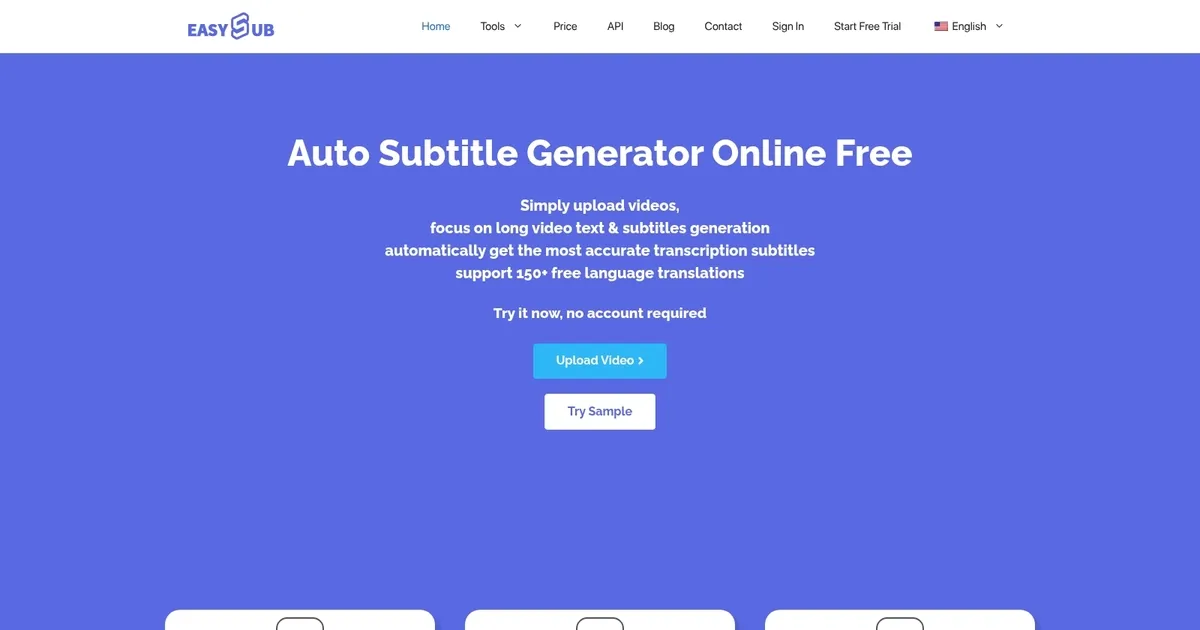
Free online automatic subtitle generator with support for over 150 languages

EasySub is an AI subtitle generator that provides users with the ability to automatically generate accurate transcription subtitles for video and audio content. It is designed to transcribe and translate spoken dialogue into subtitles in over 150 languages, aiming to provide a quick and efficient solution for creating subtitles.

Users can upload their video or audio files directly or use YouTube URLs, and the tool uses advanced AI algorithms to recognize speech and generate subtitles with a high degree of accuracy — boasting recognition accuracy higher than 90% compared to similar tools on the market.

Beyond transcriptions, EasySub offers features for subtitle editing, downloading in various formats (like TXT, ASS, SRT), and video export with subtitles. It supports transcription of multiple dialects and minor languages — providing users with a wide range of language options for subtitle generation and translation — all aimed at making video content more accessible and engaging for a global audience.

The tool is easy to use and offers the first 30 minutes of transcription for free, while subsequent services are available at a competitive rate. All this makes EasySub a potentially invaluable resource for video creators, social media marketers, educators, and anyone else needing quick and accurate subtitle creation.

Visit EasySub ↗
Categories
✍️ Writing
💬 Subtitle Generation
🎤 Voice
📝 Transcriber 💬 Speech-to-Text
🎥 Video
✏️ Video Editing
🎓 Education
🈸 Translation 🎬 Video Translation

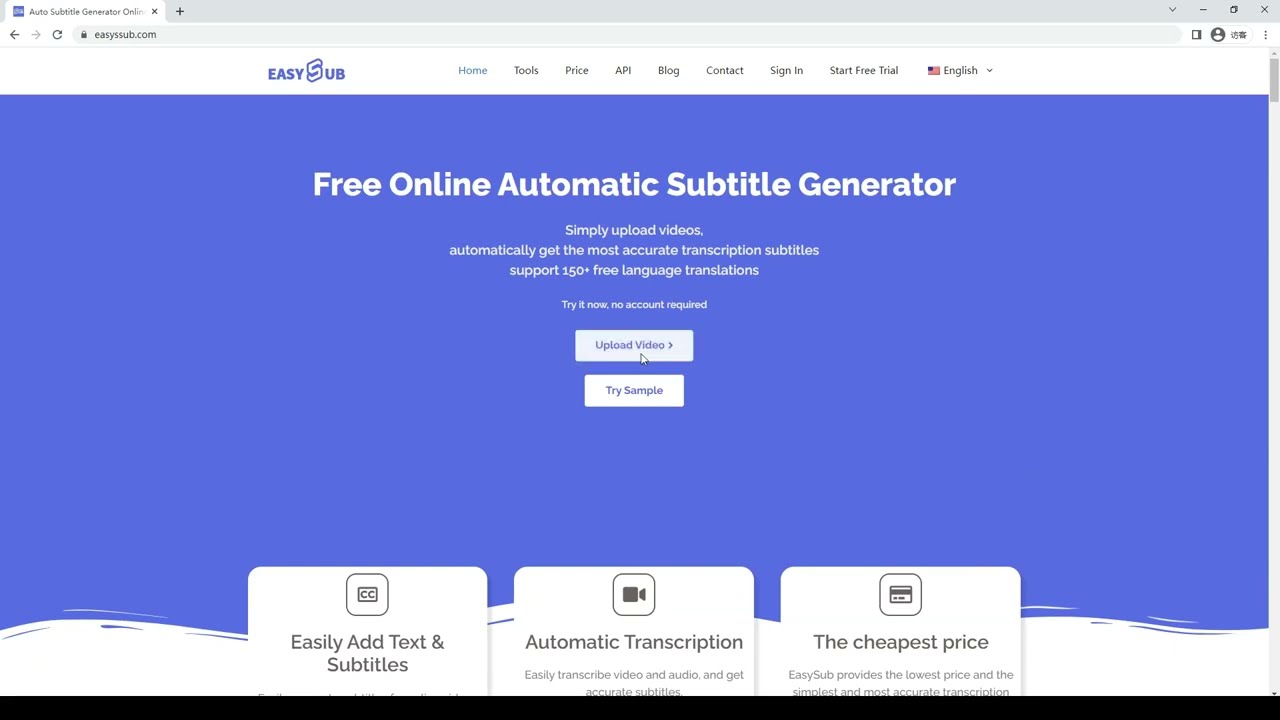
Homepage Screenshot 📸

EasySub screenshot

Video Overview 🎬

EasySub - Video Overview

What are the key features? ✨

  • AI Transcription: Uses advanced audio recognition to generate over 95% accurate subtitles from videos and audio files, specialized for long content like movies.
  • Multi-Language Translation: Provides completely free subtitle translation into 150+ languages, including dialects and minor ones.
  • Subtitle Editing Tools: Includes a timeline editor for splitting, rearranging, modifying text, timing, and positioning subtitles.
  • Export Options: Downloads subtitles in SRT, ASS, TXT formats and exports subtitled videos in resolutions suited for YouTube, TikTok, Instagram, Facebook, LinkedIn.
  • YouTube Support: Generates subtitles directly from YouTube URLs and offers a free YouTube subtitle downloader tool.

Who is it for? 🤔

EasySub is particularly helpful for content creators on social media who need quick, affordable subtitles to boost engagement on muted videos, educators transcribing lectures or lessons for accessibility, subtitle teams handling movies or long-form content, non-English speakers reaching broader audiences through translation, and anyone with hearing needs wanting better video access without complex software.

Examples of what you can use it for 💡

  • Social media creator: Uploads short clips to add auto subtitles and translate them for international viewers on TikTok or Instagram to increase watch time.
  • YouTube content maker: Pastes a video URL to generate and edit subtitles quickly, then exports for better SEO and accessibility.
  • Educator: Transcribes recorded lectures or tutorials into multi-language subtitles for students who prefer reading or speak different languages.
  • Subtitle group member: Uses the editing timeline to proofread and refine AI-generated subtitles for films or series before final export.
  • Hearing-impaired viewer: Adds accurate subtitles to personal videos or downloads existing ones via the free YouTube tool for easier watching.

Pros & Cons ⚖️

  • Free translation in 150+ languages
  • Handles long videos well
  • Low cost per minute
  • Simple, fast interface
  • Basic UI and slower processing
  • Exports limited without payment

FAQs 💬

What is EasySub?
EasySub is an online AI tool that automatically generates subtitles from uploaded videos or audio files, translates them, and allows basic editing and export.
Does EasySub offer a free trial or version?
Yes, it provides 30 minutes of free transcription time, and subtitle translation is completely free forever.
What languages does EasySub support?
It supports transcription in over 100 languages and free translation into 150+ languages, including many dialects.
Can I use EasySub with YouTube videos?
Yes, you can paste a YouTube URL to generate subtitles, and there's a free YouTube subtitle downloader tool.
What file formats does EasySub accept?
It handles common formats like MP4, MOV, AVI, MKV for video and MP3, WAV for audio.
Is EasySub accurate for subtitles?
It claims over 95% accuracy on average, up to 99% in ideal conditions, and is noted for long videos and movies.
How does pricing work for EasySub?
It uses a pay-as-you-go model starting low per minute after the free 30 minutes, with options for bulk time purchases, cheaper than many competitors.
Can I edit subtitles in EasySub?
Yes, it includes a timeline editor to adjust timing, text, position, split segments, and more.
What platforms are the exported videos suitable for?
Exports are optimized for YouTube, TikTok, Instagram, Facebook, and LinkedIn resolutions and formats.
Do I need an account to start using EasySub?
No account is required to try it; you can upload and start right away, though sign-up unlocks more features.

Ready to try EasySub?

Free online automatic subtitle generator with support for over 150 languages

Visit EasySub ↗

EasySub alternatives 🔗

  1. Vimeo AI Vimeo AI Creates polished videos from single recordings using AI edits and scripts
  2. CapCut Creative Suite CapCut Creative Suite Online creative suite for everyone to create stunning images and videos
  3. TurboScribe TurboScribe Transcribes audio and video files to accurate text instantly
  4. Loom AI Loom AI Record better video messages with automatic titles, summaries, share messages, and more
  5. VEED VEED Creates pro-level videos with AI-powered editing and collaboration tools
  6. Clipchamp Clipchamp Edit videos effortlessly with AI-powered tools and templates
Share
EasySub screenshot enlarged
Promote EasySub
light badge
Copy Embed Code
dark badge
Copy Embed Code
neutral badge
Copy Embed Code
Best AI Tools

Discover the best AI tools for any use case

Explore
  • Tool Categories
  • AI Use Cases
  • AI Events
  • AI News
  • Saved Tools
Company
  • About Us
  • Contact Us
  • Media & Partnerships
  • Suggest a Tool
Legal
  • Privacy Policy
  • Terms of Service
Copyright © 2026 Best AI Tools 415 Mission Street, 37th Floor, San Francisco, CA 94105