
logo-darklogo-darklogo-darklogo-dark
  • Home
  • Browse
    • Assistant
    • Coding
    • Image
    • Productivity
    • Video
    • Voice
    • Writing
    • All Categories
    • AI Use Cases
  • My Favorites
  • Suggest a Tool
✕
Home › Video Generation & Editing›
Published by Dusan Belic on August 30, 2023

Klap

Klap
Klap Homepage
Categories Video Generation & Editing

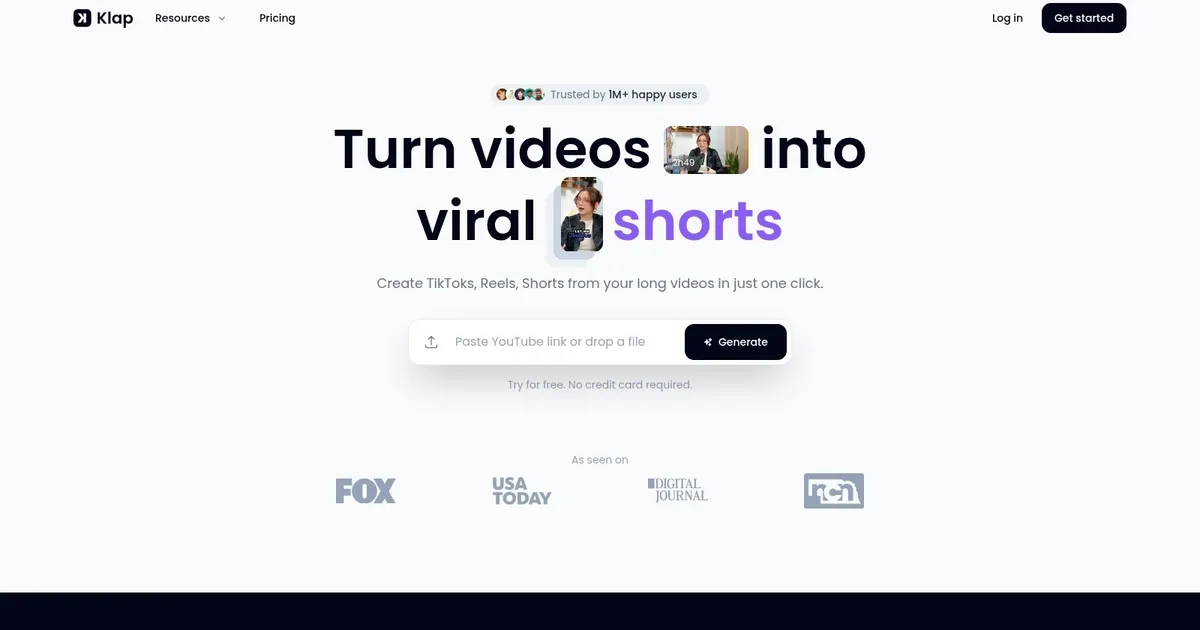
Klap - screenshot

Make short videos for TikTok, Reels, and YouTube Shorts 10x faster

Klap

Klap is designed to streamline the process of converting long-form videos into engaging, viral short clips for platforms like TikTok, Instagram Reel, and YouTube Shorts. By leveraging advanced AI technology, it automatically identifies key topics within a video, reframes it to focus on the most important aspects using face detection, and adds dynamic, engaging captions to captivate viewers.

This AI-driven approach not only simplifies content creation but also ensures the production of attention-grabbing shorts suitable for the mentioned social media platforms​​​​.

Klap is easy to use and doesn’t require a credit card to start, with the free trial option allowing users to test its capabilities. It further promotes efficiency by saving hours that would otherwise be spent on manual editing, ensuring that the content produced is optimized for viewer engagement and brand consistency.

Klap supports more than 50 languages, making it accessible to creators worldwide.

Trusted by over 350,000 users and responsible for generating millions of clips, Klap has made a significant impact on the way creators and marketers approach short-form content creation.

Klap Homepage
Categories Video Generation & Editing

What are the key features? ⭐

  • AI Editing: Automatically identifies compelling topics and edits them into multiple short clips from long videos.
  • Auto Reframing: Intelligently adjusts framing to keep subjects in focus using face detection and supports various layouts.
  • Engaging Captions: Generates customizable, animated subtitles in 52 languages to increase viewer retention and accessibility.
  • Customization Options: Allows branding with logos, fonts, colors, and manual tweaks to match personal or business style.
  • Direct Publish & Schedule: Exports clips and schedules posts directly to TikTok, Instagram, YouTube, and LinkedIn.

Who is it for? 🤔

Klap suits content creators, podcasters, YouTubers, educators, marketers, and small businesses that produce long-form videos but need to maintain a consistent short-form presence on social media without investing hours in manual editing. Its especially valuable for anyone speaking directly to camera or running interviews, since the AI excels at speech-driven content.

Examples of what you can use it for 💭

  • Podcaster: Turns full episodes into bite-sized highlights with captions to drive traffic back to the main show on platforms like TikTok and Reels.
  • YouTuber: Repurposes tutorial or vlog content into Shorts to attract new subscribers without extra editing time.
  • Educator: Converts lecture recordings into quick tips or key takeaways for Instagram and LinkedIn to reach students faster.
  • Marketer: Creates branded clips from webinars or product demos to boost engagement across social channels.
  • Interviewer: Extracts standout quotes and reactions from conversations to share as viral moments on multiple platforms.

Pros & Cons ⚖️

  • Saves hours on editing
  • Fast AI processing
  • Multi-platform scheduling
  • Strong caption support
  • Limited deep customization
  • Occasional off-context clips

FAQs 💬

What kind of videos work best with Klap?
Klap performs best with talking-head content like podcasts, interviews, educational videos, product reviews, and trainings where speech drives the value.
How many clips does it typically generate from one video?
A one-minute video often produces around 5 clips, while longer content like a one-hour episode can yield 8 to 15 depending on engaging moments detected.
Does Klap support languages other than English?
Yes, it generates captions in 52 languages, making it suitable for global creators.
Can I customize the look of the clips?
You can adjust fonts, colors, add logos, and tweak framing or captions to fit your brand.
Is there a free way to try Klap?
A free trial lets you process one video to see the results before subscribing.
Does it integrate with social media platforms?
It allows direct publishing and scheduling to TikTok, Instagram, YouTube, and LinkedIn from the dashboard.
What if the AI picks the wrong moments?
You can manually trim start/end points, reorder, or discard clips during the review step.
How does Klap compare to OpusClip?
Both automate repurposing, but Klap often processes faster for talking-head videos while OpusClip may provide deeper virality insights.
Is a mobile app available?
Klap operates as a web-based tool without a dedicated mobile app currently.
Who should avoid this tool?
Creators needing advanced manual effects, heavy motion graphics, or non-speech-focused videos may find it less ideal.
Visit Klap

Related tools ↙️

  1. Tango Tango Creates interactive how-to guides from screen captures in minutes.
  2. Nullface Nullface Generates AI-powered faceless videos for TikTok and YouTube effortlessly
  3. Cloudinary Cloudinary Manages, transforms, optimizes, and delivers images and videos with AI-powered features
  4. Verbalate Verbalate Translates and dubs videos into multiple languages using voice cloning and lip sync for global reach
  5. Choppity Choppity Transforms long videos into engaging short clips using AI automation
  6. WarpVideo WarpVideo Transforms videos through AI-powered face swapping and style restyling
Last update: January 27, 2026
Share
Promote Klap
light badge
Copy Embed Code
dark badge
Copy Embed Code
neutral badge
Copy Embed Code
About Us | Contact Us | Suggest an AI Tool | Privacy Policy | Terms of Service

Copyright © 2026 Best AI Tools
415 Mission Street, 37th Floor, San Francisco, CA 94105





