logo-darklogo-darklogo-darklogo-dark
  • Home
  • Browse
    • Assistant
    • Coding
    • Image
    • Productivity
    • Video
    • Voice
    • Writing
    • All Categories
    • AI Use Cases
  • My Favorites
  • Suggest a Tool
✕
Home › Productivity / Research & Data Analysis ›

LINER

Published by Dusan Belic on June 15, 2023

LINER

LINER
LINER Homepage
Categories ProductivityResearch & Data Analysis
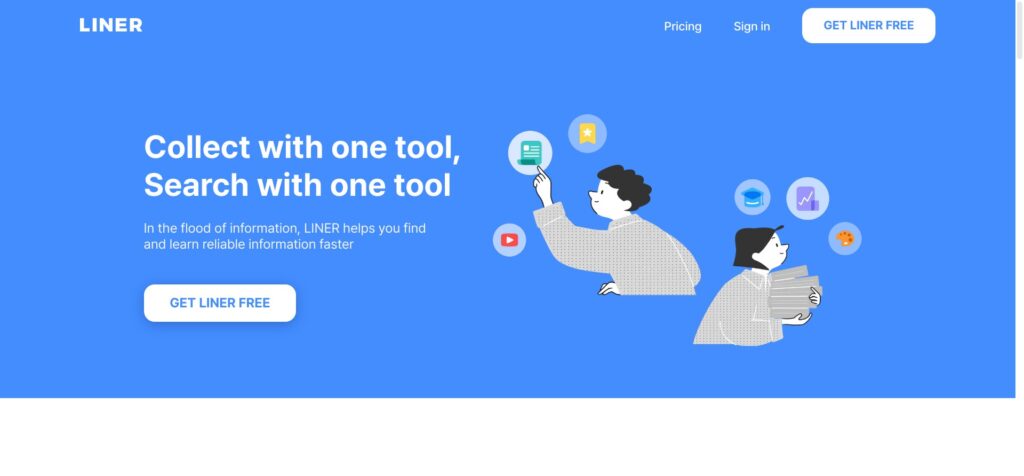
A web-based tool that combines searching and collecting information in a user-friendly interface

LINER

In the information-overloaded society, getting through the noise is becoming increasingly difficult. LINER was made to tackle this problem, helping you/us navigate the deluge of online information more efficiently.

Working as a web-based tool, it aims to streamline your internet browsing experience, allowing you to quickly locate and learn valuable information. This is made possible through a combination of search and collection features, all housed within a single tool. So, whether you’re conducting research for a project, looking for the latest news, or just exploring your interests – LINER will help you get the information you need without flooding you with irrelevant data.

LINER relies on ChatGPT to suggest what you might want to search for next. The idea here is to improve your search experience and tailor it to your specific needs.

In addition, LINER offers a universal highlighter feature across the web. You can use it on articles, images, PDF files, and even YouTube videos. It’s like having a highlighter pen for the internet, allowing you to mark up important points or interesting facts as you come across them.

Also included is a feature for discovering favorites from the web, making your information search easier and more personalized. As a result, you can uncover interesting and relevant content based on your preferences.

Finally, it’s worth adding that LINER provides storage for all the highlights and discoveries you make so you can quickly access them later on. This effectively serves as your personal knowledge base, letting you revisit and reuse the most valuable information.

With all these features, LINER your web browsing experience is no longer only about consumption but also about collection and curation — turning the entire world wide web into a more meaningful resource.

LINER Homepage
Categories ProductivityResearch & Data Analysis

Video Overview ▶️

What are the key features? ⭐

  • Collection + search: With LINER, you can collect and search information using a single tool. Instead of juggling multiple apps, you can streamline your information retrieval process and save time.
  • AI-enhanced search: LINER connects to ChatGPT to generate answers from reliable references, helping you quickly find relevant information. Moreover, it uses AI to suggest what to search for next.
  • Highlighting: With LINER, you can highlight key information everywhere on the web. This would include written text, as well as images, videos and PDF files.
  • Find new, relevant content: LINER assists you in discovering new content that aligns with your interests.
  • Storage: LINER also provides a dedicated space for storing your highlights and discoveries, so you can keep your findings organized and readily available for future use.

Who is it for? 🤔

LINER is made for researchers, teachers, students and everyone else having difficulty dealing with the information overload we all face. Its AI-enabled features and the ability to highlight all kinds of online content make it a valuable tool for product designers and productivity consultants who need to manage and organize information efficiently. Finally, even individual users can try LINER to personalize their Internet experience and get to the content they care about more easily.

Examples of what you can use it for 💭

  • Research - LINER will help you sift through the vast amount of content to find reliable information faster
  • Information gathering with the help of AI
  • Highlight online content and quickly get back to it in future
  • Create a personalized web experience for yourself

Pros & Cons ⚖️

  • Great tool for collecting all kinds of content from the Internet
  • LINER's learning capability lets you uncover more content you may like
  • You can create your very own personal knowledge base with LINER
  • GPT 4 integration is available only with the most expensive plan
FAQs 💬

What is Liner AI, and who is it for?
Liner AI is an AI-powered research assistant and search engine that helps users find, summarize, and verify information from trusted sources like academic papers and web content. It targets students, researchers, professionals, and teams needing quick, cited insights, with over 10 million users worldwide as of late 2025. I think it's especially useful for academics tackling literature reviews or pros handling reports.
How does Liner AI ensure answer accuracy?
It uses multi-agent AI systems to break down queries, cross-reference over 200 million academic sources, and provide line-by-line citations for every claim. Recent benchmarks like SimpleQA show it scoring 95.3% accuracy, outperforming tools like ChatGPT and Perplexity in fact-checking, though it might still hallucinate on niche topics.
What are the main features of Liner AI?
Key ones include Deep Research for in-depth reports, Scholar Mode for academic formatting, AI agents for tasks like hypothesis generation, file uploads for PDFs and images, and browser extensions for highlighting web content. You get unlimited simple searches on all plans, plus voice input and cross-device sync.
How much does Liner AI cost?
It starts free with basic access, then Pro at about $96/year for more searches, Max at $180/year for heavy use, and Team plans for collaboration. Prices can vary, so check the site, but the free tier covers light needs without ads after upgrade.
Is there a free version or trial of Liner AI?
Yes, the Free plan gives 3 advanced searches daily and 3 Deep Research monthly, with no credit card needed. It's perpetual, not time-limited, and includes beta features, making it a solid way to test before upgrading, though quotas might limit intensive work.
What platforms does Liner AI work on?
It runs on web browsers via extensions (Chrome, Firefox, Edge), plus iOS and Android apps for mobile highlighting and searches. Everything syncs across devices, so you can start on desktop and finish on phone, which users say boosts productivity on the go.
How does Liner AI compare to Perplexity or ChatGPT?
Liner shines in verifiable citations and academic focus, beating Perplexity in depth for research per 2025 reviews, while ChatGPT is more conversational but less source-backed. It might edge out for precision, but ChatGPT could feel faster for casual chats, depending on your needs.
Can Liner AI handle file uploads like PDFs?
Absolutely, upload PDFs, images, or docs up to 200MB on higher plans for summaries, Q&A, or analysis. Free users get 1 daily (25MB limit), and it extracts insights with citations, saving hours on lit reviews, though complex scans might need tweaks.
Is Liner AI secure for sensitive research?
It uses encryption and keeps your data private, with Team plans excluding uploads from AI training. No major breaches reported in 2025, but always review their policy, as some users worry about cloud storage for confidential work.
What do users say about Liner AI's ease of use?
Many praise the intuitive interface for quick highlights and reports, calling it a workflow changer, but some find the free quotas frustrating or the app occasionally glitchy on mobile. Overall, recent Reddit and G2 feedback rates it 4.2/5 for beginners, with a learning curve for advanced agents.

Related tools ↙️

  1. BizPlanner AI BizPlanner AI Easily create professional business plans with the help of AI
  2. Thor AI Thor AI Streamlines project management with AI-powered automation in GitHub
  3. Martin Martin Manages calendars, emails, and tasks via voice or text
  4. MagicTool MagicTool A versatile productivity platform integrating various AI features to enhance user efficiency
  5. Incite AI Incite AI Leveraging AI to provide real-time insights into global financial markets
  6. Sharly Sharly Chat with your content, create a collaborative knowledge base
Last update: November 17, 2025
Share
Promote LINER
light badge
Copy Embed Code
light badge
Copy Embed Code
light badge
Copy Embed Code
About Us | Contact Us | Suggest an AI Tool | Privacy Policy | Terms of Service

Copyright © 2026 Best AI Tools
415 Mission Street, 37th Floor, San Francisco, CA 94105