logo-darklogo-darklogo-darklogo-dark
  • Tool Categories
    • ๐ŸŽจArt & Creative Design505
    • ๐ŸขBusiness Management644
    • ๐Ÿ’ปCoding & Development515
    • ๐Ÿ‘ฎDetection83
    • ๐Ÿง General Use727
    • ๐ŸฅHealth & Wellness55
    • ๐Ÿ“ทImage & Photo Analysis100
    • ๐Ÿ–ผ๏ธImage Generation & Editing618
    • ๐Ÿ“Interior & Architectural Design37
    • ๐ŸŽ“Learning & Education483
    • โš–๏ธLegal & Finance90
    • ๐ŸŽญLifestyle & Entertainment236
    • ๐Ÿ“ขMarketing & Advertising627
    • ๐ŸŽงMusic & Audio138
    • ๐Ÿ‘”Office & Workplace1,014
    • ๐Ÿ”ฌResearch & Data Analysis372
    • ๐Ÿ‘ฅSocial Media245
    • ๐ŸŽฅVideo Generation & Editing426
    • ๐Ÿ‘ง๐ŸปVirtual Companion135
    • ๐ŸŽคVoice Generation & Editing381
    • โœ๏ธWriting & Editing808
    • All Categories
    • AI Use Cases
  • News
  • Events
    • Academic Conferences
    • Developer Conferences
    • Expos / Trade Shows
    • Industry Summits
    • Workshops / Training
    • All Events
    • Past Events
  • Saved Tools
  • Suggest a Tool
โœ•
Home › General Use › Assistant› Martin
Martin

Martin

Manages calendars, emails, and tasks via voice or text

Martin is a neat tool that acts as your hyper-organized friend who never sleeps. This AI assistant, accessible at trymartin.com, promises to manage your life — calendar, emails, texts, and all — through a slick mix of voice and text commands. Picture this: I’m rushing to a coffee shop, late for a meeting, and I mutter, “Text Sarah I’m five minutes out.” Martin doesn’t just send the text; it confirms the details with me first, saving me from an embarrassing typo. That’s the kind of thoughtful touch that makes you feel like you’re not just shouting into the void.

The dashboard at app.trymartin.com is a revelation. It’s a one-stop shop for your to-dos, calendar, and inbox, with a chat window where you can bark orders like “Reschedule my 2pm to 3pm.” The iOS app, which I downloaded after a quick sign-up, feels intuitive, and the voice feature is a cut above Siri, understanding my commands even with background noise. Users on X praise its Slack integration, which lets you ping channels or teammates without lifting a finger. I tried the “Add an idea” shortcut, which logged a thought to my notes and texted it to myself — nifty for capturing fleeting inspiration.

But, I’ll be honest, it’s not flawless. The setup for calendar integration took me a few tries, especially with my Apple Calendar, which demanded an app-specific password. Compared to Google Assistant, Martin feels more personal but lacks the same depth of device integration. Some App Store reviews mention occasional lag in processing complex commands, and I noticed a slight delay when asking Martin to draft an email. Pricing seems reasonable with a free trial and a Pro option, but it’s not as dirt-cheap as some basic assistants like Alexa.

The wow factor? Martin’s ability to call or text on your behalf. I had it send a follow-up text to a colleague, and it nailed the tone. It’s like having a digital butler who’s still learning the ropes but already impressing. If you’re curious, sign up at trymartin.com, link your email, and try a few commands. It’s a glimpse into a future where your assistant might just outshine you.

Visit Martin ↗
Categories
๐Ÿง  General
๐Ÿค– Assistant โœ… Productivity
๐Ÿ‘” Work
โœ‰๏ธ Email Assistant ๐Ÿ“… Calendar ๐Ÿ•’ Scheduling โœ… Task Management ๐Ÿ’ผ Workplace Assistant ๐Ÿ”— Agent

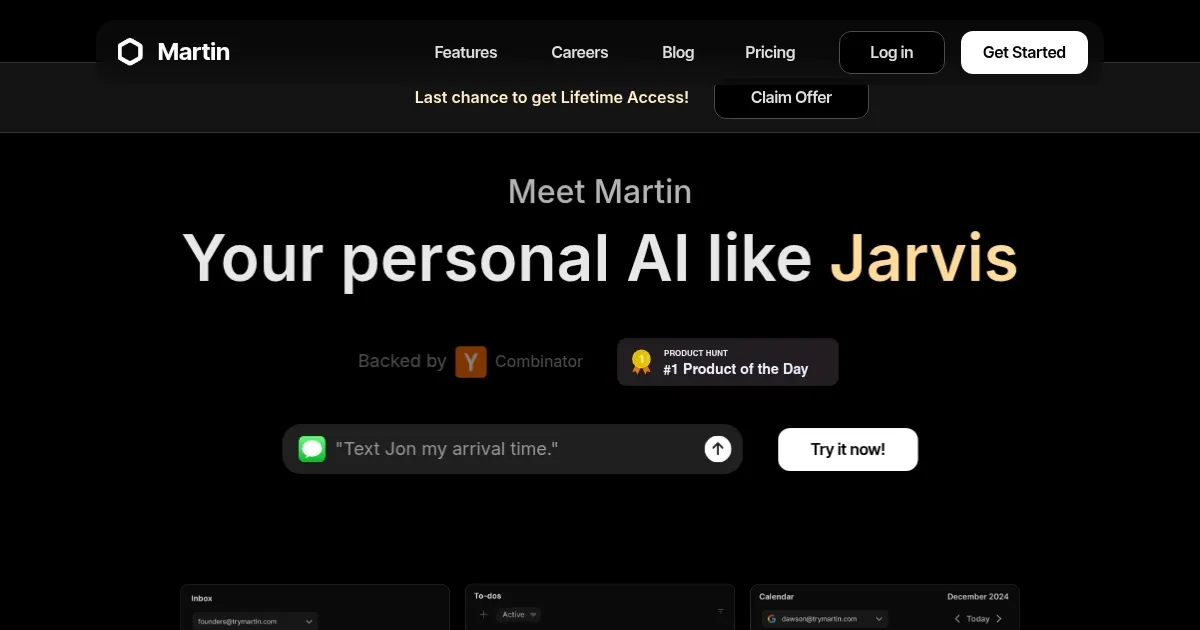
Homepage Screenshot 📸

Martin screenshot

Video Overview 🎬

Martin - Video Overview

What are the key features? ✨

  • Dashboard: Centralizes tasks, calendar, and inbox at app.trymartin.com.
  • Voice Commands: Supports 13 languages for hands-free task management.
  • Integrations: Syncs with Google, Apple, and Outlook calendars, plus Slack.
  • Proxy Actions: Sends texts or makes calls on your behalf.
  • Shortcuts: Automates tasks like summarizing daily schedules via text.

Who is it for? 🤔

Martin is made for busy professionals, freelancers, and students who juggle multiple tasks and communication channels, needing a centralized AI to manage calendars, emails, and to-dos with voice or text commands, especially those seeking a proactive assistant to streamline daily workflows.

Examples of what you can use it for 💡

  • Freelancer: Schedules client meetings and sends follow-up texts via voice commands.
  • Student: Sets reminders for assignments and adds events from emails to calendar.
  • Manager: Drafts team emails and pings Slack channels on their behalf.
  • Entrepreneur: Tracks to-dos and gets daily schedule summaries via text.
  • Remote Worker: Books reservations or reschedules calls through Martinโ€™s proxy actions.

Pros & Cons ⚖️

  • Voice commands in 13 languages.
  • Seamless Slack and calendar integration.
  • Free trial available for testing.
  • Tricky Apple Calendar setup.
  • Voice issues in noisy settings.

FAQs 💬

What platforms does Martin support?
Martin works on iOS, web, Slack, WhatsApp, email, and phone.
Can Martin integrate with my calendar?
Yes, it syncs with Google, Apple, and Outlook calendars.
Is there a free version of Martin?
A 7-day free trial is available at trymartin.com.
Does Martin support multiple languages?
It supports 13 languages, including English and Hindi.
Can Martin send texts for me?
Yes, it can text or call contacts on your behalf.
How do I set up Martin?
Sign up at app.trymartin.com and verify your email or phone.
Is Martin better than Siri?
Martin offers more actionable task management than Siri.
Does Martin work offline?
Some features, like calls, work without Wi-Fi.
Can I customize Martinโ€™s reminders?
Yes, choose SMS, email, or Slack for reminders.

Ready to try Martin?

Manages calendars, emails, and tasks via voice or text

Visit Martin ↗

Martin alternatives 🔗

  1. ChatGPT ChatGPT All-round AI assistant generating human-like responses to user queries and tasks
  2. Gemini Gemini Generates responses from text, images, audio, and video inputs using advanced multimodal AI
  3. Claude Claude Assists users in reasoning, coding, writing, and analyzing data with advanced AI models
  4. Grok Grok Delivers witty, real-time AI responses with advanced reasoning and image generation
  5. DeepSeek DeepSeek Delivers advanced AI models for coding and reasoning at low costs
  6. Perplexity Perplexity Delivers cited AI answers from web searches instantly
Share
Martin screenshot enlarged
Promote Martin
light badge
Copy Embed Code
dark badge
Copy Embed Code
neutral badge
Copy Embed Code
Best AI Tools

Discover the best AI tools for any use case

Explore
  • Tool Categories
  • AI Use Cases
  • AI Events
  • AI News
  • Saved Tools
Company
  • About Us
  • Contact Us
  • Media & Partnerships
  • Suggest a Tool
Legal
  • Privacy Policy
  • Terms of Service
Copyright © 2026 Best AI Tools 415 Mission Street, 37th Floor, San Francisco, CA 94105