logo-darklogo-darklogo-darklogo-dark
  • Tool Categories
    • ๐ŸŽจArt & Creative Design505
    • ๐ŸขBusiness Management644
    • ๐Ÿ’ปCoding & Development515
    • ๐Ÿ‘ฎDetection83
    • ๐Ÿง General Use727
    • ๐ŸฅHealth & Wellness55
    • ๐Ÿ“ทImage & Photo Analysis100
    • ๐Ÿ–ผ๏ธImage Generation & Editing618
    • ๐Ÿ“Interior & Architectural Design37
    • ๐ŸŽ“Learning & Education483
    • โš–๏ธLegal & Finance90
    • ๐ŸŽญLifestyle & Entertainment236
    • ๐Ÿ“ขMarketing & Advertising627
    • ๐ŸŽงMusic & Audio138
    • ๐Ÿ‘”Office & Workplace1,014
    • ๐Ÿ”ฌResearch & Data Analysis372
    • ๐Ÿ‘ฅSocial Media245
    • ๐ŸŽฅVideo Generation & Editing426
    • ๐Ÿ‘ง๐ŸปVirtual Companion135
    • ๐ŸŽคVoice Generation & Editing381
    • โœ๏ธWriting & Editing808
    • All Categories
    • AI Use Cases
  • News
  • Events
    • Academic Conferences
    • Developer Conferences
    • Expos / Trade Shows
    • Industry Summits
    • Workshops / Training
    • All Events
    • Past Events
  • Saved Tools
  • Suggest a Tool
โœ•
Home › Business Management › Project Management› Thor AI
Thor AI

Thor AI by Zenhub

Streamlines project management with AI-powered automation in GitHub

Thor is a project management tool integrated into GitHub, leveraging AI to automate tasks and provide real-time insights for software development teams. It enhances GitHub’s native capabilities with features like AI Suggested Labels, which analyze issue titles and descriptions to apply relevant tags automatically. The AI Acceptance Criteria tool generates standardized criteria in Behavior-Driven Development format, improving planning and testing efficiency.

Multi-repo task boards allow users to visualize and manage issues across repositories, with drag-and-drop functionality and dependency tracking. Real-time reports, including velocity tracking, burndown charts, and release reports, pull directly from GitHub data for accurate insights. The Planning Poker feature supports asynchronous story point estimation, streamlining sprint planning.

Thor’s integration eliminates the need for separate logins, making it ideal for teams already using GitHub. Its free tier includes basic features, while paid plans unlock advanced AI tools and reporting, with pricing competitive for developer-focused platforms. However, performance can lag with large boards, and its GitHub exclusivity limits versatility for teams using other platforms. Security is robust, with SOC 2 Type 2 certification and AES 256-bit encryption. Compared to Jira, which offers broader functionality but a steeper learning curve, or Trello, which is simpler but less developer-centric, Thor excels for GitHub-centric workflows.

Some users report occasional bugs, such as issues not syncing or records disappearing, which can disrupt critical workflows. The learning curve is moderate, particularly for teams unfamiliar with agile practices. Thor’s browser extension ensures seamless access within GitHub, and its API supports custom integrations. Recent updates have improved timeline views and sprint automation, enhancing usability for remote teams. For best results, explore the free trial, test AI features with small projects first, and monitor board sizes to maintain performance.

Visit Thor AI ↗
Categories
๐Ÿข Business
๐Ÿ“‹ Project Management ๐Ÿ“ฆ Product Management ๐Ÿ”„ Workflow
๐Ÿ’ป Coding
๐Ÿ™ Github ๐Ÿ‘จโ€๐Ÿ’ป Development
๐Ÿ‘” Work
โœ… Task Management ๐Ÿ”— Agent โšก Work Productivity

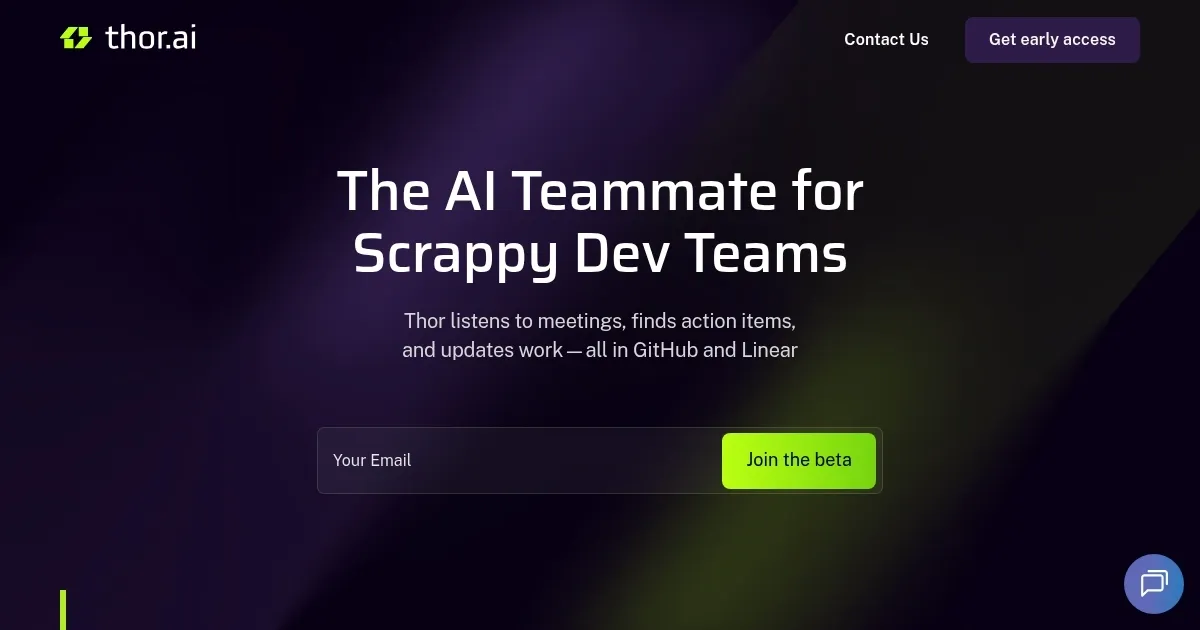
Homepage Screenshot 📸

Thor AI screenshot

What are the key features? ✨

  • AI Suggested Labels: Automatically tags issues based on title and description analysis.
  • AI Acceptance Criteria: Generates standardized criteria for efficient planning and testing.
  • Multi-Repo Task Boards: Visualizes and manages issues across multiple GitHub repositories.
  • Real-Time Reports: Provides velocity tracking, burndown charts, and release reports from GitHub data.
  • Planning Poker: Enables asynchronous story point estimation for sprint planning.

Who is it for? 🤔

Thor is designed for software development teams using GitHub, particularly those practicing agile methodologies like scrum or kanban. It suits startups, scaleups, and enterprises needing streamlined project management without leaving GitHubโ€™s ecosystem. Developers, product managers, and QA teams benefit from its AI-driven automation and real-time insights, especially when managing complex, multi-repository projects.

Examples of what you can use it for 💡

  • Developer: Uses multi-repo task boards to track and prioritize coding tasks across projects.
  • Product Manager: Leverages real-time reports to monitor team velocity and project deadlines.
  • QA Engineer: Relies on AI Acceptance Criteria to ensure consistent testing standards.
  • Scrum Master: Employs Planning Poker to facilitate asynchronous sprint planning sessions.
  • Team Lead: Automates issue movement across boards to reduce manual handoffs.

Pros & Cons ⚖️

  • Seamless GitHub integration
  • AI automates repetitive tasks
  • Intuitive multi-repo boards
  • Slow with large boards
  • GitHub-only

FAQs 💬

What is Zenhub Thor?
Zenhub Thor is a project management tool integrated with GitHub, using AI to automate tasks and provide insights.
Does it work with platforms other than GitHub?
No, Thor is designed exclusively for GitHub, limiting its use for other platforms.
Is there a free version available?
Yes, a free tier offers basic features, with paid plans unlocking advanced AI tools.
How secure is Zenhub Thor?
It uses AES 256-bit encryption and is SOC 2 Type 2 certified for robust security.
Can I try it before committing?
A 14-day Teams plan trial and a 60-day Enterprise trial are available.
Does it support multi-repository projects?
Yes, multi-repo task boards allow managing issues across multiple repositories.
What are AI Suggested Labels?
This feature auto-tags issues based on their title and description for efficiency.
Is the interface user-friendly?
Itโ€™s intuitive but may require some learning for teams new to agile or GitHub.
Can I automate sprint planning?
Yes, features like Planning Poker and automated issue movement streamline sprints.
How does it compare to Jira?
Thor is more GitHub-focused and simpler, while Jira offers broader functionality.

Ready to try Thor AI?

Streamlines project management with AI-powered automation in GitHub

Visit Thor AI ↗

Thor AI alternatives 🔗

  1. Asana AI Asana AI An AI helper built into the Asana platform to make managing projects and tasks easier
  2. ClickUp Brain ClickUp Brain Automates workflows with contextual AI for tasks, meetings, and content creation
  3. Miro AI Miro AI Visual collaboration platform that lets you build the next big thing with a prompt and a chat
  4. Notion AI Notion AI Streamlines work with AI-powered note-taking, app searches, and workflow automation
  5. Motion Motion AI tool that intelligently plans your day, schedules meetings, and creates to-do lists
  6. Creately AI Creately AI An AI-powered tool that aims to revolutionize how users create and manage visual content
Share
Thor AI screenshot enlarged
Promote Thor AI
light badge
Copy Embed Code
dark badge
Copy Embed Code
neutral badge
Copy Embed Code
Best AI Tools

Discover the best AI tools for any use case

Explore
  • Tool Categories
  • AI Use Cases
  • AI Events
  • AI News
  • Saved Tools
Company
  • About Us
  • Contact Us
  • Media & Partnerships
  • Suggest a Tool
Legal
  • Privacy Policy
  • Terms of Service
Copyright © 2026 Best AI Tools 415 Mission Street, 37th Floor, San Francisco, CA 94105