logo-darklogo-darklogo-darklogo-dark
  • Tool Categories
    • 🎨Art & Creative Design505
    • 🏢Business Management644
    • 💻Coding & Development515
    • 👮Detection83
    • 🧠General Use727
    • 🏥Health & Wellness55
    • 📷Image & Photo Analysis100
    • 🖼️Image Generation & Editing618
    • 📐Interior & Architectural Design37
    • 🎓Learning & Education483
    • ⚖️Legal & Finance90
    • 🎭Lifestyle & Entertainment236
    • 📢Marketing & Advertising627
    • 🎧Music & Audio138
    • 👔Office & Workplace1,014
    • 🔬Research & Data Analysis372
    • 👥Social Media245
    • 🎥Video Generation & Editing426
    • 👧🏻Virtual Companion135
    • 🎤Voice Generation & Editing381
    • ✍️Writing & Editing808
    • All Categories
    • AI Use Cases
  • News
  • Events
    • Academic Conferences
    • Developer Conferences
    • Expos / Trade Shows
    • Industry Summits
    • Workshops / Training
    • All Events
    • Past Events
  • Saved Tools
  • Suggest a Tool
✕
Home › Business Management › Project Management› Dart
Dart

Dart

Streamlines project management with AI-driven task automation and collaboration

Dart is an AI-powered project management tool designed to streamline workflows, enhance collaboration, and automate repetitive tasks for teams across industries. It integrates artificial intelligence to reduce manual overhead, offering features like task automation, real-time syncing, and customizable layouts. It serves startups, agencies, and enterprises, competing with tools like Trello, Asana, and ClickUp.

The Command Center allows users to input natural language commands to create tasks, assign priorities, or generate subtasks, leveraging AI to interpret intent. Auto Fill Properties populates task details automatically, while the Subtask Generation feature breaks complex tasks into smaller steps. Real-time collaboration supports live editing and commenting, with integrations for Slack, GitHub, and Zapier enhancing connectivity. The Automatic Report Generator compiles project data into concise reports, and the Fathom integration converts meeting transcripts into tasks or documents. Users appreciate the fast load times and keyboard shortcuts, which improve efficiency, per feedback on Product Hunt.

Dart’s interface is clean, with customizable views like Kanban or list formats, and it supports offline access for basic functions. The tool is compatible with macOS, Windows, and mobile devices, ensuring flexibility. Pricing includes a free tier with limited features and paid plans for advanced AI capabilities, competitive with Trello and Asana’s subscription models.

Drawbacks include a learning curve for non-technical users, particularly with integrations like Zapier, which require setup knowledge. Some features, like real-time syncing, depend on internet connectivity. Compared to ClickUp, Dart offers fewer templates but excels in AI-driven automation. Recent updates, including smarter integrations with Claude and ChatGPT, enhance performance, according to Dart’s blog.

To get started, use the free plan to test core features like the Command Center and Auto Fill Properties. Explore integrations early to streamline workflows, and leverage the template library for structured project planning. Dart is a powerful choice for teams seeking AI-enhanced efficiency.

Visit Dart ↗
Categories
🏢 Business
📋 Project Management 🔄 Workflow
👔 Work
✅ Task Management ⚡ Work Productivity 🔗 Agent
🧠 General
✅ Productivity

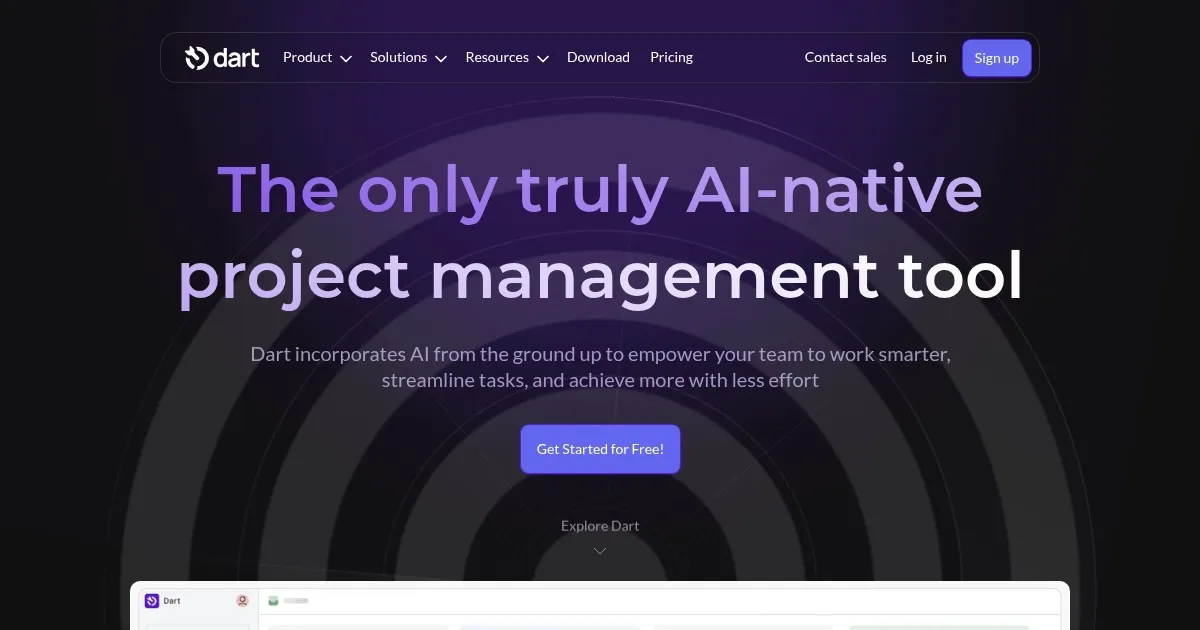
Homepage Screenshot 📸

Dart screenshot

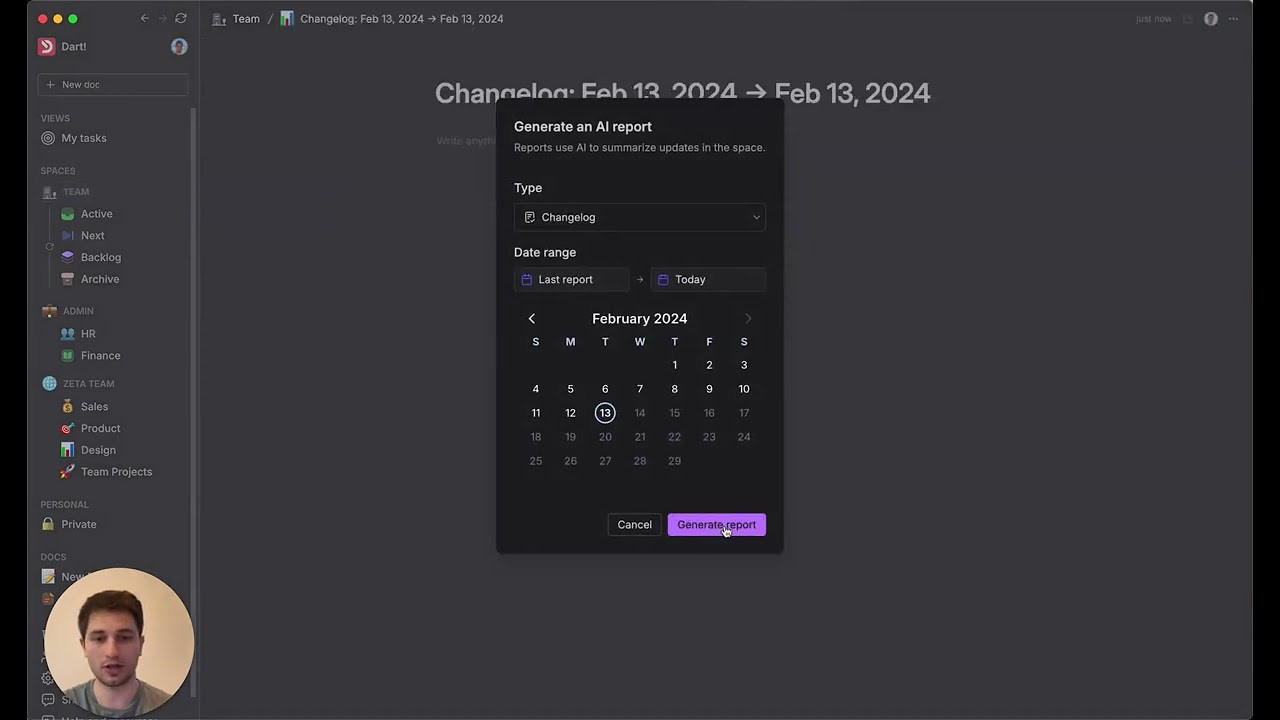
Video Overview 🎬

What are the key features? ✨

  • Command Center: Enables natural language commands to create and manage tasks efficiently.
  • Auto Fill Properties: Automatically populates task details to reduce manual data entry.
  • Subtask Generation: Breaks down large tasks into smaller, manageable subtasks using AI.
  • Real-Time Collaboration: Supports live editing and commenting across devices for team alignment.
  • Automatic Report Generator: Compiles project data into concise, shareable status reports.

Who is it for? 🤔

Dart is ideal for project managers, startups, agencies, and enterprises seeking to streamline workflows with AI-driven automation. It suits teams in industries like IT, marketing, and HR, where efficient task management and collaboration are critical. Its intuitive interface and customizable features make it accessible for both tech-savvy users and those new to project management tools, particularly those frustrated by manual overhead in tools like Trello or Asana.

Examples of what you can use it for 💡

  • Marketing Manager: Uses Dart to plan campaigns, with AI generating subtasks for content creation and scheduling.
  • Software Developer: Integrates Dart with GitHub to track coding tasks and automate sprint planning.
  • HR Professional: Leverages Dart’s templates to manage onboarding projects and automate documentation.
  • Startup Founder: Employs Dart to organize chaotic workflows, using AI to prioritize tasks and generate reports.
  • Agency Team Lead: Utilizes real-time collaboration to align distributed teams on client projects.

Pros & Cons ⚖️

  • AI automates repetitive tasks.
  • Seamless integrations with Slack, GitHub.
  • Customizable layouts and views.
  • Steep learning curve for integrations.
  • Limited template library.

FAQs 💬

What platforms does Dart support?
Dart is compatible with macOS, Windows, and mobile devices, ensuring flexible access.
Can Dart work offline?
Certain features offer offline access, but full syncing requires an internet connection.
Does Dart integrate with other tools?
Yes, Dart integrates with Slack, GitHub, Zapier, and more for streamlined workflows.
Is there a free version of Dart?
Dart offers a free tier with core features, with paid plans for advanced AI tools.
How does Dart’s AI assist with tasks?
Dart AI automates task creation, property filling, and report generation via natural language.
Can Dart handle large projects?
Yes, Dart scales for complex projects with AI-driven subtask generation and reporting.
Is Dart secure for sensitive data?
Dart uses encryption and robust protocols to protect data during usage and downloads.
How customizable is Dart’s interface?
Users can tweak layouts, themes, and notifications to fit team preferences.
Does Dart support real-time collaboration?
Yes, live syncing enables team members to edit tasks and comment in real time.
How does Dart compare to Trello or Asana?
Dart’s AI automation reduces manual work, unlike Trello’s template focus or Asana’s reporting.

Ready to try Dart?

Streamlines project management with AI-driven task automation and collaboration

Visit Dart ↗


Dart alternatives 🔗

  1. Asana AI Asana AI An AI helper built into the Asana platform to make managing projects and tasks easier
  2. ClickUp Brain ClickUp Brain Automates workflows with contextual AI for tasks, meetings, and content creation
  3. Miro AI Miro AI Visual collaboration platform that lets you build the next big thing with a prompt and a chat
  4. Notion AI Notion AI Streamlines work with AI-powered note-taking, app searches, and workflow automation
  5. Motion Motion AI tool that intelligently plans your day, schedules meetings, and creates to-do lists
  6. Creately AI Creately AI An AI-powered tool that aims to revolutionize how users create and manage visual content
Share
Dart screenshot enlarged
Promote Dart
light badge
Copy Embed Code
dark badge
Copy Embed Code
neutral badge
Copy Embed Code
Best AI Tools

Discover the best AI tools for any use case

Explore
  • Tool Categories
  • AI Use Cases
  • AI Events
  • AI News
  • Saved Tools
Company
  • About Us
  • Contact Us
  • Media & Partnerships
  • Suggest a Tool
Legal
  • Privacy Policy
  • Terms of Service
Copyright © 2026 Best AI Tools 415 Mission Street, 37th Floor, San Francisco, CA 94105