logo-darklogo-darklogo-darklogo-dark
  • Tool Categories
    • 🎨Art & Creative Design505
    • 🏢Business Management644
    • 💻Coding & Development515
    • 👮Detection83
    • 🧠General Use727
    • 🏥Health & Wellness55
    • 📷Image & Photo Analysis100
    • 🖼️Image Generation & Editing618
    • 📐Interior & Architectural Design37
    • 🎓Learning & Education483
    • ⚖️Legal & Finance90
    • 🎭Lifestyle & Entertainment236
    • 📢Marketing & Advertising627
    • 🎧Music & Audio138
    • 👔Office & Workplace1,014
    • 🔬Research & Data Analysis372
    • 👥Social Media245
    • 🎥Video Generation & Editing426
    • 👧🏻Virtual Companion135
    • 🎤Voice Generation & Editing381
    • ✍️Writing & Editing808
    • All Categories
    • AI Use Cases
  • News
  • Events
    • Academic Conferences
    • Developer Conferences
    • Expos / Trade Shows
    • Industry Summits
    • Workshops / Training
    • All Events
    • Past Events
  • Saved Tools
  • Suggest a Tool
✕
Home › General Use › Chatbot› Claude
Claude

Claude by Anthropic

Assists users in reasoning, coding, writing, and analyzing data with advanced AI models

Claude AI is a versatile assistant from Anthropic that excels in reasoning, coding, and content creation through models like Sonnet 4.5 and Opus 4.1. It handles tasks from debugging code to drafting reports with a focus on accuracy and context retention. Users access it via web, app, or API, with features like artifacts for interactive outputs and projects for organized workflows.

Key strengths include a large context window of up to one million tokens, allowing analysis of extensive documents or codebases without losing details. This outperforms ChatGPT in long-form coherence, though ChatGPT offers broader multimodal tools. Claude’s safety features reduce hallucinations, making it reliable for professional use, as noted by a few prominent publications.

For coding, Sonnet 4.5 leads benchmarks, generating production-ready applications autonomously. Developers on Reddit praise its edge-case handling over Gemini, which integrates well with Google services but trails in agentic tasks. Artifacts enable dynamic visuals like charts, useful for data analysis, with voice mode adding mobile convenience.

In writing and research, Claude synthesizes insights from uploads, producing cited reports in formats like APA. It edges Grok in polished tone, though Grok pulls real-time X data faster. Pricing starts free with limits, pro at around twenty dollars monthly, comparable to competitors but with enterprise API options.

Limitations include rate limits hitting during intensive sessions and occasional verbosity. Against DeepSeek, Claude offers better explanations but less raw compute power. Web search integration keeps it current, though not as seamless as Gemini’s.

Projects preserve context across chats, ideal for ongoing work. Users appreciate ethical guardrails for client tasks, but some note cautious refusals on sensitive prompts. Overall, it balances power and usability for coders, writers, and analysts.

To get started, experiment with artifacts on a small project, then (if needed) scale to API for custom needs. And track usage to manage limits effectively.

Visit Claude ↗
Categories
🧠 General
💬 Chatbot 🧠 Large Language Model 🤖 Assistant ✅ Productivity
✍️ Writing
🤖 Writing Assistant 🅰️ Text Generation 📝 Summarizer
💻 Coding
🤖 Code Assistant ⌨️ Code Generation
👔 Work
⚡ Work Productivity 🔗 Agent
🔬 Research
🔬 Research

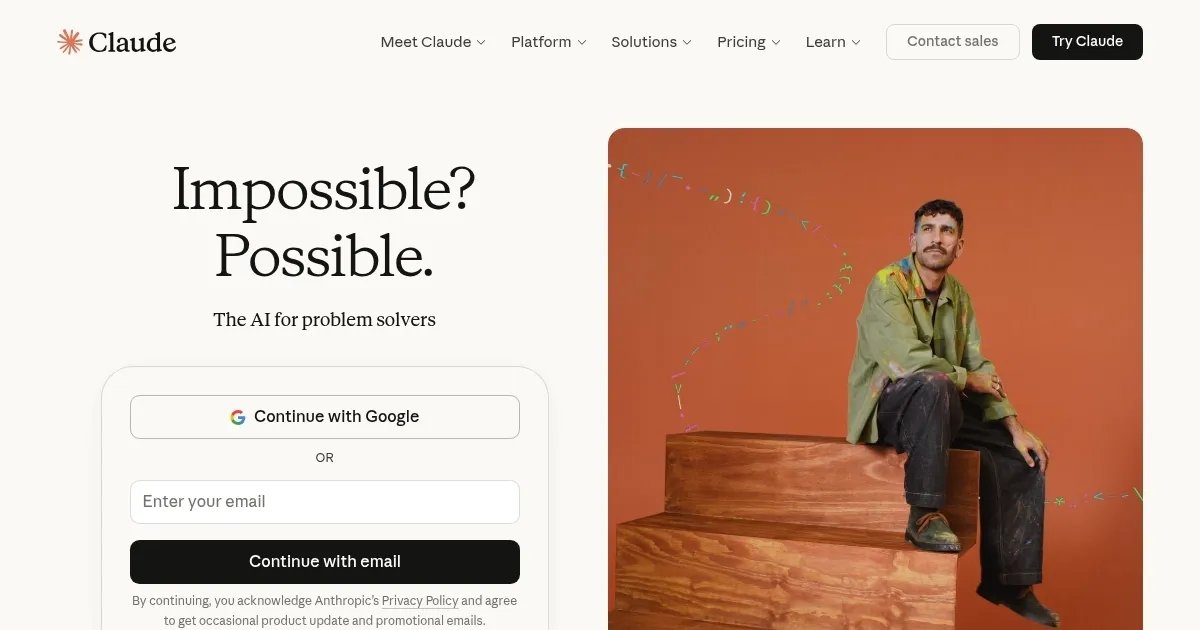
Homepage Screenshot 📸

Claude screenshot

Video Overview 🎬

Claude - Video Overview

What are the key features? ✨

  • Artifacts: Interactive outputs like diagrams and checklists that update dynamically based on user input.
  • Projects: Organized workspaces that maintain context across multiple conversations for focused workflows.
  • Computer Use: Enables the AI to navigate browsers and perform tasks autonomously, such as scheduling or data entry.
  • Voice Mode: Supports hands-free dictation and responses via mobile apps for on-the-go productivity.
  • Web Search: Integrates real-time information retrieval to enhance responses with current data.

Who is it for? 🤔

Claude AI suits developers tackling complex codebases, writers seeking polished drafts with ethical insights, researchers analyzing lengthy documents, and business professionals automating reports or strategies, empowering those who value reliable reasoning over flashy gimmicks in their daily grind.

Examples of what you can use it for 💡

  • Software Developer: Generates and debugs production-ready code, integrating with tools like GitHub for seamless workflows.
  • Content Creator: Drafts engaging articles or social posts, refining tone and structure based on audience feedback.
  • Market Analyst: Synthesizes data from uploaded spreadsheets into visualized trends and cited reports.
  • Student: Explains complex concepts in math or science, creating interactive study aids for better retention.
  • Project Manager: Organizes tasks across chats in projects, automating updates and risk assessments.

Pros & Cons ⚖️

  • Excellent coding aid
  • Large context window
  • Low hallucination rate
  • Interactive artifacts
  • Safety-focused outputs
  • Strict rate limits
  • Occasional verbosity

FAQs 💬

What is Claude AI?
Claude AI is an advanced assistant from Anthropic for tasks like coding, writing, and analysis, powered by models emphasizing safety and reasoning.
How does Claude compare to ChatGPT?
Claude excels in coding and long-context tasks with lower hallucinations, while ChatGPT offers broader multimodal features and faster iterations.
What are Claude's pricing options?
Free tier for basic use, Pro at about twenty dollars monthly for higher limits, and enterprise API plans for custom needs.
Can Claude handle coding tasks?
Yes, Sonnet 4.5 generates production-ready code, debugs, and integrates with development tools effectively.
What is the context window size?
Up to one million tokens in advanced models, allowing processing of entire books or large codebases.
Does Claude support file uploads?
It handles PDFs, images, and spreadsheets for analysis, summarization, and visualization.
Is there a mobile app?
Yes, available on iOS and Android with voice mode for hands-free interaction.
How does Claude ensure safety?
Built-in guardrails reduce harmful outputs and hallucinations, prioritizing helpful and honest responses.
Can I use Claude for research?
It synthesizes insights from documents and web searches, producing cited reports in various formats.
What are rate limits like?
Free users face daily caps; Pro extends them, but heavy use may require monitoring to avoid interruptions.

Ready to try Claude?

Assists users in reasoning, coding, writing, and analyzing data with advanced AI models

Visit Claude ↗

Claude alternatives 🔗

  1. ChatGPT ChatGPT All-round AI assistant generating human-like responses to user queries and tasks
  2. Gemini Gemini Generates responses from text, images, audio, and video inputs using advanced multimodal AI
  3. Grok Grok Delivers witty, real-time AI responses with advanced reasoning and image generation
  4. DeepSeek DeepSeek Delivers advanced AI models for coding and reasoning at low costs
  5. Perplexity Perplexity Delivers cited AI answers from web searches instantly
  6. Poe Poe Aggregates top AI models for seamless chatting and bot creation
Share
Claude screenshot enlarged
Promote Claude
light badge
Copy Embed Code
dark badge
Copy Embed Code
neutral badge
Copy Embed Code
Best AI Tools

Discover the best AI tools for any use case

Explore
  • Tool Categories
  • AI Use Cases
  • AI Events
  • AI News
  • Saved Tools
Company
  • About Us
  • Contact Us
  • Media & Partnerships
  • Suggest a Tool
Legal
  • Privacy Policy
  • Terms of Service
Copyright © 2026 Best AI Tools 415 Mission Street, 37th Floor, San Francisco, CA 94105