logo-darklogo-darklogo-darklogo-dark
  • Tool Categories
    • 🎨Art & Creative Design505
    • 🏢Business Management644
    • 💻Coding & Development515
    • 👮Detection83
    • 🧠General Use727
    • 🏥Health & Wellness55
    • 📷Image & Photo Analysis100
    • 🖼️Image Generation & Editing618
    • 📐Interior & Architectural Design37
    • 🎓Learning & Education483
    • ⚖️Legal & Finance90
    • 🎭Lifestyle & Entertainment236
    • 📢Marketing & Advertising627
    • 🎧Music & Audio138
    • 👔Office & Workplace1,014
    • 🔬Research & Data Analysis372
    • 👥Social Media245
    • 🎥Video Generation & Editing426
    • 👧🏻Virtual Companion135
    • 🎤Voice Generation & Editing381
    • ✍️Writing & Editing808
    • All Categories
    • AI Use Cases
  • News
  • Events
    • Academic Conferences
    • Developer Conferences
    • Expos / Trade Shows
    • Industry Summits
    • Workshops / Training
    • All Events
    • Past Events
  • Saved Tools
  • Suggest a Tool
✕
Home › Business Management › Project Management› Leiga
Leiga

Leiga

Automates project updates with AI to enhance team productivity

Leiga is an AI powered project management platform designed for development teams. It automates project updates by pulling data from code commits and pull requests to maintain accurate status without manual input. The tool provides real time sprint tracking with visualizations of progress and risk assessments that identify schedule delays early.

Users generate product requirements documents through a natural language interface where descriptions convert to structured formats in one click. Workflow automations handle repetitive tasks such as issue reminders and task creation based on progress triggers. Integrations connect to GitHub, GitLab, Slack, Figma, and IDEs like VS Code and JetBrains for seamless updates from development environments. Screen recording captures bugs with automatic AI transcription to attach detailed reports to tickets.

Templates support Scrum, Kanban, OKR management, bug tracking, and content scheduling for various workflows. The platform balances workloads by analyzing team capacity and suggesting assignments to prevent overload. Reports deliver usage insights and performance benchmarks against industry standards. Leiga offers a free plan for up to 10 users with basic features and AI credits, a standard plan at general mid tier pricing for unlimited users and more automations, and higher tiers for advanced AI and support.

Compared to Linear, Leiga emphasizes AI automation over issue tracking speed, while it provides more developer focused integrations than Jira at a lower entry cost. Users appreciate the reduced context switching and async collaboration tools for remote teams.

Potential drawbacks include AI adaptation time for custom workflows and limited mobile features. Start with the free trial to import existing projects and test sprint risk alerts on current work.

Visit Leiga ↗
Categories
🏢 Business
📋 Project Management 🔄 Workflow 📦 Product Management
👔 Work
✅ Task Management ⚡ Work Productivity 💼 Workplace Assistant 🔗 Agent 🕒 Scheduling

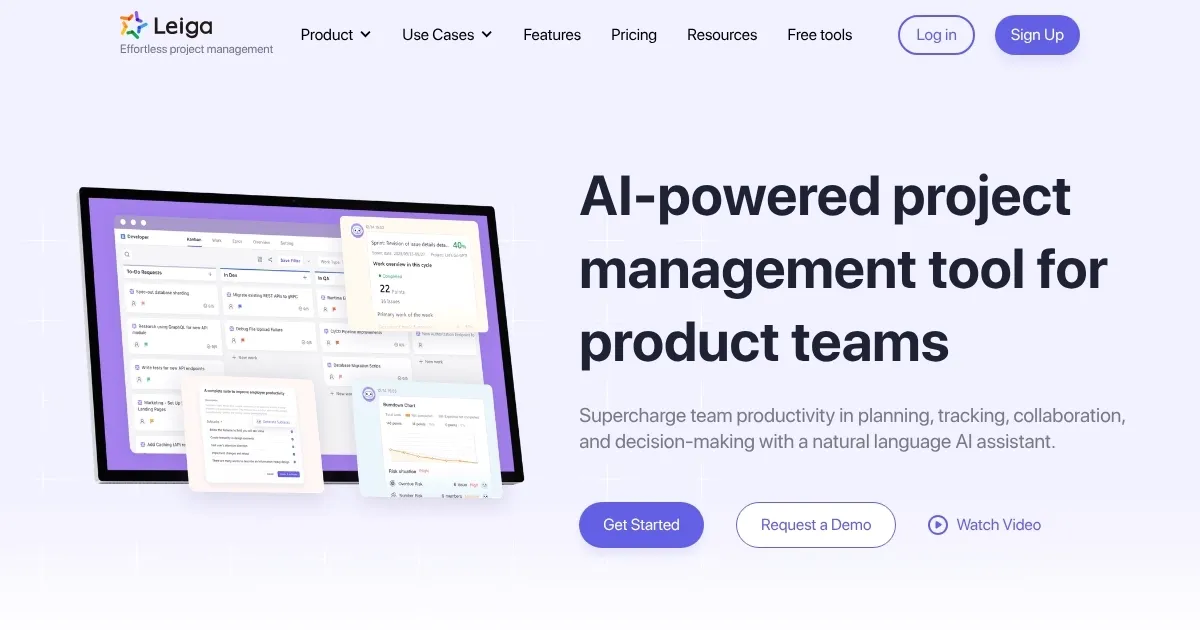
Homepage Screenshot 📸

Leiga screenshot

Video Overview 🎬

What are the key features? ✨

  • AI Copilot: Assists with natural language queries for planning, tracking, and generating reports to streamline decision making.
  • Sprint Tracking: Visualizes real time progress with risk assessments and early warnings to keep projects on schedule.
  • PRD Generator: Converts descriptions into structured product requirements documents via AI in a single click.
  • Workflow Automation: Customizes rules for repetitive tasks like reminders and auto task creation based on progress.
  • IDE Integration: Enables direct project updates from development environments without switching applications.

Who is it for? 🤔

Leiga suits development teams and product managers who juggle multiple projects in fast paced environments, especially remote or async groups seeking to cut admin time and boost coding focus. It helps engineering leads monitor workloads and risks without constant check ins, while product owners draft docs quicker to align stakeholders. Small startups benefit from the free tier for basic tracking, and growing firms scale with automations that adapt to complex workflows, all grounded in real user feedback from sites like GetApp and AI Tools directories.

Examples of what you can use it for 💡

  • Product Manager: Generates PRDs from feature ideas to share structured plans with engineering teams swiftly.
  • Developer: Updates task status and logs time directly in IDE to stay immersed in coding without tool switches.
  • Team Lead: Balances workloads by capacity to assign tasks evenly and prevent burnout across remote members.
  • QA Tester: Records bug screens with AI transcription to attach detailed reports for faster fixes.
  • Project Coordinator: Automates reminders and sprint creations to track progress and flag risks in real time.

Pros & Cons ⚖️

  • AI automates updates
  • Intuitive IDE links
  • Risk alerts save time
  • Free tier scales well
  • AI needs prompt tweaks
  • Mobile app basic

FAQs 💬

What makes Leiga different from traditional project tools?
Leiga uses AI to automate updates and generate insights, reducing manual entry compared to tools like Jira that require more configuration.
Does Leiga support remote teams?
Yes, features like screen recording with transcription enable async collaboration for distributed groups.
How does the free plan work?
The free plan covers up to 10 users with basic boards, automations, and limited AI credits for small teams to start.
Can I integrate Leiga with my code repo?
Leiga connects to GitHub and GitLab to sync commits and pull requests automatically for status updates.
Is there a trial period?
Leiga offers a free forever plan with no credit card, plus 50 initial AI credits to test features.
How accurate are the risk assessments?
Risk scores draw from real time data on progress and capacity, with users reporting reliable early warnings per reviews.
What templates are available?
Templates include Scrum, Kanban, OKR, bug management, and content scheduling for various workflows.
Does Leiga handle workload balancing?
It analyzes capacity to suggest assignments, helping distribute tasks evenly based on skills and availability.
How do I migrate from another tool?
One click imports and two way syncs with Jira allow seamless transition without data loss.
What support options exist?
Free users access help center docs, while paid plans include priority email and dedicated managers.

Ready to try Leiga?

Automates project updates with AI to enhance team productivity

Visit Leiga ↗

Leiga alternatives 🔗

  1. Asana AI Asana AI An AI helper built into the Asana platform to make managing projects and tasks easier
  2. ClickUp Brain ClickUp Brain Automates workflows with contextual AI for tasks, meetings, and content creation
  3. Miro AI Miro AI Visual collaboration platform that lets you build the next big thing with a prompt and a chat
  4. Notion AI Notion AI Streamlines work with AI-powered note-taking, app searches, and workflow automation
  5. Motion Motion AI tool that intelligently plans your day, schedules meetings, and creates to-do lists
  6. Creately AI Creately AI An AI-powered tool that aims to revolutionize how users create and manage visual content
Share
Leiga screenshot enlarged
Promote Leiga
light badge
Copy Embed Code
dark badge
Copy Embed Code
neutral badge
Copy Embed Code
Best AI Tools

Discover the best AI tools for any use case

Explore
  • Tool Categories
  • AI Use Cases
  • AI Events
  • AI News
  • Saved Tools
Company
  • About Us
  • Contact Us
  • Media & Partnerships
  • Suggest a Tool
Legal
  • Privacy Policy
  • Terms of Service
Copyright © 2026 Best AI Tools 415 Mission Street, 37th Floor, San Francisco, CA 94105