logo-darklogo-darklogo-darklogo-dark
  • Home
  • Browse
    • Assistant
    • Coding
    • Image
    • Productivity
    • Video
    • Voice
    • Writing
    • All Categories
    • AI Use Cases
  • My Favorites
  • Suggest a Tool
✕
Home › Image Generation & Editing›
Published by Dusan Belic on May 21, 2024

Magnific.ai

Magnific.ai
Magnific.ai Homepage
Categories Image Generation & Editing
A web-based AI tool that is made to enhance image quality through upscaling and detailing

Magnific.ai

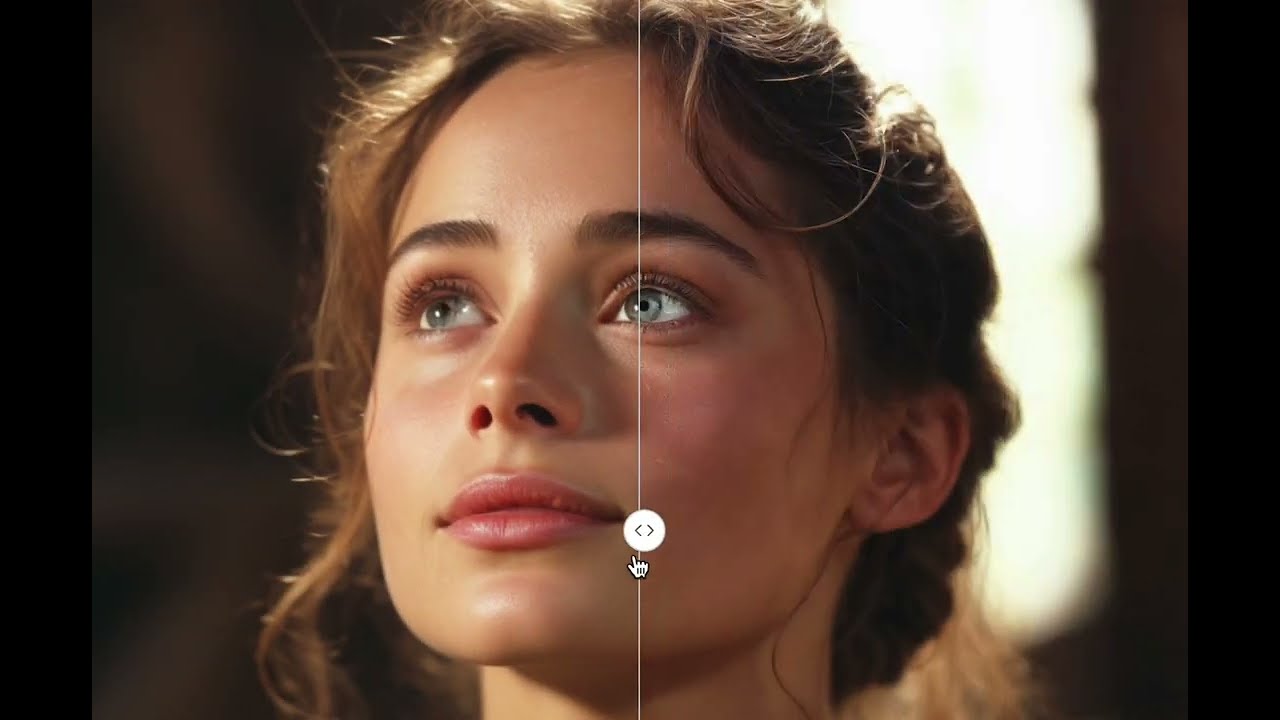
Magnific.ai is a web-based AI tool that is made to enhance image quality through upscaling and detailing. To that end, it employs advanced Generative AI to increase the resolution and enrich images with more precise details. This makes it useful for professionals across industries, such as graphic design, photography, and marketing.

Easy to use, Magnific lets users guide the upscaling process through natural language prompts and can adapt to different types of images and creative needs. However, it is important to note that Magnific AI does not offer a free version, and all plans require a subscription.

The tool is great for different use cases, from enhancing portraits to improving the quality of video game assets and nature photography. It is also beneficial for graphic designs and even in the upscaling of interior design and architecture images.

In a nutshell, Magnific.ai is a neat tool that can upscale and genuinely enhance images, adding realistic details and textures that significantly improve the original photos. Check it out.

Magnific.ai Homepage
Categories Image Generation & Editing

Video Overview ▶️

Magnific.ai - Video Overview

What are the key features? ⭐

  • Generative AI upscaling: Magnific.ai uses cutting-edge AI technology to upscale images, enhancing their resolution and quality.
  • Creative control: Users can influence the upscaling process with simple natural language prompts.
  • Easy to use: Magnific.ai offers an intuitive interface that simplifies the process of enhancing images, making it easy for anyone to start improving their photos.
  • Works with different kinds of images: The tool is suitable for a range of images, from professional photography and graphic designs to digital art and marketing materials.
  • High-quality results: Magnific.ai prides itself on producing high-quality images that are enhanced in detail and resolution.

Who is it for? 🤔

Magnific.ai is primarily made for professionals in creative industries such as photography, graphic design, and video game development. It also caters to marketers and advertisers who need high-quality images for promotional materials. Plus, let's not forget interior designers who can use the tool to present enhanced images of spaces in more detail to clients. Overall, Magnific.ai is designed for anyone who requires elevated visual content - from professionals enhancing business materials to hobbyists looking to improve personal projects.

Examples of what you can use it for 💭

  • Professional and amateur photographers can use Magnific.ai to improve the resolution and detail of their photographs
  • Graphic designers can utilize Magnific.ai to upscale and refine design elements
  • Game developers can enhance the textures and assets within their games, making them look more detailed and realistic
  • Marketers can use Magnific.ai to improve the quality of images used in all kinds of promotional materials
  • Interior designers can benefit from Magnific.ai by enhancing images of interior spaces

Pros & Cons ⚖️

  • Easy to use, yet produces amazing results
  • You can fine-tune Magnific.ai's algorithm
  • Great for different use cases
  • No free option

FAQs 💬

What does Magnific.ai actually do to images?
Magnific.ai upscales images to much higher resolutions while adding new details through generative AI. It lets you guide the process with a text prompt and sliders like Creativity to control how much the AI invents or "hallucinates" fresh elements.
Is Magnific.ai suitable for real photographs or mostly AI-generated art?
It works well on both, though many users find it shines brightest with AI-generated images where it adds depth and realism. For real photos there's a Precision mode that stays closer to the original without heavy reimagining.
How much control do I have over the upscaling results?
You get quite a bit through natural language prompts plus sliders for Creativity (how much new detail), HDR (contrast and sharpness), Resemblance (how closely it sticks to the original), and sometimes Fractality for texture complexity.
What kinds of images can I upload to Magnific.ai?
Pretty much any image type works, including photos, digital illustrations, 3D renders, graphic designs, video game assets, landscapes, portraits, architecture shots, food photography, and even vintage or low-res content.
Does Magnific.ai fix common issues like blurry faces or hands in AI art?
Yes, it often resolves those problems by adding coherent details and sharpening elements that AI generators sometimes mess up, which is why many Midjourney or Stable Diffusion users turn to it for final polish.
How long does an upscale typically take?
Processing usually takes 10 to 15 minutes per image, though it can run in the background so you don't have to wait actively.
Can I use Magnific.ai for professional printing or large displays?
Definitely, since it supports upscaling up to 16x (reaching very high resolutions like 10k+ in some cases), making images suitable for large prints, wall art, or high-detail professional use.
Is there a way to keep the output looking natural instead of overly artificial?
Yes, by lowering the Creativity slider and using higher Resemblance values you can get subtle enhancements without the AI going too wild and adding unrealistic elements.
Who typically uses Magnific.ai the most?
AI artists, photographers, digital illustrators, graphic designers, game developers, and 3D artists who need to push resolution and detail in their work often rely on it.
Does Magnific.ai integrate with other tools or workflows?
Many users combine it with Midjourney, Stable Diffusion, Blender, or After Effects for post-processing, and some workflows even mimic its style locally, though the official tool remains the easiest for guided creative upscaling.
Visit Magnific.ai

Related tools ↙️

  1. Dawn AI Dawn AI Generates personalized avatars and images from selfies using advanced AI technology
  2. Cloudinary Cloudinary Manages, transforms, optimizes, and delivers images and videos with AI-powered features
  3. Imgix Imgix Optimizes images in real-time using AI for faster web delivery
  4. Imajinn Imajinn Transforms user photos into artistic images and custom visuals using AI
  5. SVG AI SVG AI Transforms text prompts into scalable vector icons and logos instantly
  6. Artisse Artisse Generates hyper-realistic photos using AI from user selfies and custom prompts
Last update: January 5, 2026
Share
Promote Magnific.ai
light badge
Copy Embed Code
dark badge
Copy Embed Code
neutral badge
Copy Embed Code
About Us | Contact Us | Suggest an AI Tool | Privacy Policy | Terms of Service

Copyright © 2026 Best AI Tools
415 Mission Street, 37th Floor, San Francisco, CA 94105